hermes-agent-helm/hermes-agent
👩🏻💻 在 Kubernetes 上运行 Hermes Agent - 使用 Codex/Copilot 登录,轻量运行智能体团队。
在 Kubernetes 上运行支持多个 LLM 提供商的智能体框架 Hermes Agent。通过 values.yaml 即可配置 Hermes 支持的提供商,包括 OpenAI、Anthropic、Gemini、OpenRouter、NVIDIA,以及 LiteLLM/vLLM 等 OpenAI 兼容代理,并使用内置的 helm test 健康检查。





如果本项目对你有帮助,请在 GitHub 上点亮 ⭐,让更多人发现它。
简体中文版翻译入门页面,未翻译的章节使用英语。欢迎提出翻译修正建议。自动生成的
## Values表保留英语。
TL;DR
# OCI (recommended)
helm upgrade --install hermes-agent \
  oci://ghcr.io/jyje/hermes-agent-helm/hermes-agent --version 1.18.0 \
  --namespace hermes-agent --create-namespace \
  --set-string env.OPENAI_API_KEY='sk-...' --wait
# Helm Repository
helm repo add hermes-agent https://jyje.github.io/hermes-agent-helm
helm repo update
helm upgrade --install hermes-agent hermes-agent/hermes-agent \
  --namespace hermes-agent --create-namespace \
  --set-string env.OPENAI_API_KEY='sk-...' --wait
- Web 仪表盘:在浏览器中与智能体对话、浏览会话,并管理模型、技能和设置,通过密码、Nous Portal OAuth 或你自己的 OpenID Connect 登录加以保护。详见公开仪表盘。
- ArgoCD:按提供商和消息平台组合提供可直接应用的
Application清单,见examples/argocd/。 - 无需提交真实密钥的 GitOps:参阅 SealedSecret 与
extraEnvFrom指南。 - 智能体团队:运行多个实例,通过共同 Discord 频道中的
@mention交接任务。参阅hermes-collab-pair.yaml、团队指南及协作指南。
配置提供商
将 config.model.provider 设置为内置标识符,在 env 中提供对应密钥:
| 提供商 | config.model.provider |
密钥环境变量 | 示例 |
|---|---|---|---|
| OpenAI | openai-api |
OPENAI_API_KEY |
values-openai.yaml |
| Anthropic (Claude) | anthropic |
ANTHROPIC_API_KEY |
values-anthropic.yaml |
| Google Gemini | gemini |
GOOGLE_API_KEY |
values-gemini.yaml |
| Google Vertex AI | vertex |
无需密钥:从挂载的服务账户 JSON(或 ADC)自动获取 OAuth2 令牌 | values-google-vertex.yaml |
| OpenRouter | openrouter |
OPENROUTER_API_KEY |
values-openrouter.yaml |
| NVIDIA NIM | nvidia |
NVIDIA_API_KEY |
values-nvidia-nim-and-discord.yaml |
| Fireworks AI | fireworks |
FIREWORKS_API_KEY |
values-fireworks.yaml |
| DeepInfra | deepinfra |
DEEPINFRA_API_KEY |
values-deepinfra.yaml |
| Upstage Solar | upstage |
UPSTAGE_API_KEY |
values-upstage.yaml |
| GitHub Copilot | copilot |
COPILOT_GITHUB_TOKEN(OAuth 设备流程,无需 API 密钥) |
values-github-copilot.yaml |
| OpenAI Codex | openai-codex |
ChatGPT/Codex 设备登录(无需 API 密钥) | values-openai-codex.yaml |
| Mixture-of-Agents (MoA) | moa |
取决于预设中的参考模型和聚合模型 | values-moa.yaml |
| 自定义(LiteLLM / vLLM / LM Studio) | config.providers 下的自定义 ID |
取决于代理 | values-litellm.yaml |
不带后缀的
openai不是有效的提供商标识符,它是 OpenRouter 的别名。请使用openai-api。
各提供商的 --set 示例与 Discord/Telegram 设置,见下方提供商与消息平台设置。
测试
helm test hermes-agent -n hermes-agent
kubectl logs -n hermes-agent -l app.kubernetes.io/component=test --tail=-1
安装后运行 hermes doctor 风格的健康检查 Job。如需验证与真实提供商的往返调用,参阅高级测试。
概述
此 Chart 在 Kubernetes 上运行 Hermes Agent,部署以下资源:
- 单副本的 Deployment(默认)或 StatefulSet(
controller.type),持久化HERMES_HOME,运行由镜像中 s6 监督的网关。 - 保存部分
config.yaml和可选SOUL.md的 ConfigMap。 - 保存
.env配置并通过envFrom注入的 Secret。 controller.type=statefulset时创建用于 DNS 和管理的无头 Service。网关为出站连接,不包含入站端口。deployment则使用独立 PVC。两者均可选择创建 ClusterIP Service,公开明确指定的 dashboard、API 服务器或 webhook 端口,以及可选的 Ingress 或 Gateway API HTTPRoute(ingress.enabled/httpRoute.enabled)。- 运行
hermes doctor风格检查的 Helm 测试 Job(helm test)。
智能体使用 local 后端执行命令,命令在 Pod 内运行,Pod 即沙箱。集群内不支持 docker 后端:它需要 Docker 守护进程或套接字,而 containerd 集群(MicroK8s / Raspberry Pi)不提供这些组件,挂载套接字也会带来安全风险。
镜像标签使用日期格式,如
v2026.6.5对应 Hermes v0.16.0。镜像支持 amd64 和 arm64,可在 Raspberry Pi 集群上运行。扩展说明。 Hermes 是单实例个人智能体,因此 Chart 固定
replicaCount: 1,不提供多副本模式,详见 values 表。扩展时增加resources或persistence.size。需要多个智能体时,运行多个独立实例,组成共享同一个网关频道的团队。参阅 Hermes 团队。
提供商与消息平台设置
从本地 Chart 安装,例如尝试尚未发布的修改:
helm upgrade --install hermes-agent ./charts/hermes-agent \
  --namespace hermes-agent --create-namespace \
  --set-string env.OPENAI_API_KEY='sk-...' --wait
Chart 提供占位用的 OPENAI_API_KEY。安装或升级时,请按所用提供商覆盖它及 config.model,或传入 values 文件。
将 release 名称设为 Chart 名称
hermes-agent,可使资源名称保持为hermes-agent-0,避免hermes-agent-hermes-agent-0这样的重复前缀。也可设置fullnameOverride。
安装选项:LLM 提供商
安装时最主要的设置是选择 Hermes 连接的 LLM 后端。聊天平台设置见消息平台集成。
- 内置提供商:将
config.model.provider设为 Hermes 内置标识符(openai-api、anthropic、gemini、openrouter、nvidia、deepseek、lmstudio等),将config.model.default设为对应模型 ID。在env下提供匹配的密钥,如OPENAI_API_KEY、ANTHROPIC_API_KEY、GOOGLE_API_KEY、NVIDIA_API_KEY。
# OpenAI
helm upgrade --install hermes-agent ./charts/hermes-agent -n hermes-agent --create-namespace \
  --set-string config.model.provider=openai-api \
  --set-string config.model.default=gpt-4o-mini \
  --set-string env.OPENAI_API_KEY='sk-...' --wait

# Gemini
helm upgrade --install hermes-agent ./charts/hermes-agent -n hermes-agent --create-namespace \
  --set-string config.model.provider=gemini \
  --set-string config.model.default=gemini-2.5-flash \
  --set-string env.GOOGLE_API_KEY='<your-key>' \
  --set-string env.OPENAI_API_KEY=unused --wait

# NVIDIA NIM (this is the provider CI exercises end-to-end)
helm upgrade --install hermes-agent ./charts/hermes-agent -n hermes-agent --create-namespace \
  --set-string config.model.provider=nvidia \
  --set-string config.model.default=nvidia/nemotron-3-nano-omni-30b-a3b-reasoning \
  --set-string env.NVIDIA_API_KEY='nvapi-...' \
  --set-string env.OPENAI_API_KEY=unused --wait
- 自定义 OpenAI 兼容提供商(LiteLLM、vLLM、LM Studio 等):在
config.providers.<id>下配置base_url、key_env,并将config.model.provider指向该<id>。参阅更多示例中的values-litellm.yaml(远程代理)或values-litellm-k8s.yaml(集群内)。
消息平台集成(Telegram / Discord)
工作负载中的 hermes gateway run 会连接已配置凭据的聊天平台。提供机器人令牌即可启用集成。令牌是敏感信息,应放在 .Values.env 中并渲染为 Secret;允许的用户、主频道等非敏感设置可放在 .Values.extraEnv 中作为普通环境变量。设置令牌即可自动启用平台,无需修改 config.yaml。
验证状态: Chart 会生成正确的 Secret 和环境变量,智能体会识别平台。在配置了
DISCORD_BOT_TOKEN、DISCORD_HOME_CHANNELsecret 的可信 CI 运行中,CI 会用hermes send发送消息,再通过 Discord API 读取频道以确认送达;无法验证时测试会失败。机器人需要 View Channel 和 Read Message History 权限。Fork PR 不会获得 secret,因此跳过此检查。Telegram 目前仍仅使用占位配置。请在自己的集群中提供真实令牌来试用。
- Discord:在 Discord Developer Portal 创建机器人,启用 Message Content Intent,并邀请它加入服务器。
helm upgrade --install hermes-agent ./charts/hermes-agent -n hermes-agent --create-namespace \
  --set-string config.model.provider=nvidia \
  --set-string config.model.default=nvidia/nemotron-3-nano-omni-30b-a3b-reasoning \
  --set-string env.NVIDIA_API_KEY='nvapi-...' \
  --set-string env.OPENAI_API_KEY=unused \
  --set-string env.DISCORD_BOT_TOKEN='<bot-token>' --wait
可选的非敏感设置(通过 extraEnv 或 --set):
| 环境变量 | 含义 |
|---|---|
DISCORD_ALLOWED_USERS |
允许与机器人对话的用户 ID,以逗号分隔 |
DISCORD_ALLOW_ALL_USERS |
true 允许所有人(仅开发用途) |
DISCORD_HOME_CHANNEL |
cron 和通知的目标频道 ID |
DISCORD_HOME_CHANNEL_NAME |
主频道显示名称 |
-
Telegram:通过 @BotFather 创建机器人,设置
env.TELEGRAM_BOT_TOKEN。可通过extraEnv额外设置TELEGRAM_HOME_CHANNEL、TELEGRAM_ALLOWED_USERS。 -
Slack:为 Socket Mode 设置
env.SLACK_BOT_TOKEN、env.SLACK_APP_TOKEN。要关闭原生 Slack 适配器发送消息中的链接和媒体预览,添加以下部分config.yaml覆盖配置:
config:
  platforms:
    slack:
      extra:
        unfurl_links: false
        unfurl_media: false
通过 relay 适配器发送的 Slack 消息应使用 relay 命名空间:
config:
  platforms:
    relay:
      extra:
        slack:
          unfurl_links: false
          unfurl_media: false
省略任意键会保留 Slack 对应的默认预览行为。这些设置只影响发往 Slack 的消息。
可复制的消息平台配置见更多示例中的 values-anthropic-and-discord.yaml / values-openai-and-telegram.yaml。
设备流程登录(GitHub Copilot 和 OpenAI Codex)
设置 auth.deviceFlow.enabled=true 会添加 auth-device-login 初始化容器。它将验证 URL 和一次性验证码发送至 Discord 主频道或日志,等待人工批准,并将凭据持久化到 HERMES_HOME 卷。
github-copilot执行 GitHub 的 OAuth 2.0 设备授权,将COPILOT_GITHUB_TOKEN写入.env。openai-codex使用 Chart 固定的 Hermes 版本所实现的设备验证码流程,通过 Hermes 原生辅助函数原子更新auth.json,包括刷新令牌链。它认证 ChatGPT/Codex 账户,与基于 API 密钥的openai-api不同。
helm upgrade --install hermes-agent ./charts/hermes-agent -n hermes-agent --create-namespace \
  -f charts/hermes-agent/values-openai-codex.yaml \
  --set-string env.DISCORD_BOT_TOKEN='<bot-token>' --wait
# then approve the prompt posted to Discord (or read it from the logs):
kubectl logs deploy/hermes-agent -n hermes-agent -c auth-device-login -f
注意事项:
- 必须设置
persistence.enabled=true。没有持久卷时,重启会丢失令牌,每次都需要重新批准。 notify可设为discord(复用DISCORD_BOT_TOKEN和DISCORD_HOME_CHANNEL)或logs(仅在初始化容器日志中输出验证提示)。- 初始化容器以 root 身份运行,以便向任意存储类写入文件,随后将令牌文件 chown 给
auth.deviceFlow.tokenOwner。默认 uid/gid 为上游镜像运行用户10000,使非 root 智能体能够读取。 - 配置选择: 通过
auth.deviceFlow.provider选择github-copilot或openai-codex。Copilot 客户端 ID 与 Hermes 上游共用。OpenAI 协议常量与持久化逻辑来自固定的 Hermes 镜像,而非 Chart 自有凭据。
智能体团队
Hermes 是单实例个人智能体。通过运行多个独立管理的实例组成团队,共享一个 Discord 频道作为上下文通道。每个智能体拥有自己的机器人令牌、Pod、私有 HERMES_HOME PVC 和身份。任务协调仅通过 Discord 频道共享,团队知识卷单独挂载。
通过 @mention 交接任务
让所有实例使用相同的 DISCORD_HOME_CHANNEL,但使用不同的 DISCORD_BOT_TOKEN。智能体在 Discord 消息的正文中明确写入 <@BOT_USER_ID> 来交接,而不是使用回复引用。以下四个环境变量用于稳定交接、防止机器人无限互相触发:
| 环境变量 | 推荐值 | 原因 |
|---|---|---|
DISCORD_ALLOW_BOTS |
mentions |
只有被其他机器人明确 @mention 时才响应。 |
DISCORD_THREAD_REQUIRE_MENTION |
true |
在共享线程中仅由明确提及触发。 |
DISCORD_REPLY_TO_MODE |
off |
不附加回复引用,避免自动提醒对方并重启循环。 |
DISCORD_ALLOW_MENTION_REPLIED_USER |
false |
不将自动回复提醒视为真实提及。 |
将这些值放在 env / extraEnv 下。Discord 适配器通过 os.getenv 直接读取它们,因此不要放在 config 下。
同时设置 config.group_sessions_per_user: false,保留 config.discord.history_backfill: true。否则,同一个可见线程中的人类与各机器人发送者会被分入不同会话。历史回填会补充机器人未被提及时到达的可见消息。
快速开始:两个智能体,一个频道
helm upgrade --install hermes-planner ./charts/hermes-agent \
  --namespace hermes-team --create-namespace \
  -f charts/hermes-agent/values-multi-agent-collab.yaml \
  --set-string env.DISCORD_BOT_TOKEN='<planner-bot-token>' --wait

helm upgrade --install hermes-builder ./charts/hermes-agent \
  --namespace hermes-team \
  -f charts/hermes-agent/values-multi-agent-collab.yaml \
  --set-string env.DISCORD_BOT_TOKEN='<builder-bot-token>' --wait
对于三个及以上智能体或 GitOps 的声明式成员管理,使用 ArgoCD ApplicationSet,新增成员只需一行差异。参阅 hermes-collab-pair.yaml、团队指南和协作指南。
领导者与多个成员的配置使用 values-team-leader.yaml 和 values-team-member.yaml。参考协议每次只处理一个明确的机器人提及,将任务、结果与审核全部保留在 Discord 线程中。团队模式为每个 Pod 挂载共享的成员名单与协议技能 ConfigMap。领导者 release 只创建一次该 ConfigMap 和 RWX 知识 PVC;成员按名称引用并只读挂载。PVC 保存持久共享知识,不用于传递任务、状态或结果。ApplicationSet 示例只声明一次成员名单和公共策略,每项仅提供身份、角色与私有 Secret 名称。
各智能体仍可用 file、memory 工具处理自身工作;禁止的是通过文件、记忆、钩子或后台工作进行智能体之间的任务交接。
上游目前将 Hermes 机器人之间的 Discord 会话列为不受支持的拓扑,且没有内置熔断器。此示例为实验性质:使用专用可信频道,保留手动停止方式,并在固定镜像上完成真实验证后再依赖它。
参考流程已在 kind 和 v2026.7.20 镜像上完成真实验证,参阅带时间记录的团队验证证据。
另一种方案:一个 Pod,多个配置档案。 如果需要通过一个机器人令牌将不同的 Discord 服务器、频道、线程路由到不同智能体配置档案,可设置
config.gateway.multiplex_profiles: true(环境变量覆盖为GATEWAY_MULTIPLEX_PROFILES=1)。这只需一个 Pod。该功能解决路由问题,与多个机器人在同一频道交接任务的协作模式不同,请按需求选择。
高级测试
helm test Job(钩子 helm.sh/hook: test)执行 hermes --version、检查初始化的 config.yaml、检查 docker 可用性,并运行 hermes doctor。由于后端是 local,docker 检查只提供信息。通过 --set tests.enabled=false 禁用测试,或用 --set tests.doctorStrict=true 将 doctor 问题视为测试失败。
提供商端到端验证(tests.chat.enabled)
tests.chat.enabled=true 添加第五项检查:使用安装时相同的 config / env 执行真实的 hermes chat 往返调用,并将完整对话,包括提示和响应,输出到测试 Job 日志。测试挂载与主工作负载相同的 ConfigMap 和 Secret,无需另设提供商密钥。helm test 不接受 --set,因此先通过 helm upgrade --reuse-values 开启,再运行测试:
helm upgrade hermes-agent ./charts/hermes-agent -n hermes-agent \
  --reuse-values --set tests.chat.enabled=true --wait

helm test hermes-agent -n hermes-agent
kubectl logs -n hermes-agent -l app.kubernetes.io/component=test --tail=-1
输出示例(NVIDIA NIM,tests.chat.prompt 默认为 Just say hi.):
[5/5] hermes chat round-trip
--- prompt ---
Just say hi.
--- model: (config default) (timeout 180s) ---
Query: Just say hi.
Initializing agent...
────────────────────────────────────────

╭─ ⚕ Hermes ───────────────────────────────────────────────────────────────────╮
    Hi.
╰──────────────────────────────────────────────────────────────────────────────╯

--- end response ---
往返调用失败或响应为空时,默认仅记录日志,不使测试失败。设置 tests.chat.failOnError=true 可使 Job 失败。CI 在有 NVIDIA_API_KEY secret 时使用此设置。
免费提供商的单个模型可能不稳定或过载,可将 tests.chat.models 设为 provider/model ID 列表。Job 通过 hermes chat -m <id> --provider <config.model.provider> 按顺序尝试,每次使用独立的 tests.chat.timeout,任意一次成功即通过。CI 也使用少量免费 NVIDIA NIM 模型进行此检查。
配置模型
Hermes 将 $HERMES_HOME/config.yaml 和环境中的密钥作为对各版本内置默认值的部分覆盖。优先级为 CLI > config.yaml > .env > 内置默认值。Chart 遵循此模型,只设置需要修改的项目,避免复制完整上游配置造成版本间漂移。
透传原则。
.Values.config原样生成config.yaml,每一层均允许任意附加键(见values.schema.json)。Hermes 官方配置指南或环境变量参考中支持的配置,都可以通过config.<path>、env/extraEnv设置,无需修改 Chart。此 README 聚焦安装时常用的提供商、消息平台和团队拓扑,其他配置的查找方式见 FAQ。
config.yaml:只在.Values.config下设置需要覆盖的键,渲染为 ConfigMap,由初始化容器写入持久卷中的HERMES_HOME。Hermes 运行时也会写入技能、auth.json和自我改进内容。bootstrap.overwrite=false(默认)仅在文件不存在时写入,以保留运行时修改;设为true则每次部署都用 chart 配置替换。写入后,初始化容器会运行 Hermes 的非交互配置迁移,并在修改前备份config.yaml和.env。没有显式版本的配置会执行迁移;显式版本低于上游支持下限的配置保持不变,需按 README 中的恢复步骤处理。SOUL.md身份:设置.Values.soul.text,将持久化的智能体身份写入HERMES_HOME/SOUL.md。留空时由 Hermes 在首次运行时创建初始文件。写入判断独立于config.yaml:bootstrap.overwrite=false保留已有身份,true则在每次部署时替换。此值保存在 ConfigMap 中,不要放入密钥。内容和范围见上游 SOUL.md 指南。- 密钥与 API 密钥:放在
.Values.env下,渲染为 Secret,通过envFrom注入环境变量,环境变量优先于config.yaml。
密钥供应方式
为部署选择合适方式,也可以组合使用,例如用 SealedSecret 保存提供商密钥,用 Bitwarden 管理其他密钥。
| 方式 | 适用场景 | 位置 |
|---|---|---|
普通 .Values.env |
本地开发,或永不提交真实值的 values 文件 | 此 README 的提供商示例 |
SealedSecret + extraEnvFrom |
GitOps:加密真实密钥以便安全提交 | examples/argocd/ |
| Bitwarden Secrets Manager | 用一个可轮换的引导令牌集中管理多个提供商密钥 | values-bitwarden.yaml |
| 1Password | Chart 尚未覆盖:启动时镜像的 PATH 中必须有 op CLI,单靠 values 示例无法添加。应先跟踪或完成上游支持。 |
: |
GitOps 中不要在 env 内提交真实密钥。通过 extraResources 部署 SealedSecret 等资源,再用 extraEnvFrom 引用生成的 Secret。它在 Chart 自身的 Secret 之后应用,因此优先。完整示例见 examples/argocd/。
Bitwarden Secrets Manager 在启动时通过 config.secrets.bitwarden 解析提供商密钥。仅将引导凭据 BWS_ACCESS_TOKEN 保存到外部管理的 Kubernetes Secret 中,并通过 extraEnvFrom 引用,详见 values-bitwarden.yaml。首次启动会将经过校验和验证的 bws CLI 下载到 HERMES_HOME,因此 Pod 需要访问 Bitwarden 与 GitHub Releases。
公开仪表盘
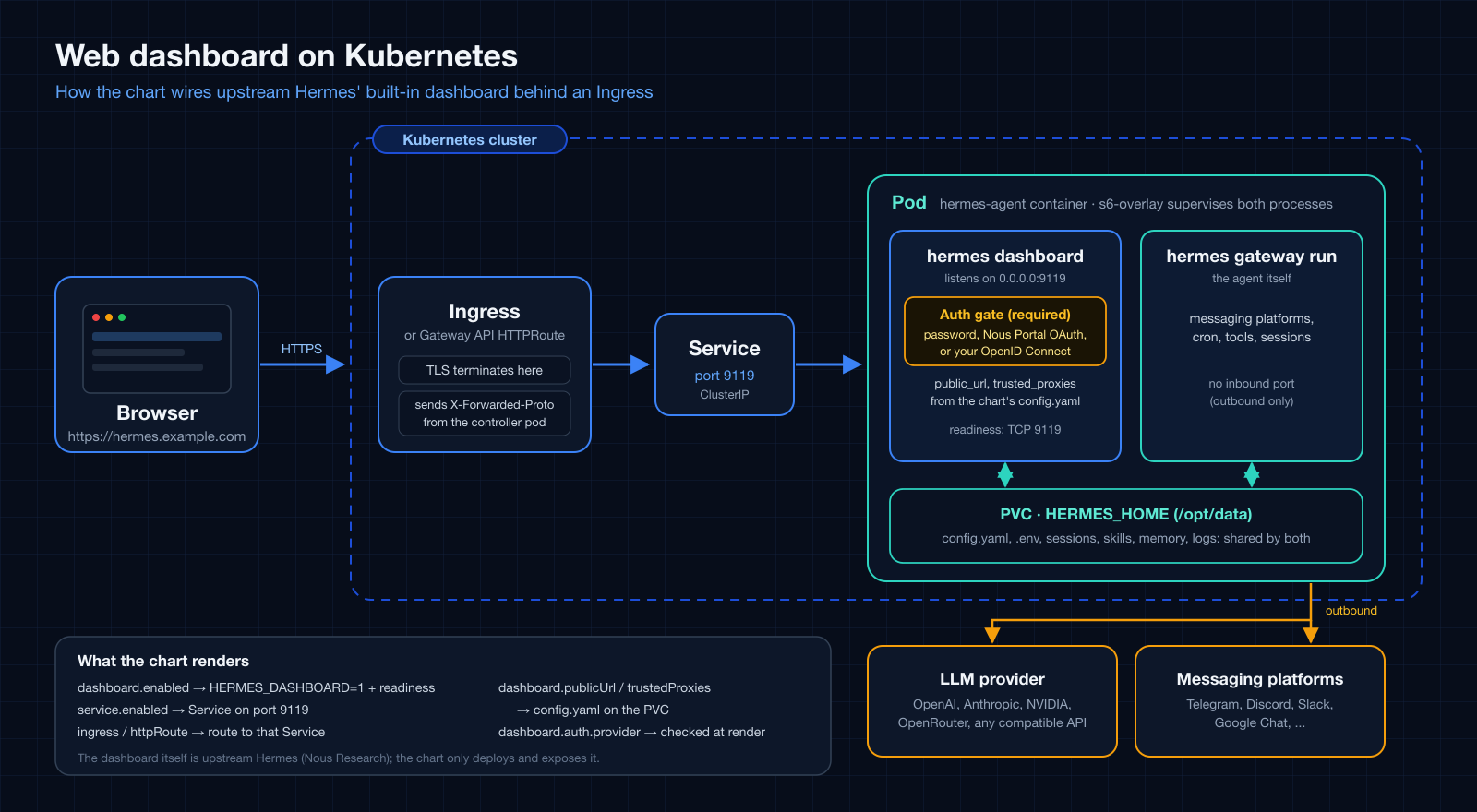
管理仪表盘(service.port,默认 9119)是镜像内的一个 s6 服务,也是唯一内置的 Web 界面。仪表盘本身属于上游 Hermes,本 Chart 只负责启用并公开它。已登录的用户能看到 API 密钥,还可以创建 shell hook 并使用 Chat 标签页,因此请把登录视为对 Pod 的 shell 访问,并按顺序完成以下步骤。
1. 选择登录方式。 绑定到非回环地址时,上游的认证网关是必需的:没有认证提供方时,仪表盘会安全失败,不会开始监听。--insecure 和 HERMES_DASHBOARD_INSECURE 已被上游弃用,不再生效。
| 方式 | dashboard.auth.provider |
适用场景 | 示例 |
|---|---|---|---|
| 用户名和密码 | basic |
可信网络或 VPN。上游不建议用于公网暴露。 | values-ingress.yaml |
| Nous Portal OAuth | oauth |
公网主机。在门户中把 Base URL 设为外部源(会自动追加 /auth/callback)。个人账号的客户端只允许其所有者登录。 |
values-ingress-oauth.yaml |
| 你自己的 OpenID Connect 提供方 | oidc |
使用自有身份提供方的公网主机(无密钥的 public PKCE 客户端)。仪表盘没有用户白名单:提供方为该客户端签发令牌的任何身份都能登录,因此请在提供方侧限制应用。 | values-ingress-oidc.yaml |
凭据来自 extraEnvFrom 或 ExternalSecret 时,请使用 external。否则,当提供方所需的键不在 env 或 extraEnv 中(OAuth 和 OIDC 也包括 config.dashboard.oauth)时,模板会在渲染阶段失败,而不是留下一个返回 502/503 的 Ingress。basic 需要 HERMES_DASHBOARD_BASIC_AUTH_USERNAME,以及 _PASSWORD 或 _PASSWORD_HASH。OAuth 客户端 ID 和 OIDC issuer 不是密钥,所以示例把它们放在 config.dashboard.oauth 下。
2. 启用并配置路由。 设置 dashboard.enabled: true(会渲染 HERMES_DASHBOARD=1)、service.enabled: true,以及 ingress 或 httpRoute。dashboard.publicUrl 会写入 config.dashboard.public_url。为空时从第一个 Ingress 主机推导(设置 ingress.tls 后为 https);使用 HTTPRoute 时请显式设置。它必须与在身份提供方注册的外部源一致。config.dashboard 下已设置的值优先。
请使用 dashboard.enabled,而不是直接在 extraEnv 或 env 中写 HERMES_DASHBOARD=1。镜像也认这个变量,但 Chart 看不到它,因此 readiness 探针、推导出的 public_url 和 trusted_proxies、认证提供方检查以及可信代理警告都会被跳过。如果保留该变量,请自行添加 probes.readiness,例如对 service.port 的 tcpSocket 探针。
3. 设置可信代理。 在终止 TLS 的 Ingress 之后,把控制器列入 dashboard.trustedProxies(会写入 config.dashboard.trusted_proxies;填写确切 IP 或有界 CIDR,0.0.0.0/0 会被拒绝)。不设置时,上游会忽略 X-Forwarded-Proto,登录仍可成功,但会话 Cookie 不会带 Secure。这个缺口不会报错,所以在没有可信代理却通过 https 提供仪表盘时,发布说明会打印警告。请填写仪表盘看到的对端地址,它取决于控制器:
- 普通控制器 Pod:它的 Pod IP 或 Pod CIDR。用
kubectl get pods -n <控制器命名空间> -o wide查看。 - 使用主机网络的控制器(例如 MicroK8s 的 ingress):它所在节点的地址。在 Calico VXLAN 这类覆盖网络 CNI 上,这只适用于与仪表盘 Pod 位于同一节点的控制器;其他节点上的控制器会从该节点的隧道地址连接,而这个地址位于 Pod 网络内。在每个节点各有一个控制器的 MicroK8s 上实测:只列出节点网络时,经其他节点登录能成功,但 Cookie 失去了
Secure。请同时列出节点网络和 Pod 网络(例如10.0.4.0/24和10.1.0.0/16)。用kubectl get ippools.crd.projectcalico.org(Calico)或kubectl get nodes -o jsonpath='{.items[*].spec.podCIDR}'查看 Pod 网络。
控制器 Pod 重建后,确切 IP 就不再匹配;测试以外的场景建议使用有界 CIDR。
4. 之后修改。 public_url 和 trusted_proxies 在卷首次初始化时写入 config.yaml,而 bootstrap.overwrite 默认为 false。因此,之后修改主机或任何 dashboard.* 值的 helm upgrade 不会传到 Pod,过期的 public_url 会破坏 OAuth 和 OIDC 回调。执行那次升级时请加上 --set bootstrap.overwrite=true,它会用 Chart 渲染的内容替换 config.yaml(以及已配置的 SOUL.md),所以请先备份运行时的修改,之后再改回 false。
5. 首次启动较慢。 首次启动时内置技能会同步到卷上,可能需要几分钟(网络存储上更久)。仪表盘启用期间,Chart 会在 service.port 上渲染 TCP readiness 探针(dashboard.readinessProbe),因此在仪表盘开始监听之前 Pod 一直是 NotReady,Ingress 也不会路由到它。helm --wait 会等待这一点。显式的 probes.readiness 优先,readiness 永远不会重启 Pod。
6. 检查。 没有会话时,GET / 会重定向到登录页,/api/env 和 /api/config 返回 401。登录后,GET /api/auth/me 会报告提供方,会话 Cookie 带有 __Host-、Secure 和 HttpOnly。
| 现象 | 可能原因 |
|---|---|
| 安装后 Ingress 立即返回 502 | 首次启动仍在进行;仪表盘开始监听前 Pod 为 NotReady。 |
| 仪表盘一直不监听 | 没有配置认证提供方,网关安全失败。 |
OIDC:/auth/login 返回 503 |
issuer 错误。响应正文会写明原因(OIDC discovery returned 404 for ...);带自定义错误页的代理可能会隐藏它,请直接访问 Service。issuer 末尾斜杠的差异可以容忍。 |
身份提供方提示 Unregistered redirect_uri(OIDC),或门户提示 redirect_uri_mismatch(OAuth) |
外部源与注册内容不一致。如果修改过主机,请参见第 4 步。 |
能登录但 Cookie 没有 Secure |
没有可信代理、地址错误,或使用了 *.localhost 主机(上游把回环主机视为开发环境)。在覆盖网络 CNI 上使用主机网络控制器时,结果可能取决于请求从哪个节点进入:请同时列出 Pod 网络(第 3 步)。 |
启用 networkPolicy 后 Ingress 超时,可能只在经过部分控制器时出现 |
策略拒绝所有入站流量,而控制器未被允许。请参见第 7 步。 |
7. 配合 NetworkPolicy 使用。 networkPolicy.enabled 会拒绝所有入站流量,因此在 Pod 仍为 Ready 的情况下(kubelet 探针不受影响),会悄无声息地切断 Ingress 到仪表盘的连接。请在 networkPolicy.extraIngress 中为 9119 端口添加规则。使用主机网络的控制器不会被 Pod 或命名空间选择器匹配。在覆盖网络 CNI 上(Calico VXLAN 实测),请同时放行节点网络和 Pod 网络,并在 dashboard.trustedProxies 中使用相同的两个 CIDR。实测的规则和可直接使用的覆盖文件见 values-networkpolicy-dashboard.yaml。
API 服务器与 webhook 监听器
apiServer.enabled 启动 Hermes 的 OpenAI 兼容 API 服务器。Chart 默认绑定 0.0.0.0,以便 Kubernetes Service 访问,与上游回环默认值不同。通过 env,或更推荐通过 extraEnvFrom 引用的外部 Secret 设置 API_SERVER_KEY,即使只监听回环地址也必须配置。apiServer.corsOrigins 仅用于明确且范围有限的浏览器来源允许列表。参阅上游 API 服务器指南。
webhook.enabled 启动一个通用 webhook 接收器。Telegram、Discord、Slack 等集成是该监听器后的路由,而非独立监听器。通过 env / extraEnvFrom 设置 WEBHOOK_SECRET 或各路由的密钥,参阅上游 webhook 指南。
这些运行时设置本身不会公开端口。沿用仅支持 dashboard 的 Service 时保持 service.ports: [],否则明确列出每个 Service 端口。values-api-server-and-webhook.yaml 提供公开 API 服务器和 webhook 端口、通过外部 Secret 引用必需凭据的示例。
A2A(Agent-to-Agent)监听器
A2A 没有专用 Chart 值或环境变量开关,上游唯一开关是 config.yaml 中的 gateway.platforms.a2a 块,因此通过现有自由格式的 config: 透传直接启用:
config:
  gateway:
    platforms:
      a2a:
        enabled: true
        extra:
          port: 9900
extraEnv:
  - name: A2A_HOST      # upstream defaults to 127.0.0.1; widen for a Service
    value: "0.0.0.0"
  - name: A2A_PORT
    value: "9900"
通过 env / extraEnvFrom 设置共享的 A2A_BEARER_TOKEN,或更推荐的逐对端 A2A_PEER_TOKENS。上游只有在配置其中之一后才允许绑定非回环地址。参阅 A2A 指南。values-a2a.yaml 示例通过显式 Service 公开端口,并从外部 Secret 引用必需令牌。
HTTP 路由:Ingress 或 HTTPRoute
两种路由资源默认均关闭。有 Ingress 控制器时使用 ingress;集群已提供 Gateway API CRD 和可由 parentRefs 引用的 Gateway 时使用 httpRoute。按集群实际使用的路由 API 选择,不要为同一主机和路径同时启用两者。
每条 Ingress 路径可覆盖 service 与 port。省略 Service 名称时指向本 Chart 的 Service,因此需要 service.enabled: true;显式指定外部 Service 时不要求启用 Chart Service。HTTPRoute 的 backendRefs 使用相同默认规则。如果隐式引用指向不存在的 Chart Service,Chart 会提前报错。
values-ingress-listeners.yaml 将 /v1 和 webhook 流量路由到不同的 Ingress 主机和 Service 端口。values-httproute.yaml 是对应的 Gateway API 示例。HTTPRoute 主机名适用于同一资源内的所有规则;需要在监听器规则间按主机隔离时,请创建不同的 HTTPRoute。
Pod Security Standards 加固
podSecurityContext / securityContext 默认留空以兼容各种集群,但固定镜像的非 root 和只读 rootfs 已通过 CI 验证。s6-overlay 会自行切换到非 root uid;将 /run 和 /tmp 挂载为可写、可执行的 tmpfs 后即可只读启动。/run 包含启动时执行的 s6 初始化二进制。请使用符合 PSS restricted 的 values-hardened.yaml,并安装到设有 pod-security.kubernetes.io/enforce=restricted 的命名空间。
两个初始化容器需要各自的 securityContext。auth.deviceFlow.securityContext 默认为空,继承登录镜像用户;目标 uid 已拥有令牌目录时可非 root 运行。values-hardened.yaml 中给出了与 tokenOwner 一致的覆盖值。team.sharedVolume.permissions 的所有权准备容器需以 root 对任意存储后端执行 chown,没有非 root 选项。在 restricted 下请关闭 permissions.enabled,并在存储后端支持时使用 podSecurityContext.fsGroup。
网关生命周期:滚动更新、关闭与排空
从镜像 v2026.7.1 起,agent.restart_drain_timeout 默认为 0。Pod 停止时,包括滚动更新、节点排空或 kubectl delete pod,会立即中断正在运行的智能体任务,保存会话记录并快速退出。默认滚动更新较快,Kubernetes 默认的 30 秒终止宽限期足够。
若要等待当前智能体轮次完成后再中断,需同时设置 Hermes 的排空时间和 Pod 的终止宽限期:
config:
  agent:
    restart_drain_timeout: 60    # seconds to wait for in-flight runs
terminationGracePeriodSeconds: 90 # keep WELL ABOVE the drain timeout
若宽限期没有充分超过排空时间,kubelet 会在排空中发送 SIGKILL。上游记录了与 systemd TimeoutStopSec 相同的竞态:可能遗留旧锁并使网关进入崩溃循环,这也是默认值改为 0 的原因。排空窗口无法保证无限时长的智能体轮次完成。
集群内不适用缩容至零。 上游
v2026.7.1的空闲检测(dormant-quiesce)仅用于 Nous 托管的 relay 部署。它由平台注入的HERMES_SCALE_TO_ZERO环境变量启用,不是用户配置键;只在仅用 relay 且注册了唤醒 URL 时启动,并依赖托管平台暂停虚拟机。本 Chart 的直接 Discord/Telegram/Slack 连接不会触发它,而且 Kubernetes 仍会维持 Pod 为 Running,因此 Chart 不公开此功能。
无人值守审批
网关 Pod 没有 TTY。Hermes 对危险 terminal / execute_code 命令发出的交互式审批可能无人回答,导致运行停滞。通过 config.approvals 调整:
config:
  approvals:
    mode: manual        # "manual" (default) prompts; the gateway has nobody to answer
    deny:                # commands matching these patterns are refused BEFORE
      - "rm -rf /"       # any approval/yolo logic even sees them: safe to keep
      - "curl.*\\|.*sh"  # even in yolo mode
    cron_mode: deny       # unattended cron runs: "deny" (default) or "approve"
    unattended_mode: deny # API server / webhook sessions: "deny" (default) or "approve"
    single_query_mode: deny  # one-shot `hermes chat -q` runs: same choice
    discord_prompt_timeout: 120  # seconds a Discord button prompt stays live
                                 # (clamped upstream; default 300s / 5 min)
cron_mode、unattended_mode、single_query_mode 分别控制 cron 任务、通过 apiServer / webhook 到达的会话及一次性 -q 执行。三者默认均为 deny:遇到危险命令时立即拒绝,而不是等到审批超时,智能体必须寻找其他方案。approve 会自动批准该场景中的全部请求。有人类参与的 Discord、Telegram 等消息平台不受这些开关控制,仍使用受平台超时限制的交互式审批。
除命令审批外,对智能体自身指令文件(AGENTS.md、SOUL.md、技能、记忆存储)的写入始终需要批准;没有人工沟通渠道时会拒绝执行,也不能通过 yolo 绕过。对应上游默认开启的 security.protected_instruction_files。自我改进技能的写入会在聊天中请求批准,不会静默落盘。
approvals.deny 是无论其他审批模式如何都硬性拒绝特定危险模式的列表,不是完整策略,也不会单独让网关变为非交互模式。请根据风险容忍度搭配 HERMES_YOLO_MODE 或审批模式,完整说明见上游安全指南。
环境变量
这里介绍启动所需的提供商和消息平台变量。Hermes 还支持更多环境变量,设置方式相同:敏感值放在 .Values.env(Secret),非敏感值放在 .Values.extraEnv(普通环境变量),外部管理的 Secret 使用 extraEnvFrom。参阅配置模型。
随 Hermes 发布持续更新的完整参考见 环境变量文档。
截至镜像 v2026.8.31,其他常用变量如下:
| 变量 | 用途 |
|---|---|
DEEPSEEK_API_KEY |
DeepSeek 提供商 |
ZAI_API_KEY |
Z.AI / GLM 提供商(内置键 zai;GLM_BASE_URL 选择 Global/China/Coding-Plan 端点) |
MODEL_API_KEY |
Meta Model API(Muse Spark)提供商(内置键 meta-ai;也接受别名 META_API_KEY,META_BASE_URL 覆盖端点) |
NEBIUS_API_KEY / NEBIUS_BASE_URL |
Nebius Token Factory 提供商(nebius-token-factory)及可选端点覆盖 |
RAMP_ROUTER_API_KEY / RAMP_ROUTER_BASE_URL |
Ramp Router 提供商(router)及可选端点覆盖 |
TOKENPLAN_API_KEY / TOKENPLAN_BASE_URL |
Tencent TokenPlan 提供商(tencent-tokenplan,Anthropic Messages 端点)及可选端点覆盖 |
AZURE_FOUNDRY_API_KEY |
Microsoft Foundry / Azure OpenAI 提供商 |
HERMES_WRITE_SAFE_ROOT |
将 write_file / patch 限制在指定根目录内(多个目录使用操作系统路径分隔符) |
SLACK_BOT_TOKEN / SLACK_APP_TOKEN |
Slack 机器人(Socket Mode) |
MATRIX_HOMESERVER / MATRIX_ACCESS_TOKEN |
Matrix 主服务器集成 |
WHATSAPP_CLOUD_PHONE_NUMBER_ID / WHATSAPP_CLOUD_ACCESS_TOKEN |
WhatsApp Cloud API |
HERMES_DASHBOARD_BASIC_AUTH_USERNAME / HERMES_DASHBOARD_BASIC_AUTH_PASSWORD |
仪表板内置用户名和密码认证,上游在非回环绑定时强制启用;HERMES_DASHBOARD_PUBLIC_URL 声明 Ingress 后的外部来源地址 |
HERMES_MAX_ITERATIONS |
每次会话的工具调用迭代预算(默认 500 次,之后允许一次收尾调用);硬上限为 config.agent.max_turns,上游默认不限,Chart 已不再初始化该值 |
HERMES_AGENT_TIMEOUT |
网关无活动超时(默认 1800 秒 / 30 分钟) |
SESSION_IDLE_MINUTES |
空闲会话重置窗口(默认 1440 分钟) |
HERMES_TIMEZONE |
覆盖 IANA 时区 |
无法通过环境变量配置: 上下文压缩、回退提供商及提供商路由只存在于
config.yaml(.Values.config)中,没有对应环境变量。
FAQ
如何设置此 README 未提及的 Hermes 配置?
此 README 介绍安装时的基础设置。其他项目按以下步骤配置:
- 在官方配置指南(
config.yaml键)或环境变量参考中查找所需设置。 - 找到如
foo.bar: baz的键后,在 values 文件中设为.Values.config.foo.bar,或使用--set-string config.foo.bar=baz。如为SOME_TOKEN环境变量,则设为.Values.env.SOME_TOKEN(敏感)或.Values.extraEnv(非敏感)。 - 执行
helm upgrade,再用kubectl exec <pod> -- hermes doctor或helm test确认。
Hermes 已支持的设置无需修改 Chart,参阅透传原则。Chart 的 values.yaml 和示例用于值得提供起始模板的配置,例如完整提供商配置、消息机器人防循环变量和团队拓扑。
为什么上游发行说明中的新功能没有变成新的 values.yaml 键?
大多数上游配置已可通过透传直接使用,例如 #45、#46、#48。只有新提供商、新密钥来源等足够复杂、值得提供可复制起点的配置才会新增 values-*.yaml 示例,而非为上游每个键单独添加。
更多示例
以下 -f 覆盖文件面向小型或家庭集群,例如 Raspberry Pi / arm64 k3s,可按需修改。文件中的凭据是虚拟占位值或外部 Secret 引用。安装时用 --set-string 覆盖占位值(见各文件顶部的命令),或使用前述 SealedSecret 与 extraEnvFrom 模式。
| 文件 | 模型提供商 | 附加功能 |
|---|---|---|
values-nvidia-nim-and-discord.yaml |
NVIDIA NIM | 已配置 Discord 机器人 |
values-nvidia-nim-and-buzz.yaml |
NVIDIA NIM | 已配置 Buzz 机器人(Block 基于 Nostr 的人类与智能体平台) |
values-github-copilot.yaml |
GitHub Copilot (copilot) |
OAuth 设备流程登录与 Discord 机器人 |
values-openai-codex.yaml |
OpenAI Codex (openai-codex) |
ChatGPT/Codex 设备登录与 Discord 机器人 |
values-anthropic-and-discord.yaml |
Anthropic (Claude) | 已配置 Discord 机器人 |
values-openai-and-telegram.yaml |
OpenAI (openai-api) |
已配置 Telegram 机器人 |
values-google-chat.yaml |
OpenAI (openai-api) |
通过 Pub/Sub pull 订阅配置 Google Chat 机器人,服务账户 JSON 通过 extraVolumes 挂载 |
values-openai.yaml |
OpenAI (openai-api) |
: |
values-anthropic.yaml |
Anthropic (Claude) | : |
values-gemini.yaml |
Google Gemini | : |
values-google-vertex.yaml |
Google Vertex AI (vertex) |
通过 extraVolumes 挂载服务账户 JSON(无需静态 API 密钥) |
values-openrouter.yaml |
OpenRouter | : |
values-fireworks.yaml |
Fireworks AI | Fireworks 原生模型 ID |
values-deepinfra.yaml |
DeepInfra | 通过 DEEPINFRA_BASE_URL 覆盖端点 |
values-upstage.yaml |
Upstage Solar | 通过 UPSTAGE_BASE_URL 覆盖端点 |
values-moa.yaml |
Mixture-of-Agents (moa) |
并行运行参考模型,由聚合模型综合结果 |
values-bitwarden.yaml |
任意 | Bitwarden Secrets Manager 在启动时提供密钥 |
values-litellm.yaml |
LiteLLM 代理(远程/Ingress) | : |
values-litellm-k8s.yaml |
LiteLLM 代理(集群内 Service DNS) | : |
values-ingress.yaml |
OpenAI (openai-api) |
Dashboard Ingress:启用仪表板、上游密码认证及可信代理 |
values-ingress-oauth.yaml |
OpenAI (openai-api) |
使用 Nous Portal OAuth 的仪表盘 Ingress,上游推荐用于公网仪表盘的登录方式 |
values-ingress-oidc.yaml |
OpenAI (openai-api) |
使用你自己的 OpenID Connect 提供方的仪表盘 Ingress(public PKCE 客户端,无需 Nous Portal) |
values-api-server-and-webhook.yaml |
OpenAI (openai-api) |
API 服务器与 webhook:显式 Service 端口和外部监听器密钥 |
values-a2a.yaml |
OpenAI (openai-api) |
A2A(Agent-to-Agent):config.yaml 透传与显式 Service 端口,供其他 A2A 智能体发现并调用 |
values-ingress-listeners.yaml |
OpenAI (openai-api) |
Ingress 监听器路由:/v1 API 与 webhook 主机使用不同 Service 端口 |
values-httproute.yaml |
OpenAI (openai-api) |
Gateway API HTTPRoute:通过已有 Gateway 路由监听器流量 |
values-networkpolicy-litellm.yaml |
LiteLLM 代理(集群内) | 限制出站流量的 NetworkPolicy:阻止 RFC1918 和云元数据端点,仅精确放行 LiteLLM Service |
values-networkpolicy-dashboard.yaml |
OpenAI (openai-api) |
启用 NetworkPolicy 的仪表盘 Ingress:9119 端口的入站规则与对应的可信代理,在 Calico VXLAN 上的主机网络控制器上实测 |
values-hardened.yaml |
OpenAI (openai-api) |
PSS restricted:非 root、只读 rootfs、移除 capabilities,已在强制 restricted 的命名空间中通过 CI 验证 |
values-soul.yaml |
任意 | 持久化身份:实用工程风格,保留运行时编辑 |
values-multi-agent-collab.yaml |
任意 | 协作双智能体:在共享 Discord 频道中通过 @mention 交接 |
values-team-leader.yaml + values-team-member.yaml |
NVIDIA NIM(也可使用其他提供商) | 领导者编排团队:串行显式机器人 @mention,RWX 知识 PVC 由领导者写入、成员只读,不通过文件交接任务。见团队指南 |
values-shared-knowledge.yaml |
Anthropic (Claude) | 共享 RWX PVC:多个智能体读写同一知识库 |
通过 ArgoCD 部署时,参阅 examples/argocd/。每个示例均有对应 Application 清单及基于 extraEnvFrom 的密钥配置。
Values
| Key | Type | Description | Default |
|---|---|---|---|
| affinity | object | Affinity rules for Pod scheduling. | {} |
| apiServer | object | ------------------------------------------------------------------------- | {"corsOrigins":"","enabled":false,"host":"0.0.0.0","port":8642} |
| apiServer.corsOrigins | string | Comma-separated browser origins allowed to call the API directly. Empty disables browser CORS access. | "" |
| apiServer.enabled | bool | Enable Hermes' OpenAI-compatible HTTP API server. | false |
| apiServer.host | string | Bind address. Upstream defaults to 127.0.0.1; a Kubernetes Service needs a non-loopback address. API_SERVER_KEY is still required on loopback. | "0.0.0.0" |
| apiServer.port | int | API server port. | 8642 |
| args | list | Arguments passed through the image entrypoint. gateway run selects the non-interactive outbound messaging service instead of the default TUI. |
["gateway","run"] |
| auth | object | ------------------------------------------------------------------------- | {"deviceFlow":{"enabled":false,"forceRelogin":false,"image":{"repository":"python","tag":"3.13-slim"},"notify":"discord","provider":"github-copilot","providers":{"github-copilot":{"authHost":"github.com","clientId":"Ov23li8tweQw6odWQebz","flow":"github","scope":"read:user","tokenEnv":"COPILOT_GITHUB_TOKEN","validateUrl":"https://api.github.com/copilot_internal/v2/token"},"openai-codex":{"flow":"openai-codex","issuer":"https://auth.openai.com"}},"resources":{},"securityContext":{},"timeoutSeconds":870,"tokenOwner":{"gid":10000,"uid":10000}}} |
| auth.deviceFlow.enabled | bool | Bootstrap a provider credential via the OAuth device flow at startup. When false, the agent uses the static key from env/extraEnvFrom. |
false |
| auth.deviceFlow.forceRelogin | bool | Force a fresh login even if a token already exists on the volume. | false |
| auth.deviceFlow.image | object | Login image for GitHub-style profiles. OpenAI Codex uses the pinned Hermes image so auth.json persistence and refresh stay version-aligned. | {"repository":"python","tag":"3.13-slim"} |
| auth.deviceFlow.notify | string | Where to deliver the verification URL + user code for human approval. discord reuses the agent's bot creds (DISCORD_BOT_TOKEN + DISCORD_HOME_CHANNEL from env/extraEnvFrom). The code is always also printed to the init container logs as a fallback. |
"discord" |
| auth.deviceFlow.provider | string | Which provider profile to authenticate. Must be a key under providers below. Only one device-flow login runs at a time. |
"github-copilot" |
| auth.deviceFlow.providers.github-copilot.authHost | string | Host serving the device-code + token endpoints (GitHub-style paths). | "github.com" |
| auth.deviceFlow.providers.github-copilot.clientId | string | OAuth client id for the device grant. The shared opencode/Copilot-CLI client that Hermes upstream itself uses (hermes_cli/copilot_auth.py). | "Ov23li8tweQw6odWQebz" |
| auth.deviceFlow.providers.github-copilot.flow | string | Login protocol handler. | "github" |
| auth.deviceFlow.providers.github-copilot.scope | string | OAuth scope requested in the device grant. | "read:user" |
| auth.deviceFlow.providers.github-copilot.tokenEnv | string | .env key Hermes reads this provider's token from (resolution order COPILOT_GITHUB_TOKEN > GH_TOKEN > GITHUB_TOKEN). | "COPILOT_GITHUB_TOKEN" |
| auth.deviceFlow.providers.github-copilot.validateUrl | string | Optional endpoint to verify an existing token is still live; on 401/403 the init container re-runs the login. Empty = skip the check. | "https://api.github.com/copilot_internal/v2/token" |
| auth.deviceFlow.providers.openai-codex.flow | string | Use the OpenAI Codex device-code flow bundled with the pinned Hermes version and persist refreshable credentials in auth.json. | "openai-codex" |
| auth.deviceFlow.providers.openai-codex.issuer | string | OpenAI account issuer. Override only for a compatible test server. | "https://auth.openai.com" |
| auth.deviceFlow.resources | object | Resources for the login init container. | {} |
| auth.deviceFlow.securityContext | object | securityContext for the device-login init container. Empty by default - inherits the image's own user (root for the Python image, the pinned Hermes image otherwise). Overriding to a non-root uid only works if that uid can already write the token's destination path; see values-hardened.yaml for a verified non-root override (uid/gid matching tokenOwner, so the chown above becomes a same-uid no-op). | {} |
| auth.deviceFlow.timeoutSeconds | int | Seconds to wait for the human to authorize before the init container fails (and retries). Keep below the provider's device-code validity. | 870 |
| auth.deviceFlow.tokenOwner | object | uid/gid that should own the written token file. By default this init container inherits the login image's own user (root for the Python image below) so it can write to any storage class reliably, then chowns the token to this owner. Set it to the Hermes runtime uid; the upstream image's s6-overlay runs the agent as uid/gid 10000: so the non-root agent can read the credential. | {"gid":10000,"uid":10000} |
| bootstrap.enabled | bool | Seed chart-managed files into HERMES_HOME via an init container. | true |
| bootstrap.overwrite | bool | false: seed config.yaml and configured SOUL.md only if absent, preserving runtime edits across upgrades. Set true to replace both files with chart content on every deploy. | false |
| command | list | Container command override. Empty keeps the Hermes image entrypoint, which starts the s6-supervised outbound messaging gateway and prepares volume ownership before dropping privileges. Set only for explicit debugging. | [] |
| config | object | ------------------------------------------------------------------------- | {"agent":{"gateway_timeout":1800},"model":{"default":"gpt-4o-mini","provider":"openai-api"},"providers":{},"terminal":{"backend":"local"}} |
| controller | object | ------------------------------------------------------------------------- | {"type":"deployment"} |
| controller.type | string | Workload kind: "deployment" or "statefulset". | "deployment" |
| deploymentAnnotations | object | Annotations to add to the Deployment or StatefulSet object. | {} |
| env | object | ------------------------------------------------------------------------- | {"OPENAI_API_KEY":"sk-REPLACE_ME"} |
| externalSecret | object | ------------------------------------------------------------------------- | {"data":[],"dataFrom":[],"enabled":false,"refreshInterval":"1h","secretStoreRef":{"kind":"ClusterSecretStore","name":""},"target":{"creationPolicy":"Owner","deletionPolicy":"Retain","name":""}} |
| externalSecret.data | list | Individual remoteRef -> key mappings. See the External Secrets Operator docs for the full field set. | [] |
| externalSecret.dataFrom | list | Bulk provider-native secret imports. See the External Secrets Operator docs for the full field set. | [] |
| externalSecret.enabled | bool | Render an ExternalSecret instead of the chart's own env Secret. Requires the External Secrets Operator CRDs to already be installed in-cluster. | false |
| externalSecret.refreshInterval | string | How often ESO resyncs the target Secret from the provider. | "1h" |
| externalSecret.secretStoreRef | object | Which SecretStore/ClusterSecretStore to pull from. name is required when enabled. |
{"kind":"ClusterSecretStore","name":""} |
| externalSecret.target.name | string | Target Secret name. Empty defaults to the chart's own env Secret name (<fullname>-env); when set, every chart-owned envFrom reference uses this name instead. |
"" |
| extraContainers | list | Extra sidecar containers appended to the Pod's main containers: list. Distinct from extraInitContainers (init phase only). Full container spec; giving a sidecar its own resources and a PSS-compatible securityContext is the operator's responsibility. |
[] |
| extraEnv | list | Plain (non-secret) env vars injected directly on the container. | [] |
| extraEnvFrom | list | Extra envFrom sources (reference existing ConfigMaps/Secrets). | [] |
| extraInitContainers | list | Extra init containers, appended after the chart's own (seed-config, device-flow login). Full container spec; combine with extraVolumes for one-time preparation of a user-provided volume (for example, a shared knowledge volume used independently of the Discord team handoff). |
[] |
| extraResources | list | Extra raw manifests rendered as-is alongside this chart's resources. Each entry is tpl-rendered, so {{ .Release.Namespace }} etc. work, and may be either an object or a multiline string (see examples/argocd/). Useful for things this chart doesn't model directly, e.g. a SealedSecret that a sealed-secrets controller decrypts into a Secret referenced via extraEnvFrom (see examples/argocd/). |
[] |
| extraVolumeMounts | list | Extra volume mounts on the hermes-agent container (pairs with extraVolumes). | [] |
| extraVolumes | list | Extra volumes on the pod, for anything the agent needs as a FILE rather than an env var: e.g. a Secret holding a service-account JSON (see values-google-vertex.yaml). | [] |
| fullnameOverride | string | Fully override the generated resource name (release-name-chart). | "" |
| httpRoute.enabled | bool | Create a Gateway API HTTPRoute. The cluster must already provide the Gateway API CRD and a Gateway selected by parentRefs. |
false |
| httpRoute.hostnames | list | HTTP hostnames accepted by this route. | [] |
| httpRoute.parentRefs | list | Gateway API parent references. | [] |
| httpRoute.rules | list | HTTPRoute rules. An empty backendRef name targets this chart's Service. | [] |
| image.pullPolicy | string | Image pull policy. | "IfNotPresent" |
| image.repository | string | Container image repository (multi-arch: amd64 + arm64). | "nousresearch/hermes-agent" |
| image.tag | string | Image tag. Upstream uses DATE-based tags (e.g. "v2026.6.5" == Hermes v0.16.0), plus latest / main. There is no semver tag. Empty defaults to .Chart.AppVersion. |
"" |
| imagePullSecrets | list | Image pull secrets for private registries. | [] |
| ingress.annotations | object | Annotations to add to the Ingress (e.g. auth, cert-manager, rewrite rules). | {} |
| ingress.className | string | IngressClass name (e.g. "nginx", "traefik"). Empty uses the cluster default. | "" |
| ingress.enabled | bool | Create an Ingress resource. | false |
| ingress.hosts | list | Host/path rules. Each path defaults to this chart's Service and the legacy dashboard port; override service and port per listener. |
[{"host":"hermes-agent.example.com","paths":[{"path":"/","pathType":"Prefix"}]}] |
| ingress.tls | list | TLS configuration for the Ingress. | [] |
| nameOverride | string | Override the chart name used in resource names. | "" |
| networkPolicy | object | ------------------------------------------------------------------------- | {"allowDns":true,"blockPrivateEgress":true,"dns":{"namespaceSelector":{"matchLabels":{"kubernetes.io/metadata.name":"kube-system"}},"podSelector":{"matchLabels":{"k8s-app":"kube-dns"}}},"enabled":false,"extraEgress":[],"extraIngress":[]} |
| networkPolicy.allowDns | bool | Permit DNS lookups to kube-dns/CoreDNS. Required for the agent to resolve any provider/messaging endpoint. | true |
| networkPolicy.blockPrivateEgress | bool | Block RFC1918 ranges and the cloud metadata endpoint (both IPv4 169.254.0.0/16 and its IPv6 equivalent within fd00::/8) while still permitting public internet egress. Set false when the agent must reach an in-cluster proxy such as LiteLLM - see values-networkpolicy-litellm.yaml for a precise allowlist instead. | true |
| networkPolicy.dns.namespaceSelector | object | Kubernetes' immutable namespace-name label keeps this peer limited to kube-system. Override both selectors for a distribution whose DNS runs elsewhere. | {"matchLabels":{"kubernetes.io/metadata.name":"kube-system"}} |
| networkPolicy.enabled | bool | Create a NetworkPolicy isolating both directions. Ingress is denied entirely by default - not an oversight: hermes gateway run is outbound-only, so nothing needs to reach this Pod unless a listener (dashboard, apiServer, webhook, a2a, ...) is exposed. Use extraIngress in that case. |
false |
| networkPolicy.extraEgress | list | Additional raw NetworkPolicy egress rules, appended as-is. | [] |
| networkPolicy.extraIngress | list | Additional raw NetworkPolicy ingress rules, appended as-is. Required before enabling networkPolicy alongside any exposed listener. | [] |
| nodeSelector | object | Node selector for Pod scheduling. | {} |
| persistence | object | ------------------------------------------------------------------------- | {"accessModes":["ReadWriteOnce"],"enabled":true,"existingClaim":"","mountPath":"/opt/data","size":"5Gi","storageClass":""} |
| persistence.existingClaim | string | Use an existing PVC instead of creating a new one. When specified, the chart will use this PVC and skip creating its own. | "" |
| persistence.storageClass | string | StorageClass for the volumeClaimTemplate. Empty = cluster default. | "" |
| podAnnotations | object | Annotations to add to the Pod. | {} |
| podLabels | object | Labels to add to the Pod. | {} |
| podSecurityContext | object | Pod-level securityContext. Left empty by default to stay compatible with the image's s6-overlay init (which starts as root and drops privileges itself). Non-root and read-only rootfs are both CI-verified to work; see values-hardened.yaml for a Pod Security Standards restricted-compliant overlay rather than hand-rolling this. |
{} |
| probes | object | Health probes. Empty = none. The image's s6-overlay already supervises and auto-restarts the gateway in-container, so k8s probes are optional. Provide a full probe spec to enable, e.g. an exec check: liveness: exec: { command: ["hermes","gateway","status"] } initialDelaySeconds: 30 periodSeconds: 30 | {"liveness":{},"readiness":{},"startup":{}} |
| probes.liveness | object | Liveness probe spec. Empty = no liveness probe. | {} |
| probes.readiness | object | Readiness probe spec. Empty = no readiness probe. | {} |
| probes.startup | object | Startup probe spec. Empty = no startup probe. Use this when first start takes longer than the liveness probe allows. | {} |
| replicaCount | int | Set to 0 to prepare GitOps resources (Secret, ConfigMap, PVC, ...) without starting an agent Pod, then scale to 1 after credentials and optional device login are ready. The gateway and device-login init container do not run while paused. Hermes Agent is a single-writer workload bound to one HERMES_HOME (ReadWriteOnce PVC), so values above 1 are unsupported: Deployment replicas contend for the same volume and StatefulSet replicas are disconnected agent identities. | 1 |
| resources | object | Container resource requests/limits. Lightweight defaults aimed at small clusters (incl. Raspberry Pi / arm64). | {"limits":{"cpu":"2","memory":"2Gi"},"requests":{"cpu":"100m","memory":"256Mi"}} |
| runtimeClassName | string | RuntimeClass for the Pod. Set to a sandboxed runtime (gVisor: "gvisor", Kata: "kata-containers") to add a kernel isolation boundary around the agent's shell execution. Empty by default: the cluster's default runtime. | "" |
| securityContext | object | Container-level securityContext. Same caveat as podSecurityContext above. |
{} |
| service.annotations | object | Annotations to add to the Service. | {} |
| service.enabled | bool | Create a ClusterIP Service for explicitly selected listeners. | false |
| service.port | int | Legacy dashboard Service port. Used only while service.ports is empty, preserving the existing dashboard-only Service behaviour. |
9119 |
| service.ports | list | Explicit Service ports. A non-empty list replaces the legacy dashboard port entirely. Enabling apiServer or webhook does not add a Service port automatically. | [] |
| service.type | string | Service type. | "ClusterIP" |
| serviceAccount.annotations | object | Annotations to add to the ServiceAccount. | {} |
| serviceAccount.automountServiceAccountToken | bool | Mount the ServiceAccount token into the Pod. The agent does not call the Kubernetes API, so this chart turns it off. Behaviour change on upgrade: without this field, Kubernetes applies its own default of true. Set to true if something inside the Pod deliberately calls the API (e.g. kubectl-style tooling in an extraContainer). | false |
| serviceAccount.create | bool | Create a ServiceAccount for the pod. | true |
| serviceAccount.name | string | Name to use; generated from fullname when empty. | "" |
| soul | object | Contents of SOUL.md, seeded into HERMES_HOME alongside config.yaml. It defines the agent's persistent identity. Empty means the chart seeds nothing, so Hermes writes its own starter file on first run. | {"text":""} |
| team | object | ------------------------------------------------------------------------- | {"enabled":false,"identity":"","leader":{"mentionEnv":"","name":""},"members":[],"name":"","protocol":{"maxHandoffs":6},"role":"member","sharedVolume":{"accessModes":["ReadWriteMany"],"claimName":"","create":false,"enabled":true,"mountPath":"/opt/data/team-knowledge","permissions":{"enabled":false,"gid":10000,"image":"busybox:1.38","securityContext":{"runAsGroup":0,"runAsUser":0},"uid":10000},"retain":true,"size":"10Gi","storageClass":""},"skill":{"configMapName":"","create":false,"enabled":true,"extraInstructions":"","name":""}} |
| team.enabled | bool | Enable the chart-native leader/member team protocol, roster skill, and shared knowledge volume mount for this release. | false |
| team.identity | string | This release's identity. For a leader it must equal leader.name; for a member it must match one entry under members. |
"" |
| team.leader.mentionEnv | string | Environment variable containing the leader's Discord user ID. Supply it through a Secret/SealedSecret; the ID is expanded by Hermes at runtime. | "" |
| team.leader.name | string | Leader identity shared by every release in the team. | "" |
| team.members | list | Configured members. ApplicationSet users define this once in the common template so every generated release receives the same complete roster. | [] |
| team.name | string | Stable team identifier used in the generated skill and default names. | "" |
| team.protocol.maxHandoffs | int | Maximum serial leader-to-member handoffs before escalating to a human. | 6 |
| team.role | string | This release's team role. | "member" |
| team.sharedVolume.accessModes | list | RWX access modes used only when create=true. |
["ReadWriteMany"] |
| team.sharedVolume.claimName | string | Shared PVC name. Empty defaults to <team.name>-knowledge. |
"" |
| team.sharedVolume.create | bool | Create the shared PVC from this release. Set true on exactly one leader release; all members set false and reference the same claimName. |
false |
| team.sharedVolume.enabled | bool | Mount a required RWX knowledge volume when team mode is enabled. | true |
| team.sharedVolume.mountPath | string | Mount path for durable accepted team knowledge. | "/opt/data/team-knowledge" |
| team.sharedVolume.permissions.enabled | bool | On the leader, chown the shared volume before Hermes starts. Enable only when the storage backend permits ownership changes. This init container needs root (see securityContext below), so it is incompatible with Pod Security Standards restricted - set false and rely on podSecurityContext.fsGroup instead when the storage backend honours it. See values-hardened.yaml. |
false |
| team.sharedVolume.permissions.image | string | Init image used for shared-volume ownership preparation. | "busybox:1.38" |
| team.sharedVolume.permissions.securityContext | object | securityContext for the chown init container. Defaults to root - chown across arbitrary storage backends needs it. Not overridable to non-root; disable permissions.enabled instead under restricted. Setting this to {} does NOT restore an image-default user the way auth.deviceFlow.securityContext: {} does - it renders an explicit empty securityContext, which inherits podSecurityContext's fields (e.g. a hardened profile's non-root runAsUser), silently breaking the chown this container exists to perform. Disable permissions.enabled instead of clearing this value. |
{"runAsGroup":0,"runAsUser":0} |
| team.sharedVolume.permissions.uid | int | Runtime owner for the shared knowledge directory. | 10000 |
| team.sharedVolume.retain | bool | Keep a chart-created shared claim when the owning release is removed. | true |
| team.sharedVolume.size | string | Requested shared storage size used only when create=true. |
"10Gi" |
| team.sharedVolume.storageClass | string | StorageClass used only when create=true; empty uses cluster default. |
"" |
| team.skill.configMapName | string | Shared ConfigMap name. Empty defaults to <team.name>-skill. |
"" |
| team.skill.create | bool | Create the shared skill ConfigMap from this release. Set true on exactly one leader release; every member references the same ConfigMap. | false |
| team.skill.enabled | bool | Mount the shared team roster and protocol as a read-only skill. | true |
| team.skill.extraInstructions | string | Optional deployment-specific policy appended to the generated skill. Used only by the release with skill.create=true. |
"" |
| team.skill.name | string | Skill name. Empty defaults to <team.name>-roster. |
"" |
| terminationGracePeriodSeconds | string | Pod termination grace period in seconds. Empty = Kubernetes default (30s). The gateway (image v2026.7.1+) defaults agent.restart_drain_timeout to 0: on stop it interrupts in-flight runs immediately, persists the transcript, and exits fast: the default grace period is plenty. If you opt into a drain window via config.agent.restart_drain_timeout: <seconds>, raise this WELL ABOVE that value or the kubelet SIGKILLs the gateway mid-drain (stale lock + crash loop: the same race upstream warns about with systemd's TimeoutStopSec). See "Gateway lifecycle" in the README. |
"" |
| tests | object | ------------------------------------------------------------------------- | {"chat":{"enabled":false,"failOnError":false,"maxTurns":1,"models":[],"prompt":"Just say hi.","timeout":180},"doctorStrict":false,"doctorTimeout":120,"enabled":true,"image":{"pullPolicy":"","repository":"","tag":""},"resources":{"limits":{"cpu":"1","memory":"512Mi"},"requests":{"cpu":"100m","memory":"128Mi"}}} |
| tests.chat | object | ------------------------------------------------------------------------- | {"enabled":false,"failOnError":false,"maxTurns":1,"models":[],"prompt":"Just say hi.","timeout":180} |
| tests.chat.enabled | bool | Run a hermes chat round-trip and log the conversation. |
false |
| tests.chat.failOnError | bool | When true, a failed/empty round-trip fails the test job. | false |
| tests.chat.maxTurns | int | Max agent turns for the round-trip. | 1 |
| tests.chat.models | list | Optional pool of provider/model ids to try in order (via hermes chat -m <id> --provider config.model.provider), each with its own timeout. Passes as soon as one succeeds: useful for free-tier models that are sometimes overloaded. Leave empty to use config.model.default as-is (single attempt, no -m/--provider override). |
[] |
| tests.chat.prompt | string | Prompt sent to the agent. | "Just say hi." |
| tests.chat.timeout | int | Seconds to allow each round-trip attempt to run before timing out. | 180 |
| tests.doctorStrict | bool | When true, hermes doctor issues fail the test. When false, doctor runs for visibility but only hard checks (hermes --version, seeded config) fail. |
false |
| tests.doctorTimeout | int | Seconds to allow hermes doctor to run before timing out. |
120 |
| tests.enabled | bool | Render the chart test Job. | true |
| tests.image | object | Image used by the test Job. Empty fields fall back to the main image.* (so the hermes CLI + doctor are available and arch matches). |
{"pullPolicy":"","repository":"","tag":""} |
| tests.resources | object | Resource requests/limits for the test Job's container. | {"limits":{"cpu":"1","memory":"512Mi"},"requests":{"cpu":"100m","memory":"128Mi"}} |
| tolerations | list | Tolerations for Pod scheduling. | [] |
| webhook.enabled | bool | Enable Hermes' generic inbound webhook receiver. Telegram, Discord, Slack, and other sources are routes behind this single listener. | false |
| webhook.port | int | Webhook receiver port. | 8644 |
Autogenerated from chart metadata using helm-docs v1.14.2