hermes-agent-helm/hermes-agent¶
👩🏻💻 Kubernetes에서 실행하는 Hermes Agent - Codex/Copilot 계정으로 로그인하고, 에이전트 팀을 운영하며, 가볍게 유지됩니다.
Hermes Agent - 멀티 제공자 LLM 에이전트 프레임워크 - 를 Kubernetes에서 실행하세요. Hermes가 지원하는 모든 제공자(OpenAI, Anthropic, Gemini, OpenRouter, NVIDIA, 또는 LiteLLM/vLLM 같은 OpenAI 호환 프록시)를 values.yaml만으로 설정할 수 있고, 내장된 helm test 헬스체크도 함께 제공됩니다.





이 프로젝트가 도움이 되셨나요? GitHub에서 별(⭐)을 눌러주세요 - 다른 분들이 찾는 데 도움이 됩니다.
TL;DR¶
# OCI (권장)
helm upgrade --install hermes-agent \
  oci://ghcr.io/jyje/hermes-agent-helm/hermes-agent --version 1.18.0 \
  --namespace hermes-agent --create-namespace \
  --set-string env.OPENAI_API_KEY='sk-...' --wait
# Helm Repository
helm repo add hermes-agent https://jyje.github.io/hermes-agent-helm
helm repo update
helm upgrade --install hermes-agent hermes-agent/hermes-agent \
  --namespace hermes-agent --create-namespace \
  --set-string env.OPENAI_API_KEY='sk-...' --wait
- 웹 대시보드: 브라우저에서 에이전트와 채팅하고, 세션을 둘러보고, 모델, 스킬, 설정을 관리합니다. 비밀번호, Nous Portal OAuth, 또는 자체 OpenID Connect 로그인으로 보호됩니다: 대시보드 노출하기.
- ArgoCD: 제공자/메신저 조합별로 바로 적용 가능한
Application매니페스트:examples/argocd/. - 실제 시크릿을 커밋하지 않는 GitOps: SealedSecret +
extraEnvFrom가이드:examples/argocd/§ SealedSecret. - 에이전트 팀: 여러 인스턴스를 Discord 채널에서
@mention으로 대화를 넘기도록 연결:examples/argocd/hermes-collab-pair.yaml, 팀 구성 + 협업 가이드 참고.
제공자 설정¶
config.model.provider를 내장 키로 설정하고, 해당 키를 env 아래에 제공하세요:
| 제공자 | config.model.provider |
키 env var | 예제 |
|---|---|---|---|
| OpenAI | openai-api |
OPENAI_API_KEY |
values-openai.yaml |
| Anthropic (Claude) | anthropic |
ANTHROPIC_API_KEY |
values-anthropic.yaml |
| Google Gemini | gemini |
GOOGLE_API_KEY |
values-gemini.yaml |
| Google Vertex AI | vertex |
없음: 마운트된 서비스 계정 JSON(또는 ADC)에서 OAuth2 토큰 자동 발급 | values-google-vertex.yaml |
| OpenRouter | openrouter |
OPENROUTER_API_KEY |
values-openrouter.yaml |
| NVIDIA NIM | nvidia |
NVIDIA_API_KEY |
values-nvidia-nim-and-discord.yaml |
| Fireworks AI | fireworks |
FIREWORKS_API_KEY |
values-fireworks.yaml |
| DeepInfra | deepinfra |
DEEPINFRA_API_KEY |
values-deepinfra.yaml |
| Upstage Solar | upstage |
UPSTAGE_API_KEY |
values-upstage.yaml |
| GitHub Copilot | copilot |
COPILOT_GITHUB_TOKEN (OAuth 디바이스 플로우: API 키 불필요) |
values-github-copilot.yaml |
| OpenAI Codex | openai-codex |
ChatGPT/Codex 디바이스 로그인(API 키 불필요) | values-openai-codex.yaml |
| Mixture-of-Agents (MoA) | moa |
프리셋의 reference/aggregator 모델에 따라 다름 | values-moa.yaml |
| 커스텀 (LiteLLM / vLLM / LM Studio) | config.providers 아래 직접 정의한 id |
프록시마다 다름 | values-litellm.yaml |
openai(접미사 없음)는 유효하지 않은 제공자 키입니다 - OpenRouter의 별칭으로 처리됩니다.openai-api를 사용하세요.
제공자별 전체 --set 예시와 메신저(Discord/Telegram) 설정 가이드는 아래
제공자 & 메신저 설정을 참고하세요.
테스트¶
helm test hermes-agent -n hermes-agent
kubectl logs -n hermes-agent -l app.kubernetes.io/component=test --tail=-1
설치 후 hermes doctor 스타일 헬스체크 Job을 실행합니다. 실제 제공자
라운드트립까지 검증하려면 아래 고급 테스트를 참고하세요.
개요¶
Kubernetes에서 Hermes Agent를 실행합니다. 다음 리소스를 배포합니다:
- 영속
HERMES_HOME을 가진 단일 레플리카의 Deployment(기본) 또는 StatefulSet(controller.type) - 이미지의 s6-supervised gateway를 실행 - 부분
config.yaml과 선택적SOUL.md를 담는 ConfigMap .env를 담는 Secret(envFrom으로 주입)controller.type=statefulset인 경우: DNS/거버넌스용 헤드리스 Service(인바운드 포트 없음 - gateway는 아웃바운드);deployment인 경우: 대신 독립 PVC. 둘 다 선택한 dashboard, API server, webhook 리스너 포트용 선택적 ClusterIP Service와 선택적 Ingress 또는 Gateway API HTTPRoute(ingress.enabled또는httpRoute.enabled)를 가질 수 있습니다hermes doctor스타일 체크를 실행하는 Helm test Job(helm test)
에이전트의 명령 실행은 local 백엔드를 사용합니다(명령이 파드 내부에서
실행되며, 파드 자체가 샌드박스입니다). docker 백엔드는 의도적으로 클러스터
내에서 지원하지 않습니다 - Docker 데몬/소켓이 필요한데, containerd 클러스터
(MicroK8s / Raspberry Pi)에는 없고, 마운트하는 것 자체가 보안 위험입니다.
이미지 태그는 날짜 기반입니다(예:
v2026.6.5== Hermes v0.16.0); 이미지는 멀티 아키텍처(amd64 + arm64)이므로 Raspberry Pi 클러스터에서도 실행됩니다.스케일링 참고. Hermes는 단일 인스턴스 개인용 에이전트이므로, 이 차트는
replicaCount: 1을 고정하며 멀티 레플리카 모드가 없습니다(값 테이블의replicaCount설명 참고). 키우려면 스케일 업(더 큰resources, 더 큰persistence.size)을 하고 - 한 에이전트로 부족해지면 여러 인스턴스를 띄워 하나의 gateway 채널을 공유하는 팀으로 묶으세요. Hermes 팀을 참고하세요.
제공자 & 메신저 설정¶
로컬 차트 체크아웃으로 설치하는 경우(예: 아직 릴리즈되지 않은 변경 시도):
helm upgrade --install hermes-agent ./charts/hermes-agent \
  --namespace hermes-agent --create-namespace \
  --set-string env.OPENAI_API_KEY='sk-...' --wait
이 차트는 플레이스홀더 OPENAI_API_KEY를 기본으로 포함합니다; 설치/업그레이드
시점에 사용하는 제공자에 맞게(그리고 config.model도) 덮어쓰거나, values
파일을 제공하세요.
팁: 릴리즈 이름을 차트 이름(
hermes-agent)과 같게 하면 리소스 이름이hermes-agent-hermes-agent-0처럼 접두사가 중복되는 대신hermes-agent-0처럼 깔끔하게 유지됩니다. 또는fullnameOverride를 설정하세요.
설치 옵션: LLM 제공자¶
설치 시점에 설정하는 가장 중요한 항목입니다 - Hermes가 어떤 LLM 백엔드와 대화할지를 정합니다. (채팅 플랫폼 설정은 아래 메신저 통합을 참고하세요.)
- 내장 제공자:
config.model.provider를 Hermes의 내장 키(openai-api,anthropic,gemini,openrouter,nvidia,deepseek,lmstudio, …) 중 하나로 설정하고,config.model.default를 해당 제공자의 모델 id로 설정하세요. 그에 맞는 키를env아래에 제공하세요(OPENAI_API_KEY,ANTHROPIC_API_KEY,GOOGLE_API_KEY,NVIDIA_API_KEY, …).
# OpenAI
helm upgrade --install hermes-agent ./charts/hermes-agent -n hermes-agent --create-namespace \
  --set-string config.model.provider=openai-api \
  --set-string config.model.default=gpt-4o-mini \
  --set-string env.OPENAI_API_KEY='sk-...' --wait

# Gemini
helm upgrade --install hermes-agent ./charts/hermes-agent -n hermes-agent --create-namespace \
  --set-string config.model.provider=gemini \
  --set-string config.model.default=gemini-2.5-flash \
  --set-string env.GOOGLE_API_KEY='<your-key>' \
  --set-string env.OPENAI_API_KEY=unused --wait

# NVIDIA NIM (CI가 엔드-투-엔드로 검증하는 제공자)
helm upgrade --install hermes-agent ./charts/hermes-agent -n hermes-agent --create-namespace \
  --set-string config.model.provider=nvidia \
  --set-string config.model.default=nvidia/nemotron-3-nano-omni-30b-a3b-reasoning \
  --set-string env.NVIDIA_API_KEY='nvapi-...' \
  --set-string env.OPENAI_API_KEY=unused --wait
- 커스텀 OpenAI 호환 제공자(LiteLLM, vLLM, LM Studio, …):
config.providers.<id>(base_url,key_env) 아래 등록하고config.model.provider가 해당<id>를 가리키게 하세요. "More examples"의values-litellm.yaml(원격 프록시) 또는values-litellm-k8s.yaml(클러스터 내)을 참고하세요.
메신저 통합 (Telegram / Discord)¶
hermes gateway run(워크로드의 실행 커맨드)은 자격 증명을 찾을 수 있는
모든 채팅 플랫폼에 연결합니다 - 따라서 메신저를 연결하는 것은 단순히 봇
토큰을 제공하는 문제입니다. 토큰은 민감하므로 .Values.env(Secret으로
렌더링됨) 아래에 두고, 민감하지 않은 설정(허용된 사용자, 홈 채널)은
.Values.extraEnv(평문 env) 아래 둘 수 있습니다. 토큰을 설정하는 것만으로
해당 플랫폼이 자동으로 활성화됩니다 - config.yaml 변경은 필요 없습니다.
검증 상태: 차트는 올바른 Secret/env를 렌더링하고 에이전트가 해당 플랫폼을 인식합니다.
DISCORD_BOT_TOKEN과DISCORD_HOME_CHANNEL시크릿이 설정된 신뢰된 CI 실행에서는, CI가 완전한 라이브 라운드트립을 수행합니다. 해당 채널에hermes send를 보내고, Discord API로 채널을 다시 읽어 메시지가 도착했는지 확인하며 - 검증할 수 없으면 실패합니다(봇에는 View Channel + Read Message History 권한이 필요합니다). 포크 PR은 시크릿이 노출되지 않으므로 이 단계를 건너뜁니다. Telegram은 아직 플레이스홀더만 있습니다. 실제 봇 토큰을 제공하면 본인 클러스터에서 둘 다 시도해볼 수 있습니다.
- Discord: Discord Developer Portal에서 봇을 생성하고, Message Content Intent를 활성화한 후 서버에 초대하세요.
helm upgrade --install hermes-agent ./charts/hermes-agent -n hermes-agent --create-namespace \
  --set-string config.model.provider=nvidia \
  --set-string config.model.default=nvidia/nemotron-3-nano-omni-30b-a3b-reasoning \
  --set-string env.NVIDIA_API_KEY='nvapi-...' \
  --set-string env.OPENAI_API_KEY=unused \
  --set-string env.DISCORD_BOT_TOKEN='<bot-token>' --wait
선택적인 민감하지 않은 설정(extraEnv 또는 --set을 통해):
| env var | 의미 |
|---|---|
DISCORD_ALLOWED_USERS |
봇과 대화할 수 있는 사용자 ID 목록(쉼표 구분) |
DISCORD_ALLOW_ALL_USERS |
true로 설정하면 누구나 허용(개발용) |
DISCORD_HOME_CHANNEL |
cron / 알림 전달용 채널 ID |
DISCORD_HOME_CHANNEL_NAME |
해당 홈 채널의 표시 이름 |
-
Telegram: @BotFather로 봇을 생성하고
env.TELEGRAM_BOT_TOKEN을 설정하세요(선택적으로TELEGRAM_HOME_CHANNEL,TELEGRAM_ALLOWED_USERS를extraEnv로). -
Slack: Socket Mode에는
env.SLACK_BOT_TOKEN과env.SLACK_APP_TOKEN을 설정하세요. 네이티브 Slack 어댑터가 보내는 메시지의 링크와 미디어 미리보기를 끄려면 다음 부분config.yaml오버라이드를 추가하세요.
config:
  platforms:
    slack:
      extra:
        unfurl_links: false
        unfurl_media: false
relay 어댑터를 통해 전송하는 Slack 메시지에는 대신 relay 네임스페이스를 사용하세요.
config:
  platforms:
    relay:
      extra:
        slack:
          unfurl_links: false
          unfurl_media: false
Slack의 기본 unfurl 동작을 유지하려면 각 키를 생략하세요. 이 설정은 Slack으로 나가는 메시지에만 적용됩니다.
복사해서 바로 쓸 수 있는 메신저 설정 블록은 "More examples"의
values-anthropic-and-discord.yaml / values-openai-and-telegram.yaml을
참고하세요.
Device flow 로그인(GitHub Copilot과 OpenAI Codex)¶
auth.deviceFlow.enabled=true로 auth-device-login init container를
추가할 수 있습니다. 이 컨테이너는 검증 URL과 일회용 코드를 Discord 또는
Telegram 홈 채널(또는 로그)로 보내고, 사용자의 승인을 기다린 뒤 자격증명을 HERMES_HOME
볼륨에 저장합니다.
github-copilot은 GitHub OAuth 2.0 device grant를 수행하고COPILOT_GITHUB_TOKEN을.env에 저장합니다.openai-codex는 차트에 고정된 Hermes 버전의 device-code flow를 따르고, Hermes native helper로 refresh-token chain을 포함한auth.json을 원자적으로 갱신합니다. 이는 ChatGPT/Codex 계정 인증이며 API key 방식인openai-api와 별개입니다.
auth.deviceFlow.provider에서 github-copilot 또는 openai-codex를 선택하세요.
helm upgrade --install hermes-agent ./charts/hermes-agent -n hermes-agent --create-namespace \
  -f charts/hermes-agent/values-openai-codex.yaml \
  --set-string env.DISCORD_BOT_TOKEN='<bot-token>' --wait
# Discord에 게시된 요청을 승인하거나 init container 로그를 확인하세요.
kubectl logs deploy/hermes-agent -n hermes-agent -c auth-device-login -f
참고 사항:
persistence.enabled=true가 필요합니다. 영속 볼륨이 없으면 재시작할 때 자격증명이 사라져 매번 다시 승인해야 합니다.notify는discord(DISCORD_BOT_TOKEN과DISCORD_HOME_CHANNEL재사용),telegram(TELEGRAM_BOT_TOKEN과TELEGRAM_HOME_CHANNEL재사용), 또는logs(init container 로그에만 표시)입니다.telegram은sendMessage만 쓰므로 같은 봇을 폴링하는 에이전트와 충돌하지 않습니다. 여러 릴리스로 구성한 팀에서는 device login을 하는 모든 릴리스에TELEGRAM_HOME_CHANNEL을 설정하세요. 각 안내 메시지에 릴리스 이름(팀 신원, 팀 모드가 아니면 릴리스 이름)이 표시되므로 병렬 로그인도 구분할 수 있습니다.- 준비 완료 메시지: "login complete"는 자격증명이 저장됐다는 뜻일 뿐입니다. 첫 시작은
스킬 동기화와 모델 준비로 몇 분이 더 걸릴 수 있고, Hermes는 재시작은 알리지만 새로
시작한 것은 알리지 않습니다.
readyNotify.enabled=true로 게이트웨이가 올라오면 같은 Discord 또는 Telegram 홈 채널에 한 줄을 보낼 수 있습니다(readyNotify.notify로 채널을 고르고, device flow가 켜져 있으면 비워 두면auth.deviceFlow.notify를 따릅니다). 차트가HERMES_HOME/hooks/ready-notify에gateway:startup훅을 심고,env/extraEnvFrom에 이미 있는 봇 자격증명을 재사용합니다. 실제 첫 시작에서 이 메시지는 Hermes의Gateway running로그와 거의 동시에 도착했고, 첫 턴이 준비되기 몇 초 전이었습니다. - init container는 스토리지 클래스와 관계없이 쓸 수 있도록 root로 실행한
뒤, 자격증명 파일의 소유자를
auth.deviceFlow.tokenOwner(기본 uid/gid10000)로 변경합니다. - Copilot client id는 Hermes upstream이 사용하는 shared client와 같습니다. OpenAI protocol 상수와 저장 로직은 차트가 별도로 소유하지 않고 pinned Hermes 이미지에서 가져옵니다.
에이전트 팀¶
Hermes는 단일 인스턴스 개인용 에이전트입니다 - 수평 확장(스케일 아웃)이 아닙니다.
대신 잘 관리된 인스턴스를 여러 개 띄우고, 하나의 Discord 채널을 컨텍스트 버스로
공유해 팀을 구성하세요. 각 에이전트는 고유한 봇 토큰, 파드, 사설 HERMES_HOME
PVC, 아이덴티티를 가집니다. 과제 조정은 Discord 채널에서만 공유하며, 팀 전용 지식
볼륨은 별도로 마운트합니다.
@mention으로 대화 넘기기¶
모든 인스턴스가 같은 DISCORD_HOME_CHANNEL을 가리키도록 설정하고(각각 다른
DISCORD_BOT_TOKEN), Discord 메시지 본문에 <@BOT_USER_ID>를 직접 삽입해
대화를 넘깁니다 - 답장 참조(reply reference)가 아닌 본문 mention이어야 합니다.
무한 핑퐁을 막기 위해 아래 네 가지 환경변수를 설정하세요:
| 환경변수 | 권장값 | 이유 |
|---|---|---|
DISCORD_ALLOW_BOTS |
mentions |
다른 봇이 @mention할 때만 반응합니다. |
DISCORD_THREAD_REQUIRE_MENTION |
true |
공유 스레드에서도 명시적 mention이 있어야만 반응합니다. |
DISCORD_REPLY_TO_MODE |
off |
답장 참조를 붙이지 않습니다: 답장은 자동 ping을 발생시켜 루프를 재시작합니다. |
DISCORD_ALLOW_MENTION_REPLIED_USER |
false |
자동 reply-ping을 실제 mention으로 처리하지 않습니다. |
이 환경변수들은 env / extraEnv 아래에 설정하세요(config 블록이 아닙니다.
Discord 어댑터가 os.getenv로 직접 읽습니다).
또한 config.group_sessions_per_user: false를 설정하고
config.discord.history_backfill: true를 유지하세요. 그렇지 않으면 Hermes가 같은
스레드의 사람과 각 봇 발신자를 서로 다른 세션으로 분리합니다. Backfill은 봇이
멘션되지 않았던 동안 도착한 보이는 메시지를 문맥으로 보충합니다.
빠른 시작: 에이전트 2개, 채널 1개¶
helm upgrade --install hermes-planner ./charts/hermes-agent \
  --namespace hermes-team --create-namespace \
  -f charts/hermes-agent/values-multi-agent-collab.yaml \
  --set-string env.DISCORD_BOT_TOKEN='<planner-bot-token>' --wait

helm upgrade --install hermes-builder ./charts/hermes-agent \
  --namespace hermes-team \
  -f charts/hermes-agent/values-multi-agent-collab.yaml \
  --set-string env.DISCORD_BOT_TOKEN='<builder-bot-token>' --wait
에이전트가 3명 이상이거나 GitOps로 관리하려면 ArgoCD ApplicationSet을 사용하세요.
팀원 추가가 한 줄 diff로 해결됩니다.
examples/argocd/hermes-collab-pair.yaml과
팀 구성 + 협업 가이드를
참고하세요.
리더와 여러 멤버로 구성하려면
values-team-leader.yaml과
values-team-member.yaml을 사용하세요. 이 기준
프로토콜은 한 번에 하나의 명시적 봇 멘션만 직렬로 처리하고 모든 과제·결과·리뷰를
Discord 스레드에 남깁니다. 별도로 미리 준비한 RWX PVC에는 영속 공유 지식만 두며,
과제·상태·결과 핸드오프에는 사용하지 않습니다. 팀 레시피는 이 claim을 필수로 하며
리더는 읽기/쓰기, 멤버는 읽기 전용으로 마운트합니다.
file과 memory toolset은 각 에이전트의 자체 작업에 계속 사용할 수 있으며,
파일·메모리·hook·백그라운드 작업을 통한 에이전트 간 핸드오프만 금지합니다.
Telegram 팀에는 team.platform: telegram과 역할별 values 예제를 사용하세요.
단일 공유 봇, BotFather 설정, 릴리스별 Secret, mention 라우팅과 루프 방지책은
Telegram 팀 가이드에 정리했습니다.
예제 렌더는 CI에서 검사합니다. 실제 Telegram 그룹에서 라이브로 두 모델(nemotron-3-ultra-550b,
gpt-6-luna)의 리더, 멤버, 리더 핸드오프를 끝까지 확인했고, 증거는
#311의 댓글에 있습니다. 리더 모델이
중요합니다. 30B 모델은 위임하지 않고 스스로 답했습니다. 다른 사람 계정 차단, 루프 가드 임계값,
연속 핸드오프는 시험하지 않았습니다.
예제: 모든 봇이 OpenAI Codex에 로그인하는 Telegram 팀. 릴리스마다 독립적으로 로그인하므로
외부 자격증명 프록시나 공유 토큰이 필요 없습니다. 봇 토큰 3개를 Secret(tg-august, tg-may,
tg-march, 각각 TELEGRAM_BOT_TOKEN 키)에 넣고, 역할별 values 파일 위에 overlay 하나를 겹칩니다.
# codex-overlay.yaml
config:
  model:
    provider: openai-codex
    default: gpt-6-luna            # 더 큰 창은 gpt-6-luna-900k
auth:
  deviceFlow:
    enabled: true
    provider: openai-codex
    notify: telegram               # 코드가 팀 그룹으로 옵니다
readyNotify:
  enabled: true                    # 봇이 준비되면 "ready" 한 줄
# 세 개를 한 번에 설치합니다. 각 봇이 자기 코드를 그룹에 보냅니다.
# 예: "OpenAI Codex login required for may"
for r in august may march; do
  role=member; [ "$r" = august ] && role=leader
  helm upgrade --install "hermes-$r" ./charts/hermes-agent \
    --namespace hermes-team --create-namespace \
    -f "charts/hermes-agent/values-telegram-team-$role.yaml" -f codex-overlay.yaml \
    --set-string "fullnameOverride=hermes-$r" --set-string "team.identity=$r" \
    --set-json "extraEnvFrom=[{\"secretRef\":{\"name\":\"tg-$r\"}}]" &
done; wait
https://auth.openai.com/codex/device에서 코드 3개를 승인하세요. 아직 팀에 메시지를 보내지 마세요.
"login complete" 뒤에도 첫 시작에 몇 분이 걸리고(실제로 약 7분), 그 사이에 보낸 메시지는
유실됩니다. 각 봇의 "is ready" 한 줄이 올 때까지 기다린 뒤 리더를 멘션하세요.
- member values 파일처럼 모든 릴리스에
TELEGRAM_HOME_CHANNEL을 설정하세요. 로그인과 준비 완료 메시지가 그곳으로 갑니다. - 한 ChatGPT 계정으로 3번 로그인해도 갱신은 정상이었지만, 업스트림은 같은 계정으로 다시 로그인하면 이전 로그인이 폐기된다고 설명합니다. 팀에서는 봇마다 계정을 따로 쓰는 것을 권하며, 확인한 것과 하지 않은 것은 OpenAI Codex를 참고하세요.
- 각 봇의 첫 답변에 Hermes의 "caps context at 272K" 안내가 한 번 붙을 수 있습니다.
compression.codex_gpt55_autoraise_notice: false로 끌 수 있습니다.
Upstream은 현재 Hermes 봇 대 봇 Discord 대화를 내장 circuit breaker가 없는 미지원 토폴로지로 문서화합니다. 이 예시는 실험적입니다. 전용 신뢰 채널과 수동 중지 경로를 준비하고, 고정한 이미지 조합으로 실제 실증한 뒤 사용하세요.
기준 시퀀스는 kind의 v2026.7.20에서 실제로 완주했습니다. 타임스탬프가 있는
팀 증거를 참고하세요.
대안: 파드 하나, 프로필 여러 개. 여러 봇이 채널 하나를 공유하는 게 아니라, 봇 토큰 하나로 서로 다른 Discord 길드/채널/스레드를 서로 다른 에이전트 프로필로 라우팅하는 게 실제로 필요한 것이라면, gateway 프로필 멀티플렉싱을 쓰세요. 업스트림은 이를 기본으로 켭니다(
gateway.multiplex_profiles의 기본값이true이고 유효한 값은true뿐이며, 예전의false는 폐기됐습니다). 그래서 차트 설정은 필요 없습니다. 이러면 팀원마다 파드 하나가 아니라 파드 하나로 끝납니다 - 위의 핸드오프 패턴과는 다른 문제(협업이 아니라 라우팅)를 푸는 것이니, 실제 필요한 형태에 맞춰 고르세요.
고급 테스트¶
helm test Job(훅 helm.sh/hook: test)은 hermes --version을
실행하고, 시드된 config.yaml을 검증하며, docker 가용성을 확인하고(백엔드가
local이므로 정보 제공용), hermes doctor를 실행합니다. --set
tests.enabled=false로 끄거나, --set tests.doctorStrict=true로 doctor
실패를 치명적 오류로 만들 수 있습니다.
제공자 엔드-투-엔드 검증 (tests.chat.enabled)¶
tests.chat.enabled=true는 5번째 체크를 추가합니다: 릴리즈가 설치될 때 사용된
동일한 config/env로 실제 hermes chat 라운드트립을 수행하고(테스트
Job이 메인 워크로드와 같은 ConfigMap·Secret을 마운트하므로 별도의 제공자
키가 필요 없습니다), 전체 대화(프롬프트 + 응답)를 테스트 Job의 로그에
출력합니다. helm test는 --set을 받지 않으므로, helm upgrade --reuse-values로
플래그를 켠 다음 테스트를 실행하세요:
helm upgrade hermes-agent ./charts/hermes-agent -n hermes-agent \
  --reuse-values --set tests.chat.enabled=true --wait

helm test hermes-agent -n hermes-agent
kubectl logs -n hermes-agent -l app.kubernetes.io/component=test --tail=-1
출력 예시(NVIDIA NIM, 기본 프롬프트 tests.chat.prompt "Just say hi."):
[5/5] hermes chat round-trip
--- prompt ---
Just say hi.
--- model: (config default) (timeout 180s) ---
Query: Just say hi.
Initializing agent...
────────────────────────────────────────

╭─ ⚕ Hermes ───────────────────────────────────────────────────────────────────╮
    Hi.
╰──────────────────────────────────────────────────────────────────────────────╯

--- end response ---
기본적으로 실패하거나 빈 라운드트립은 치명적이지 않습니다(로그만 남김);
tests.chat.failOnError=true로 설정하면 테스트 Job을 실패시킵니다(NVIDIA_API_KEY
시크릿이 있을 때 CI가 이렇게 동작합니다).
단일 모델이 불안정/과부하될 수 있는 무료 등급 제공자의 경우, tests.chat.models에
provider/model id 목록을 설정하세요 - 테스트 Job이 각각을 순서대로
hermes chat -m <id> --provider <config.model.provider>로 시도하고(시도마다
자체 tests.chat.timeout 적용) 하나라도 성공하면 통과합니다. CI가 바로 이
방식을 사용합니다(소수의 무료 NVIDIA NIM 모델 풀).
설정 모델¶
Hermes는 $HERMES_HOME/config.yaml과 환경의 시크릿을 버전별 내장 기본값 위에
적용되는 부분 오버라이드로 읽습니다(우선순위: CLI > config.yaml >
.env > 내장 기본값). 이 차트도 같은 모델을 따릅니다 - 바꾸고 싶은 값만
설정하면 되고, 업스트림 전체 설정을 차트에 복제하지 않습니다(그러면 Hermes
버전이 바뀔 때마다 어긋나게 됩니다).
패스스루 원칙.
.Values.config는 그대로config.yaml로 렌더링됩니다 - 모든 레벨에서 임의의 추가 키를 허용합니다(values.schema.json참고). 즉 Hermes 자체의 설정 가이드나 환경변수 레퍼런스에 문서화된 어떤 키든config.<경로>또는env/extraEnv로 차트 변경 없이 이미 설정 가능합니다. 이 README는 설치 시점에 대부분의 사람이 건드리는 소수의 설정(제공자, 메신저, 팀 토폴로지)만 엄선해 다루며, 의도적으로 업스트림 문서 전체를 복제하지 않습니다. 조회 방법은 아래 FAQ를 참고하세요.
config.yaml:.Values.config아래 오버라이드할 키만 설정하세요. ConfigMap으로 렌더링되어 init 컨테이너에 의해HERMES_HOME에 시드됩니다 (영속 볼륨), Hermes가 런타임에도 자신의 home에 쓰기 때문입니다(skills,auth.json, self-improvement).bootstrap.overwrite=false(기본값)는 파일이 없을 때만 시드해 업그레이드 중 런타임 수정을 보존합니다.true로 설정하면 배포마다 차트 설정으로 파일을 교체합니다. 시드 후 init 컨테이너가 Hermes의 비대화형 설정 마이그레이션을 실행합니다. 변경 전에config.yaml과.env를 백업하고, 마이그레이션이 실패하면 복원합니다. 버전 표기가 없는 설정은 새 부분 설정으로 마이그레이션합니다. 업스트림 지원 기준(현재 v12)보다 낮은 버전을 명시한 설정은 수정하지 않으므로 아래 복구 절차를 따르세요.SOUL.md정체성:.Values.soul.text를 설정하면 영속 에이전트 정체성을HERMES_HOME/SOUL.md에 시드합니다. 비워 두면 Hermes가 첫 실행에서 자체 시작 파일을 만듭니다.config.yaml과는 독립적으로 처리하므로bootstrap.overwrite=false에서는 기존 정체성을 보존하고,true에서는 매 배포마다 차트 내용으로 교체합니다. ConfigMap 기반 값에는 시크릿을 넣지 마세요. 정체성 내용과 범위는 공식 SOUL.md 가이드를 참고하세요.- 시크릿 / API 키:
.Values.env아래 설정하세요. Secret으로 렌더링되어envFrom을 통해 환경변수로 주입됩니다(env가config.yaml보다 우선).
마이그레이션 지원 기준보다 오래된 설정 복구¶
Hermes는 지원하지 않는 설정 스키마 버전을 명시한 파일을 자동 마이그레이션하지
않습니다. 편집 전에 HERMES_HOME/config.yaml을 백업하고 업스트림 마이그레이션
기록을 검토하세요. 파일의 키가 지원 기준과 호환됨을 확인한 경우에만 최상위에
_config_version: 12를 설정하고 워크로드를 재시작하세요. Hermes가 지원되는
마이그레이션을 실행하고 HERMES_HOME/backups/config/에 마이그레이션 전 백업을
남깁니다. 호환성을 확인할 수 없다면 hermes setup으로 최신 설정을 만든 뒤 백업에서
필요한 항목을 복원하세요. 기본값인 bootstrap.overwrite=false는 기존 파일을
보존하므로 이 복구를 수행할 수 있습니다. true이면 마이그레이션 전에 차트
values의 설정으로 파일을 교체합니다.
시크릿 공급 전략¶
배포마다 하나를 고르세요 - 조합도 가능합니다(제공자 키는 SealedSecret, 나머지는 Bitwarden 등):
| 전략 | 언제 쓰나 | 참고 |
|---|---|---|
평문 .Values.env |
로컬/개발용, 또는 실제 값을 절대 커밋하지 않는 values 파일 | 이 README의 제공자 예제 |
SealedSecret + extraEnvFrom |
GitOps: 실제 시크릿을 암호화해서 커밋 가능하게 | examples/argocd/ |
| Bitwarden Secrets Manager | N개 제공자 키를 회전 가능한 부트스트랩 토큰 하나로 중앙화 | values-bitwarden.yaml |
| 1Password | 이 차트는 아직 다루지 않습니다: 해당 시크릿 소스는 시작 시 이미지/PATH에 op CLI가 있어야 하는데, 이는 values 예제 하나로 해결할 범위를 넘어섭니다. 업스트림 쪽 작업이 먼저 필요합니다. |
: |
GitOps 환경에서는 실제 키를 env에 커밋하지 말고 - 대신 extraResources를
통해 SealedSecret(또는 유사한 것)을 배포하고, 거기서 생성된 Secret을
extraEnvFrom으로 참조하세요(차트 자체 Secret 다음에 적용되므로 우선
적용됩니다). 완전한 SealedSecret + extraEnvFrom GitOps 예제는
examples/argocd/를 참고하세요.
Bitwarden Secrets Manager는 config.secrets.bitwarden으로 시작 시 제공자
키를 가져옵니다. 부트스트랩 자격증명인 BWS_ACCESS_TOKEN만 외부에서 관리하는
Kubernetes Secret에 넣고 extraEnvFrom으로 참조하세요.
values-bitwarden.yaml 예제를 참고하세요. 첫 시작
시 checksum 검증된 bws CLI를 HERMES_HOME에 내려받으므로, Pod에는
Bitwarden과 GitHub Releases로의 egress가 필요합니다.
- 대시보드 라우팅: 대시보드 노출하기를 참고하세요.
대시보드 노출하기¶
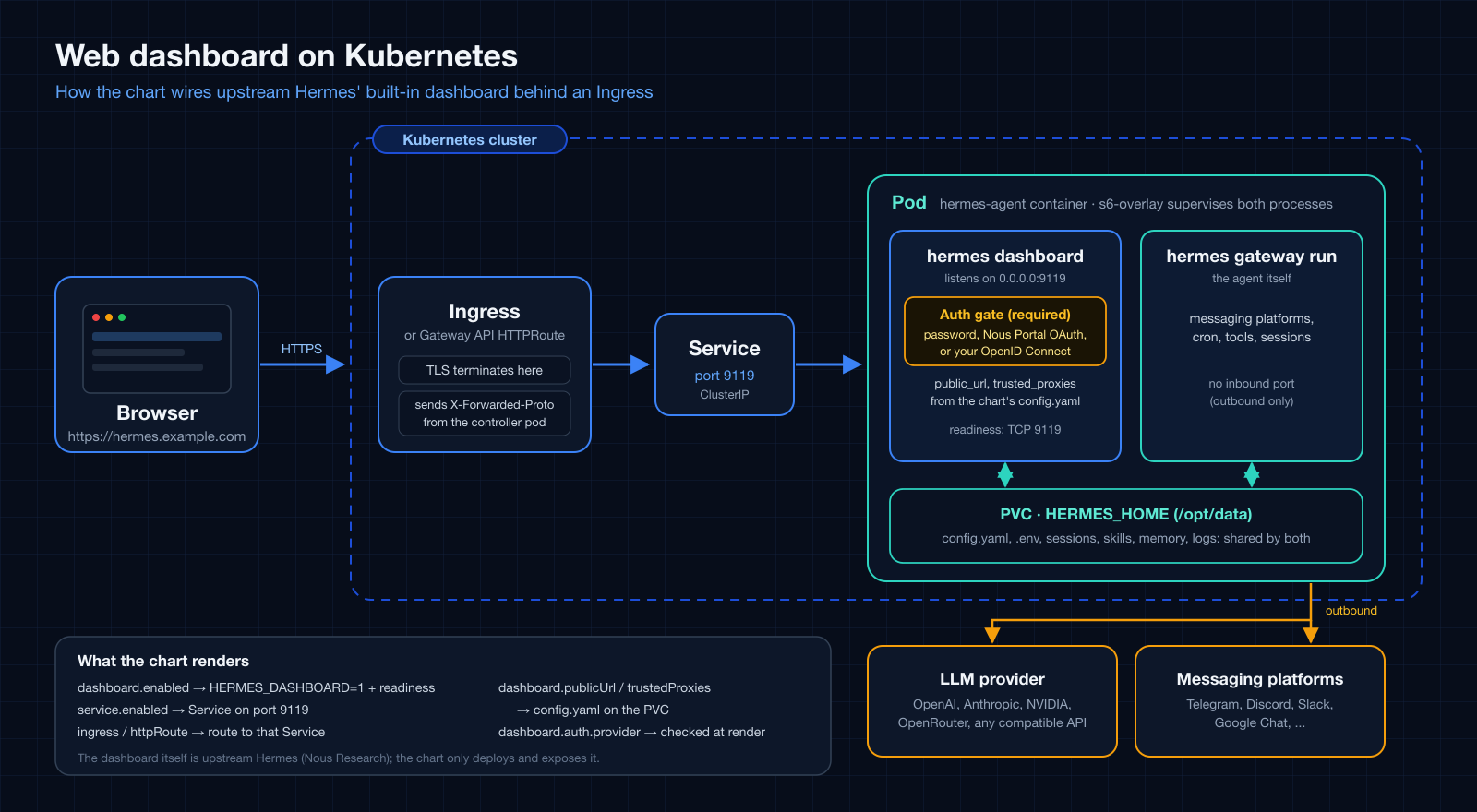
관리 대시보드(service.port, 기본값 9119)는 이미지 안의 s6 서비스이자 유일한 내장
웹 UI입니다. 로그인한 사람에게 API 키를 보여 주고, 로그인한 사용자는 shell hook 생성과
Chat 탭 사용도 할 수 있으므로 로그인을 pod 셸 접근 권한으로 여기고 아래 순서대로 진행하세요.
1. 로그인 방식을 고릅니다. non-loopback 바인드에서는 업스트림의 인증 gate가
필수라서, provider가 없으면 대시보드는 fail-closed되어 아예 리슨하지 않습니다.
--insecure와 HERMES_DASHBOARD_INSECURE는 업스트림에서 deprecated no-op입니다.
| 방식 | dashboard.auth.provider |
용도 | 예시 |
|---|---|---|---|
| 사용자 이름과 비밀번호 | basic |
신뢰된 네트워크나 VPN. 업스트림은 공개 인터넷 노출에는 권장하지 않습니다. | values-ingress.yaml |
| Nous Portal OAuth | oauth |
공개 호스트. 포털에서 Base URL을 외부 origin으로 설정합니다(/auth/callback은 포털이 붙입니다). 개인 계정 클라이언트는 로그인이 소유자로 제한됩니다. |
values-ingress-oauth.yaml |
| 자체 OpenID Connect 제공자 | oidc |
자체 identity provider를 쓰는 공개 호스트(비밀 없는 public PKCE 클라이언트). 대시보드에는 사용자 허용 목록이 없어서, 제공자가 해당 클라이언트에 토큰을 발급하는 모든 신원이 로그인할 수 있으므로 제공자에서 애플리케이션 접근을 제한하세요. | values-ingress-oidc.yaml |
자격증명을 extraEnvFrom이나 ExternalSecret으로 주입한다면 external을 쓰세요.
그렇지 않으면 provider의 키가 env나 extraEnv(OAuth와 OIDC는
config.dashboard.oauth 포함)에 없을 때 Ingress가 502/503만 내는 대신 렌더링
단계에서 실패합니다. basic에는 HERMES_DASHBOARD_BASIC_AUTH_USERNAME과
_PASSWORD(또는 _PASSWORD_HASH)가 필요합니다. OAuth 클라이언트 ID와 OIDC
issuer는 비밀이 아니므로 예시는 이를 config.dashboard.oauth 아래에 둡니다.
2. 켜고 라우팅합니다. dashboard.enabled: true(HERMES_DASHBOARD=1로
렌더링됨), service.enabled: true, 그리고 ingress나 httpRoute를 설정하세요.
dashboard.publicUrl은 config.dashboard.public_url에 반영되며, 비어 있으면 첫
번째 Ingress host에서 유도됩니다(ingress.tls가 있으면 https). HTTPRoute에서는
명시적으로 지정하세요. 값은 identity provider에 등록한 외부 origin과 같아야 합니다.
config.dashboard에 이미 지정한 값이 우선합니다.
extraEnv나 env에 HERMES_DASHBOARD=1을 직접 넣는 것보다 dashboard.enabled를
쓰세요. 이미지는 그 변수를 인식하지만 차트는 볼 수 없어서 readiness probe, 유도되는
public_url과 trusted_proxies, 인증 provider 확인, 신뢰 프록시 경고가 모두
적용되지 않습니다. 변수를 그대로 쓴다면 직접 probes.readiness(예: service.port에
대한 tcpSocket probe)를 추가하세요.
3. 신뢰 프록시를 지정합니다. TLS를 종단하는 Ingress 뒤라면 컨트롤러를
dashboard.trustedProxies에 넣으세요(config.dashboard.trusted_proxies에 반영되며
정확한 IP 또는 제한된 CIDR이고 0.0.0.0/0은 거부됩니다). 없으면 업스트림이
X-Forwarded-Proto를 무시해서 로그인은 되지만 세션 쿠키에 Secure가 붙지 않습니다.
눈에 띄지 않으므로 대시보드를 https로 제공하면서 신뢰 프록시가 없으면 릴리스
노트에 경고가 출력됩니다. 넣을 값은 대시보드가 상대 peer로 보는 주소이며 컨트롤러
종류에 따라 다릅니다.
- 일반 컨트롤러 파드: 파드 IP나 파드 CIDR.
kubectl get pods -n <컨트롤러 네임스페이스> -o wide로 확인합니다. - host-network 컨트롤러(예: MicroK8s ingress): 컨트롤러가 떠 있는 노드의 주소입니다.
Calico VXLAN 같은 overlay CNI에서는 대시보드 파드와 같은 노드의 컨트롤러에만
해당합니다. 다른 노드의 컨트롤러는 그 노드의 터널 주소로 접근하며, 이 주소는 파드
네트워크 안에 있습니다. 노드마다 컨트롤러가 하나씩 있는 MicroK8s에서 측정한 결과,
노드 네트워크만 넣으면 다른 노드를 통한 로그인은 되지만 쿠키에서
Secure가 빠졌습니다. 노드 네트워크와 파드 네트워크를 모두 넣으세요(예:10.0.4.0/24와10.1.0.0/16). 파드 네트워크는kubectl get ippools.crd.projectcalico.org(Calico)나kubectl get nodes -o jsonpath='{.items[*].spec.podCIDR}'로 확인합니다.
정확한 IP는 컨트롤러 파드가 재생성되면 더 이상 맞지 않으므로, 테스트가 아니라면 제한된 CIDR을 권합니다.
4. 나중에 바꿀 때. public_url과 trusted_proxies는 볼륨을 처음 시드할 때
config.yaml에 기록되고 bootstrap.overwrite의 기본값은 false입니다. 따라서
host나 dashboard.* 값을 바꾼 뒤의 helm upgrade는 파드에 반영되지 않으며,
낡은 public_url은 OAuth와 OIDC 콜백을 깨뜨립니다. 그 업그레이드에는
--set bootstrap.overwrite=true를 주세요. config.yaml(과 설정한 SOUL.md)이 차트가
렌더링한 내용으로 교체되므로 런타임 편집은 먼저 백업하고, 이후 false로 되돌리세요.
5. 첫 시작이 느립니다. 첫 시작은 번들 스킬이 볼륨에 동기화되는 동안 몇 분
걸릴 수 있습니다(네트워크 스토리지에서는 더 오래). 대시보드가 켜져 있는 동안
차트는 service.port에 대한 TCP readiness probe를 렌더링하므로(dashboard.readinessProbe),
대시보드가 리슨하기 전에는 파드가 NotReady이고 Ingress도 라우팅하지 않습니다.
helm --wait는 이를 기다립니다. 명시적인 probes.readiness가 우선하며 readiness는
파드를 재시작하지 않습니다.
6. 확인합니다. 세션이 없으면 GET /는 로그인 페이지로 리다이렉트되고 /api/env와
/api/config는 401입니다. 로그인 후 GET /api/auth/me가 provider를 보여 주고 세션
쿠키는 __Host-, Secure, HttpOnly입니다.
| 증상 | 가능한 원인 |
|---|---|
| 설치 직후 Ingress가 502 | 첫 시작이 진행 중이며, 대시보드가 리슨하기 전까지 파드는 NotReady입니다. |
| 대시보드가 리슨하지 않음 | 인증 provider가 없어 gate가 fail-closed 상태입니다. |
OIDC에서 /auth/login이 503 |
issuer가 틀렸습니다. 응답 본문에 원인(OIDC discovery returned 404 for ...)이 있으며, 커스텀 오류 페이지를 쓰는 프록시는 이를 가릴 수 있으니 Service에 직접 요청하세요. issuer 끝 / 차이는 허용됩니다. |
identity provider가 Unregistered redirect_uri(OIDC), 포털이 redirect_uri_mismatch(OAuth) |
외부 origin이 등록한 값과 다릅니다. host를 바꿨다면 4단계를 보세요. |
로그인은 되는데 쿠키에 Secure가 없음 |
신뢰 프록시가 없거나 주소가 틀렸거나 *.localhost host입니다(업스트림은 loopback 호스트를 개발 환경으로 봅니다). overlay CNI의 host-network 컨트롤러 뒤에서는 요청이 들어온 노드에 따라 달라질 수 있으니 파드 네트워크도 넣으세요(3단계). |
networkPolicy를 켠 뒤 Ingress가 타임아웃되고, 일부 컨트롤러에서만 그럴 수도 있음 |
정책이 인바운드를 모두 막고 컨트롤러가 허용되지 않았습니다. 7단계를 보세요. |
7. NetworkPolicy와 함께 쓸 때. networkPolicy.enabled는 인바운드를 모두 막기
때문에, 파드는 Ready인 채로(kubelet probe는 영향을 받지 않습니다) Ingress가 대시보드에
닿지 못하게 조용히 끊어 버립니다. networkPolicy.extraIngress에 9119 포트 규칙을
추가하세요. host-network 컨트롤러는 pod나 namespace 선택자로 매칭되지 않습니다.
overlay CNI(Calico VXLAN에서 측정)에서는 노드 네트워크와 파드 네트워크를 모두 허용하고
dashboard.trustedProxies에도 같은 두 CIDR을 쓰세요. 측정한 규칙과 바로 쓸 수 있는
오버레이는 values-networkpolicy-dashboard.yaml에
있습니다.
API server와 webhook 리스너¶
apiServer.enabled는 Hermes의 OpenAI 호환 API server를 시작합니다. Kubernetes
Service가 연결할 수 있도록 차트의 기본 host는 업스트림 loopback 기본값과 달리
0.0.0.0입니다. loopback 전용 server라도 API_SERVER_KEY가 필요하므로 env
또는 권장 방식인 extraEnvFrom으로 참조하는 외부 관리 Secret을 통해 설정하세요.
apiServer.corsOrigins는 명시적이고 좁은 browser origin 허용 목록에만 사용하세요.
공식 API server 가이드를
참고하세요.
webhook.enabled는 하나의 범용 webhook receiver를 시작합니다. Telegram,
Discord, Slack 등은 별도 리스너가 아니라 이 리스너 뒤의 route입니다.
WEBHOOK_SECRET 또는 route별 secret을 env나 extraEnvFrom으로 설정하세요.
공식 webhook 가이드를
참고하세요.
두 런타임 설정 모두 포트를 자동 노출하지 않습니다. 기존 dashboard만 노출하는
Service를 유지하려면 service.ports: []를 두고, API server나 webhook을 노출할
때는 필요한 Service port를 모두 명시하세요. 바로 사용할 수 있는
values-api-server-and-webhook.yaml은 API
server와 webhook 포트를 노출하고 필요한 자격증명은 외부 Secret으로 참조합니다.
A2A(Agent-to-Agent) 리스너¶
위 두 리스너와 달리 A2A는 전용 chart 값이나 env var 스위치가 없습니다 —
업스트림의 유일한 스위치는 config.yaml의 gateway.platforms.a2a 블록이라,
차트가 이미 갖고 있는 free-form config: passthrough로 직접 켭니다:
config:
  gateway:
    platforms:
      a2a:
        enabled: true
        extra:
          port: 9900
extraEnv:
  - name: A2A_HOST      # 업스트림 기본값은 127.0.0.1 - Service를 위해 넓힘
    value: "0.0.0.0"
  - name: A2A_PORT
    value: "9900"
A2A_BEARER_TOKEN(공유) 또는 A2A_PEER_TOKENS(피어별, 권장)를 env나
extraEnvFrom으로 설정하세요 — 업스트림은 이 토큰이 설정돼야만 loopback
너머로 바인딩을 넓힙니다. 공식
A2A 가이드를
참고하세요. 바로 사용할 수 있는 values-a2a.yaml은 명시적
Service port로 이 포트를 노출하고 필요한 토큰은 외부 Secret으로 참조합니다.
HTTP 라우팅: Ingress 또는 HTTPRoute¶
두 라우팅 리소스는 기본으로 꺼져 있습니다. 설치된 Ingress controller가 있으면
ingress를 사용하세요. 클러스터에 Gateway API CRD와 parentRefs로 참조할
Gateway가 이미 있으면 httpRoute를 사용하세요. 같은 host와 path에 두 리소스를
함께 켜기보다 클러스터가 운영하는 라우팅 API 하나를 선택하세요.
각 Ingress path는 service와 port를 덮어쓸 수 있습니다. Service 이름을 생략하면
이 차트의 Service를 대상으로 하므로 service.enabled: true가 필요합니다. 외부
Service 이름을 명시하면 차트 Service 없이도 됩니다. HTTPRoute도 각
backendRefs 항목에 같은 기본 규칙을 적용합니다. 암시적 chart-Service backend가
존재하지 않는 Service를 가리키면 차트가 일찍 실패합니다.
values-ingress-listeners.yaml은 /v1 API와
webhook 트래픽을 서로 다른 Ingress host와 Service port로 라우팅합니다.
values-httproute.yaml은 Gateway API 시작점입니다. 하나의
HTTPRoute에서 hostname은 모든 rule에 적용되므로, 리스너 rule을 host 단위로
분리해야 하면 별도의 HTTPRoute를 만드세요.
Pod Security Standards 하드닝¶
podSecurityContext/securityContext는 어떤 클러스터에서도 동작하도록
기본값이 비어 있지만, non-root와 read-only rootfs 둘 다 pinned 이미지 기준으로
CI 검증됐습니다: s6-overlay가 스스로 non-root uid로 내려가고, /run과 /tmp가
쓰기 가능한 실행형(execable) tmpfs이기만 하면 read-only 상태로도 정상
부팅합니다(/run엔 s6 자신의 init 바이너리가 있고, 시작할 때 그걸 exec합니다).
직접 만들지 말고 values-hardened.yaml을 쓰세요 -
Pod Security Standards restricted를 만족하는 오버레이이고,
pod-security.kubernetes.io/enforce=restricted가 설정된 namespace에 설치하면
됩니다.
init container 2개는 pod/메인 컨테이너와 별도로 자기만의 securityContext가
필요합니다: auth.deviceFlow.securityContext(기본값 비어 있음, login 이미지의
기본 유저를 그대로 씀)는 대상 uid가 토큰 저장 경로를 이미 소유하고 있으면
non-root로도 동작합니다 - values-hardened.yaml이 tokenOwner와 맞춘 오버라이드
예시를 보여줍니다. team.sharedVolume.permissions의 소유권 준비 컨테이너는
임의의 storage backend에 chown하려면 root가 필요해서 non-root 옵션이
없습니다 - restricted 아래에서는 permissions.enabled를 꺼두고, storage
backend가 fsGroup을 지원한다면 podSecurityContext.fsGroup에 맡기세요.
무인(unattended) 승인¶
Gateway 파드에는 TTY가 없습니다 - 위험한 terminal/execute_code 명령에
대한 Hermes의 인터랙티브 승인 프롬프트에 답할 사람이 없어서, 그 자리에서
실행이 멈출 수 있습니다. config.approvals 아래에서 조정하세요:
config:
  approvals:
    mode: manual        # 기본값 "manual"은 프롬프트를 띄움 - gateway엔 답할 사람이 없음
    deny:                # 이 패턴에 매칭되는 명령은 승인/yolo 로직이 보기도 전에
      - "rm -rf /"       # 무조건 거부됩니다: yolo 모드에서도 안전하게 유지
      - "curl.*\\|.*sh"
    cron_mode: deny       # 무인 cron 실행: "deny"(기본값) 또는 "approve"
    unattended_mode: deny # API 서버 / webhook 세션: "deny"(기본값) 또는 "approve"
    single_query_mode: deny  # 단발 `hermes chat -q` 실행: 같은 선택지
    discord_prompt_timeout: 120  # Discord 버튼 프롬프트 유지 시간(초)
                                 # (업스트림에서 clamp됨; 기본값 300초/5분)
cron_mode, unattended_mode, single_query_mode는 "답할 사람이 없는"
세 가지 상황을 위한 스위치입니다. 각각 cron 작업, 이 차트가 노출할 수 있는
apiServer / webhook 리스너로 들어온 세션, 단발 -q 실행을 다룹니다.
기본값은 모두 deny입니다: 그런 세션이 위험 명령 프롬프트에 걸리면 승인
타임아웃 동안 멈추는 대신 즉시 거부되고, 에이전트는 다른 경로를 찾아야
합니다. approve는 그 컨텍스트의 모든 명령을 자동 승인합니다. 상대편에
사람이 있는 메시징 플랫폼(Discord, Telegram 등)은 이 스위치의 대상이 아니며,
플랫폼별 프롬프트 타임아웃 안에서 인터랙티브 프롬프트를 받습니다.
명령 승인과는 별개로, 에이전트 자신의 지시 파일(AGENTS.md, SOUL.md,
skills, memory 저장소)에 대한 쓰기는 항상 승인을 요구하고, 사람 채널이 없으면
fail-closed되며, yolo 우회가 없습니다(업스트림
security.protected_instruction_files, 기본 켜짐). Hermes의 self-improvement
skill 쓰기는 조용히 반영되는 대신 채팅에서 프롬프트로 나타난다고 보면
됩니다.
approvals.deny는 전체 정책이 아니라 "거부 목록"입니다 - 다른 승인 모드가
무엇이든 상관없이 특정 위험 패턴을 무조건 막기 위해 존재합니다. 이것만으로
gateway가 비대화형이 되지는 않으니, 감수할 위험 수준에 맞는
HERMES_YOLO_MODE/승인 모드 설정과 함께 사용하세요(전체 내용은 보안
가이드
참고 - 승인 정책 전체를 여기서 다시 다루지는 않습니다).
환경변수¶
이 차트는 시작에 필요한 제공자 및
메신저 변수만 다룹니다 - Hermes
자체는 환경에서 훨씬 많은 변수를 읽습니다. 이들 모두 위와 같은 방식으로
설정할 수 있습니다: 시크릿은 .Values.env(Secret) 아래, 민감하지 않은 설정은
.Values.extraEnv(평문 env) 아래, 또는 외부에서 관리되는 시크릿은
extraEnvFrom을 통해(설정 모델 참고).
전체 레퍼런스(각 Hermes 릴리즈에 맞춰 최신 상태 유지): Environment Variables - Hermes Agent docs.
이미지 v2026.8.31 기준으로 자주 쓰이는 몇 가지를 더 소개합니다:
| 변수 | 용도 |
|---|---|
DEEPSEEK_API_KEY |
DeepSeek 제공자 |
ZAI_API_KEY |
Z.AI / GLM 제공자 (내장 키 zai; GLM_BASE_URL로 Global/중국/Coding Plan 엔드포인트 선택) |
MODEL_API_KEY |
Meta Model API (Muse Spark) 제공자 (내장 키 meta-ai; 별칭 META_API_KEY도 허용, META_BASE_URL로 엔드포인트 오버라이드) |
NEBIUS_API_KEY / NEBIUS_BASE_URL |
Nebius Token Factory 제공자 (내장 키 nebius-token-factory) 및 선택적 엔드포인트 오버라이드 |
RAMP_ROUTER_API_KEY / RAMP_ROUTER_BASE_URL |
Ramp Router 제공자 (내장 키 router) 및 선택적 엔드포인트 오버라이드 |
TOKENPLAN_API_KEY / TOKENPLAN_BASE_URL |
Tencent TokenPlan 제공자 (내장 키 tencent-tokenplan, Anthropic Messages 엔드포인트) 및 선택적 엔드포인트 오버라이드 |
AZURE_FOUNDRY_API_KEY |
Microsoft Foundry / Azure OpenAI 제공자 |
HERMES_WRITE_SAFE_ROOT |
write_file/patch를 이 루트 디렉터리들로 제한 (여러 개는 OS 경로 구분자로) |
SLACK_BOT_TOKEN / SLACK_APP_TOKEN |
Slack 봇 (Socket Mode) |
MATRIX_HOMESERVER / MATRIX_ACCESS_TOKEN |
Matrix 홈서버 통합 |
WHATSAPP_CLOUD_PHONE_NUMBER_ID / WHATSAPP_CLOUD_ACCESS_TOKEN |
WhatsApp Cloud API |
HERMES_DASHBOARD_BASIC_AUTH_USERNAME / HERMES_DASHBOARD_BASIC_AUTH_PASSWORD |
대시보드 auth gate용 내장 사용자명/비밀번호 제공자 (업스트림은 non-loopback 바인드에서 항상 이 gate를 켬); HERMES_DASHBOARD_PUBLIC_URL은 Ingress 뒤의 외부 origin 선언 |
HERMES_MAX_ITERATIONS |
대화당 도구 호출 반복 예산 (기본값: 500, 소진 시 마무리용 grace call 1회); 하드 캡은 config.agent.max_turns로, 업스트림 기본은 무제한이며 이 차트도 더 이상 시드하지 않음 |
HERMES_AGENT_TIMEOUT |
Gateway 비활성 타임아웃 (기본값: 1800초 / 30분) |
SESSION_IDLE_MINUTES |
유휴 세션 초기화 주기 (기본값: 1440) |
HERMES_TIMEZONE |
IANA 타임존 오버라이드 |
환경변수로 설정 불가: 컨텍스트 압축, 폴백 제공자, 제공자 라우팅은
config.yaml(.Values.config아래)에만 존재하며, 대응하는 환경변수가 없습니다.
FAQ¶
이 README에 없는 Hermes 설정을 하고 싶어요 - 어떻게 하나요?
이 README는 설치 시점의 기본 사항(제공자, 메신저, 팀 토폴로지)만 다룹니다. 그 외의 것은:
- 공식 설정 가이드
(
config.yaml키용) 또는 환경변수 레퍼런스 (환경변수용)에서 바꾸고 싶은 항목을 찾아보세요. config.yaml키(예:foo.bar: baz)를 찾았다면? values 파일의.Values.config.foo.bar에 설정하세요(또는--set-string config.foo.bar=baz). 환경변수(예:SOME_TOKEN)를 찾았다면?.Values.env.SOME_TOKEN(시크릿) 또는.Values.extraEnv(평문)에 설정하세요.helm upgrade후kubectl exec <pod> -- hermes doctor또는helm test로 확인하세요.
Hermes 자체가 이미 지원하는 설정이라면 차트 변경은 전혀 필요 없습니다 - 위의
패스스루 원칙을 참고하세요. 이 차트의 values.yaml/예제
파일들은 시작 템플릿을 가질 만한 가치가 있는 설정(새 제공자의 전체 블록,
메신저의 루프 브레이크 env var, 팀 토폴로지)에 대해서만 존재하며, Hermes
자체 레퍼런스 문서를 다시 복제한 것이 아닙니다.
업스트림 릴리즈 노트가 왜 새 values.yaml 키로 이어지지 않았나요?
"config X 추가" 형태의 업스트림 요청 대부분은 위 패스스루로 차트 변경 없이
이미 도달 가능한 것으로 판명됩니다 - 최근 사례:
#45,
#46,
#48. 새
values-*.yaml 예제 파일은 설정이 복사해서 바로 쓸 시작점을 가질 만큼
복잡할 때만(새 제공자, 새 시크릿 소스) 추가되며, 업스트림이 출시하는
개별 키마다 추가되지는 않습니다.
더 많은 예제¶
소규모/홈 클러스터(예: Raspberry Pi / arm64 k3s 클러스터)를 대상으로 한,
바로 적용 가능한 -f 오버레이입니다. 이 파일의 자격증명은 더미 플레이스홀더
또는 외부 Secret 참조입니다. 플레이스홀더는 설치 시점에 --set-string으로
덮어쓰거나(각 파일 헤더 주석의 커맨드 참고), 위의 SealedSecret +
extraEnvFrom 패턴을 사용하세요.
| 파일 | 모델 제공자 | 추가 사항 |
|---|---|---|
values-nvidia-nim-and-discord.yaml |
NVIDIA NIM | Discord 봇 연결됨 |
values-nvidia-nim-and-buzz.yaml |
NVIDIA NIM | Buzz 봇 연결됨 (Block의 Nostr 기반 사람+에이전트 플랫폼) |
values-github-copilot.yaml |
GitHub Copilot (copilot) |
OAuth device-flow 로그인 + Discord 봇 |
values-openai-codex.yaml |
OpenAI Codex (openai-codex) |
ChatGPT/Codex device 로그인 + Discord 봇 |
values-anthropic-and-discord.yaml |
Anthropic (Claude) | Discord 봇 연결됨 |
values-openai-and-telegram.yaml |
OpenAI (openai-api) |
Telegram 봇 연결됨 |
values-telegram-team-assistant.yaml |
OpenAI (openai-api) |
여러 사용자가 함께 쓰는 Telegram 봇 1개 |
values-telegram-team-leader.yaml + values-telegram-team-member.yaml |
NVIDIA NIM | Telegram 리더/멤버 팀, mention gate와 루프 방지 포함 |
examples/argocd/hermes-team-telegram.yaml |
any | ArgoCD ApplicationSet: 리더 1명, Telegram 멤버 여러 명, 릴리스별 Secret |
values-google-chat.yaml |
OpenAI (openai-api) |
Pub/Sub pull 구독으로 Google Chat 봇 연결, 서비스 계정 JSON은 extraVolumes로 마운트 |
values-openai.yaml |
OpenAI (openai-api) |
: |
values-anthropic.yaml |
Anthropic (Claude) | : |
values-gemini.yaml |
Google Gemini | : |
values-google-vertex.yaml |
Google Vertex AI (vertex) |
서비스 계정 JSON 마운트 (extraVolumes, 정적 API 키 없음) |
values-openrouter.yaml |
OpenRouter | : |
values-fireworks.yaml |
Fireworks AI | Fireworks 고유 모델 ID |
values-deepinfra.yaml |
DeepInfra | DEEPINFRA_BASE_URL로 엔드포인트 오버라이드 |
values-upstage.yaml |
Upstage Solar | UPSTAGE_BASE_URL로 엔드포인트 오버라이드 |
values-moa.yaml |
Mixture-of-Agents (moa) |
reference 모델들이 병렬로 실행되고, aggregator 모델이 결과를 종합 |
values-bitwarden.yaml |
any | Bitwarden Secrets Manager가 시작 시 제공자 키 제공 |
values-litellm.yaml |
LiteLLM 프록시 (원격/Ingress) | : |
values-litellm-k8s.yaml |
LiteLLM 프록시 (클러스터 내 Service DNS) | : |
values-ingress.yaml |
OpenAI (openai-api) |
대시보드 Ingress 연결됨 (대시보드 활성화, 업스트림 비밀번호 gate, trusted proxy) |
values-ingress-oauth.yaml |
OpenAI (openai-api) |
Nous Portal OAuth를 쓰는 대시보드 Ingress, 인터넷에 공개하는 대시보드에 업스트림이 권장하는 로그인 방식 |
values-ingress-oidc.yaml |
OpenAI (openai-api) |
자체 OpenID Connect 제공자를 쓰는 대시보드 Ingress (public PKCE 클라이언트, Nous Portal 불필요) |
values-api-server-and-webhook.yaml |
OpenAI (openai-api) |
API server + webhook: 명시적 Service port와 외부 listener secret |
values-a2a.yaml |
OpenAI (openai-api) |
A2A (Agent-to-Agent): config.yaml passthrough + 명시적 Service port로 다른 A2A 에이전트가 발견·구동 가능 |
values-ingress-listeners.yaml |
OpenAI (openai-api) |
Ingress 리스너 라우팅: /v1 API와 webhook host가 별도 Service port 사용 |
values-httproute.yaml |
OpenAI (openai-api) |
Gateway API HTTPRoute: 사전에 만든 Gateway를 통한 리스너 라우팅 |
values-networkpolicy-litellm.yaml |
LiteLLM proxy (in-cluster) | Egress 제한 NetworkPolicy: RFC1918과 클라우드 metadata endpoint 차단, LiteLLM Service만 정확히 허용 |
values-networkpolicy-dashboard.yaml |
OpenAI (openai-api) |
NetworkPolicy를 켠 대시보드 Ingress: 9119 포트 인바운드 규칙과 그에 맞는 trusted proxy, Calico VXLAN의 host-network 컨트롤러에서 측정 |
values-hardened.yaml |
OpenAI (openai-api) |
Pod Security Standards restricted: non-root, read-only rootfs, capability 전부 drop - restricted를 강제하는 namespace에서 CI 검증됨 |
values-soul.yaml |
any | 영속 정체성: 실용적인 엔지니어링 말투, 런타임 편집 보존 |
values-multi-agent-collab.yaml |
any | 협업 페어: 공유 Discord 채널에서 @mention으로 핸드오프하는 두 에이전트 |
values-team-leader.yaml + values-team-member.yaml |
NVIDIA NIM (무엇이든 가능) | 리더 주도 팀: 직렬 명시적 봇 @mention과 리더 쓰기/멤버 읽기 전용 RWX 지식 PVC; 파일 기반 과제 핸드오프는 사용하지 않음; Teams 참고 |
values-shared-knowledge.yaml |
Anthropic (Claude) | 공유 RWX PVC: 동일한 지식 베이스에 읽기/쓰기하는 다수의 에이전트 |
순수 helm/-f 대신 ArgoCD로 배포하시나요? examples/argocd/를
참고하세요 - 위 예제마다 하나의 Application 매니페스트와 그에 맞는
extraEnvFrom 기반 시크릿 패턴이 준비되어 있습니다.
Values¶
| Key | Type | Description | Default |
|---|---|---|---|
| affinity | object | Affinity rules for Pod scheduling. | {} |
| apiServer | object | ------------------------------------------------------------------------- | {"corsOrigins":"","enabled":false,"host":"0.0.0.0","port":8642} |
| apiServer.corsOrigins | string | Comma-separated browser origins allowed to call the API directly. Empty disables browser CORS access. | "" |
| apiServer.enabled | bool | Enable Hermes' OpenAI-compatible HTTP API server. | false |
| apiServer.host | string | Bind address. Upstream defaults to 127.0.0.1; a Kubernetes Service needs a non-loopback address. API_SERVER_KEY is still required on loopback. | "0.0.0.0" |
| apiServer.port | int | API server port. | 8642 |
| args | list | Arguments passed through the image entrypoint. gateway run selects the non-interactive outbound messaging service instead of the default TUI. |
["gateway","run"] |
| auth | object | ------------------------------------------------------------------------- | {"deviceFlow":{"enabled":false,"forceRelogin":false,"image":{"repository":"python","tag":"3.13-slim"},"notify":"discord","provider":"github-copilot","providers":{"github-copilot":{"authHost":"github.com","clientId":"Ov23li8tweQw6odWQebz","flow":"github","scope":"read:user","tokenEnv":"COPILOT_GITHUB_TOKEN","validateUrl":"https://api.github.com/copilot_internal/v2/token"},"openai-codex":{"flow":"openai-codex","issuer":"https://auth.openai.com"}},"resources":{},"securityContext":{},"timeoutSeconds":870,"tokenOwner":{"gid":10000,"uid":10000}}} |
| auth.deviceFlow.enabled | bool | Bootstrap a provider credential via the OAuth device flow at startup. When false, the agent uses the static key from env/extraEnvFrom. |
false |
| auth.deviceFlow.forceRelogin | bool | Force a fresh login even if a token already exists on the volume. | false |
| auth.deviceFlow.image | object | Login image for GitHub-style profiles. OpenAI Codex uses the pinned Hermes image so auth.json persistence and refresh stay version-aligned. | {"repository":"python","tag":"3.13-slim"} |
| auth.deviceFlow.notify | string | Where to deliver the verification URL + user code for human approval. discord reuses the agent's bot creds (DISCORD_BOT_TOKEN + DISCORD_HOME_CHANNEL from env/extraEnvFrom). The code is always also printed to the init container logs as a fallback. |
"discord" |
| auth.deviceFlow.provider | string | Which provider profile to authenticate. Must be a key under providers below. Only one device-flow login runs at a time. |
"github-copilot" |
| auth.deviceFlow.providers.github-copilot.authHost | string | Host serving the device-code + token endpoints (GitHub-style paths). | "github.com" |
| auth.deviceFlow.providers.github-copilot.clientId | string | OAuth client id for the device grant. The shared opencode/Copilot-CLI client that Hermes upstream itself uses (hermes_cli/copilot_auth.py). | "Ov23li8tweQw6odWQebz" |
| auth.deviceFlow.providers.github-copilot.flow | string | Login protocol handler. | "github" |
| auth.deviceFlow.providers.github-copilot.scope | string | OAuth scope requested in the device grant. | "read:user" |
| auth.deviceFlow.providers.github-copilot.tokenEnv | string | .env key Hermes reads this provider's token from (resolution order COPILOT_GITHUB_TOKEN > GH_TOKEN > GITHUB_TOKEN). | "COPILOT_GITHUB_TOKEN" |
| auth.deviceFlow.providers.github-copilot.validateUrl | string | Optional endpoint to verify an existing token is still live; on 401/403 the init container re-runs the login. Empty = skip the check. | "https://api.github.com/copilot_internal/v2/token" |
| auth.deviceFlow.providers.openai-codex.flow | string | Use the OpenAI Codex device-code flow bundled with the pinned Hermes version and persist refreshable credentials in auth.json. | "openai-codex" |
| auth.deviceFlow.providers.openai-codex.issuer | string | OpenAI account issuer. Override only for a compatible test server. | "https://auth.openai.com" |
| auth.deviceFlow.resources | object | Resources for the login init container. | {} |
| auth.deviceFlow.securityContext | object | securityContext for the device-login init container. Empty by default - inherits the image's own user (root for the Python image, the pinned Hermes image otherwise). Overriding to a non-root uid only works if that uid can already write the token's destination path; see values-hardened.yaml for a verified non-root override (uid/gid matching tokenOwner, so the chown above becomes a same-uid no-op). | {} |
| auth.deviceFlow.timeoutSeconds | int | Seconds to wait for the human to authorize before the init container fails (and retries). Keep below the provider's device-code validity. | 870 |
| auth.deviceFlow.tokenOwner | object | uid/gid that should own the written token file. By default this init container inherits the login image's own user (root for the Python image below) so it can write to any storage class reliably, then chowns the token to this owner. Set it to the Hermes runtime uid; the upstream image's s6-overlay runs the agent as uid/gid 10000: so the non-root agent can read the credential. | {"gid":10000,"uid":10000} |
| bootstrap.enabled | bool | Seed chart-managed files into HERMES_HOME via an init container. | true |
| bootstrap.overwrite | bool | false: seed config.yaml and configured SOUL.md only if absent, preserving runtime edits across upgrades. Set true to replace both files with chart content on every deploy. | false |
| command | list | Container command override. Empty keeps the Hermes image entrypoint, which starts the s6-supervised outbound messaging gateway and prepares volume ownership before dropping privileges. Set only for explicit debugging. | [] |
| config | object | ------------------------------------------------------------------------- | {"agent":{"gateway_timeout":1800},"model":{"default":"gpt-4o-mini","provider":"openai-api"},"providers":{},"terminal":{"backend":"local"}} |
| controller | object | ------------------------------------------------------------------------- | {"type":"deployment"} |
| controller.type | string | Workload kind: "deployment" or "statefulset". | "deployment" |
| deploymentAnnotations | object | Annotations to add to the Deployment or StatefulSet object. | {} |
| env | object | ------------------------------------------------------------------------- | {"OPENAI_API_KEY":"sk-REPLACE_ME"} |
| externalSecret | object | ------------------------------------------------------------------------- | {"data":[],"dataFrom":[],"enabled":false,"refreshInterval":"1h","secretStoreRef":{"kind":"ClusterSecretStore","name":""},"target":{"creationPolicy":"Owner","deletionPolicy":"Retain","name":""}} |
| externalSecret.data | list | Individual remoteRef -> key mappings. See the External Secrets Operator docs for the full field set. | [] |
| externalSecret.dataFrom | list | Bulk provider-native secret imports. See the External Secrets Operator docs for the full field set. | [] |
| externalSecret.enabled | bool | Render an ExternalSecret instead of the chart's own env Secret. Requires the External Secrets Operator CRDs to already be installed in-cluster. | false |
| externalSecret.refreshInterval | string | How often ESO resyncs the target Secret from the provider. | "1h" |
| externalSecret.secretStoreRef | object | Which SecretStore/ClusterSecretStore to pull from. name is required when enabled. |
{"kind":"ClusterSecretStore","name":""} |
| externalSecret.target.name | string | Target Secret name. Empty defaults to the chart's own env Secret name (<fullname>-env); when set, every chart-owned envFrom reference uses this name instead. |
"" |
| extraContainers | list | Extra sidecar containers appended to the Pod's main containers: list. Distinct from extraInitContainers (init phase only). Full container spec; giving a sidecar its own resources and a PSS-compatible securityContext is the operator's responsibility. |
[] |
| extraEnv | list | Plain (non-secret) env vars injected directly on the container. | [] |
| extraEnvFrom | list | Extra envFrom sources (reference existing ConfigMaps/Secrets). | [] |
| extraInitContainers | list | Extra init containers, appended after the chart's own (seed-config, device-flow login). Full container spec; combine with extraVolumes for one-time preparation of a user-provided volume (for example, a shared knowledge volume used independently of the Discord team handoff). |
[] |
| extraResources | list | Extra raw manifests rendered as-is alongside this chart's resources. Each entry is tpl-rendered, so {{ .Release.Namespace }} etc. work, and may be either an object or a multiline string (see examples/argocd/). Useful for things this chart doesn't model directly, e.g. a SealedSecret that a sealed-secrets controller decrypts into a Secret referenced via extraEnvFrom (see examples/argocd/). |
[] |
| extraVolumeMounts | list | Extra volume mounts on the hermes-agent container (pairs with extraVolumes). | [] |
| extraVolumes | list | Extra volumes on the pod, for anything the agent needs as a FILE rather than an env var: e.g. a Secret holding a service-account JSON (see values-google-vertex.yaml). | [] |
| fullnameOverride | string | Fully override the generated resource name (release-name-chart). | "" |
| httpRoute.enabled | bool | Create a Gateway API HTTPRoute. The cluster must already provide the Gateway API CRD and a Gateway selected by parentRefs. |
false |
| httpRoute.hostnames | list | HTTP hostnames accepted by this route. | [] |
| httpRoute.parentRefs | list | Gateway API parent references. | [] |
| httpRoute.rules | list | HTTPRoute rules. An empty backendRef name targets this chart's Service. | [] |
| image.pullPolicy | string | Image pull policy. | "IfNotPresent" |
| image.repository | string | Container image repository (multi-arch: amd64 + arm64). | "nousresearch/hermes-agent" |
| image.tag | string | Image tag. Upstream uses DATE-based tags (e.g. "v2026.6.5" == Hermes v0.16.0), plus latest / main. There is no semver tag. Empty defaults to .Chart.AppVersion. |
"" |
| imagePullSecrets | list | Image pull secrets for private registries. | [] |
| ingress.annotations | object | Annotations to add to the Ingress (e.g. auth, cert-manager, rewrite rules). | {} |
| ingress.className | string | IngressClass name (e.g. "nginx", "traefik"). Empty uses the cluster default. | "" |
| ingress.enabled | bool | Create an Ingress resource. | false |
| ingress.hosts | list | Host/path rules. Each path defaults to this chart's Service and the legacy dashboard port; override service and port per listener. |
[{"host":"hermes-agent.example.com","paths":[{"path":"/","pathType":"Prefix"}]}] |
| ingress.tls | list | TLS configuration for the Ingress. | [] |
| nameOverride | string | Override the chart name used in resource names. | "" |
| networkPolicy | object | ------------------------------------------------------------------------- | {"allowDns":true,"blockPrivateEgress":true,"dns":{"namespaceSelector":{"matchLabels":{"kubernetes.io/metadata.name":"kube-system"}},"podSelector":{"matchLabels":{"k8s-app":"kube-dns"}}},"enabled":false,"extraEgress":[],"extraIngress":[]} |
| networkPolicy.allowDns | bool | Permit DNS lookups to kube-dns/CoreDNS. Required for the agent to resolve any provider/messaging endpoint. | true |
| networkPolicy.blockPrivateEgress | bool | Block RFC1918 ranges and the cloud metadata endpoint (both IPv4 169.254.0.0/16 and its IPv6 equivalent within fd00::/8) while still permitting public internet egress. Set false when the agent must reach an in-cluster proxy such as LiteLLM - see values-networkpolicy-litellm.yaml for a precise allowlist instead. | true |
| networkPolicy.dns.namespaceSelector | object | Kubernetes' immutable namespace-name label keeps this peer limited to kube-system. Override both selectors for a distribution whose DNS runs elsewhere. | {"matchLabels":{"kubernetes.io/metadata.name":"kube-system"}} |
| networkPolicy.enabled | bool | Create a NetworkPolicy isolating both directions. Ingress is denied entirely by default - not an oversight: hermes gateway run is outbound-only, so nothing needs to reach this Pod unless a listener (dashboard, apiServer, webhook, a2a, ...) is exposed. Use extraIngress in that case. |
false |
| networkPolicy.extraEgress | list | Additional raw NetworkPolicy egress rules, appended as-is. | [] |
| networkPolicy.extraIngress | list | Additional raw NetworkPolicy ingress rules, appended as-is. Required before enabling networkPolicy alongside any exposed listener. | [] |
| nodeSelector | object | Node selector for Pod scheduling. | {} |
| persistence | object | ------------------------------------------------------------------------- | {"accessModes":["ReadWriteOnce"],"enabled":true,"existingClaim":"","mountPath":"/opt/data","size":"5Gi","storageClass":""} |
| persistence.existingClaim | string | Use an existing PVC instead of creating a new one. When specified, the chart will use this PVC and skip creating its own. | "" |
| persistence.storageClass | string | StorageClass for the volumeClaimTemplate. Empty = cluster default. | "" |
| podAnnotations | object | Annotations to add to the Pod. | {} |
| podLabels | object | Labels to add to the Pod. | {} |
| podSecurityContext | object | Pod-level securityContext. Left empty by default to stay compatible with the image's s6-overlay init (which starts as root and drops privileges itself). Non-root and read-only rootfs are both CI-verified to work; see values-hardened.yaml for a Pod Security Standards restricted-compliant overlay rather than hand-rolling this. |
{} |
| probes | object | Health probes. Empty = none. The image's s6-overlay already supervises and auto-restarts the gateway in-container, so k8s probes are optional. Provide a full probe spec to enable, e.g. an exec check: liveness: exec: { command: ["hermes","gateway","status"] } initialDelaySeconds: 30 periodSeconds: 30 | {"liveness":{},"readiness":{},"startup":{}} |
| probes.liveness | object | Liveness probe spec. Empty = no liveness probe. | {} |
| probes.readiness | object | Readiness probe spec. Empty = no readiness probe. | {} |
| probes.startup | object | Startup probe spec. Empty = no startup probe. Use this when first start takes longer than the liveness probe allows. | {} |
| replicaCount | int | Set to 0 to prepare GitOps resources (Secret, ConfigMap, PVC, ...) without starting an agent Pod, then scale to 1 after credentials and optional device login are ready. The gateway and device-login init container do not run while paused. Hermes Agent is a single-writer workload bound to one HERMES_HOME (ReadWriteOnce PVC), so values above 1 are unsupported: Deployment replicas contend for the same volume and StatefulSet replicas are disconnected agent identities. | 1 |
| resources | object | Container resource requests/limits. Lightweight defaults aimed at small clusters (incl. Raspberry Pi / arm64). | {"limits":{"cpu":"2","memory":"2Gi"},"requests":{"cpu":"100m","memory":"256Mi"}} |
| runtimeClassName | string | RuntimeClass for the Pod. Set to a sandboxed runtime (gVisor: "gvisor", Kata: "kata-containers") to add a kernel isolation boundary around the agent's shell execution. Empty by default: the cluster's default runtime. | "" |
| securityContext | object | Container-level securityContext. Same caveat as podSecurityContext above. |
{} |
| service.annotations | object | Annotations to add to the Service. | {} |
| service.enabled | bool | Create a ClusterIP Service for explicitly selected listeners. | false |
| service.port | int | Legacy dashboard Service port. Used only while service.ports is empty, preserving the existing dashboard-only Service behaviour. |
9119 |
| service.ports | list | Explicit Service ports. A non-empty list replaces the legacy dashboard port entirely. Enabling apiServer or webhook does not add a Service port automatically. | [] |
| service.type | string | Service type. | "ClusterIP" |
| serviceAccount.annotations | object | Annotations to add to the ServiceAccount. | {} |
| serviceAccount.automountServiceAccountToken | bool | Mount the ServiceAccount token into the Pod. The agent does not call the Kubernetes API, so this chart turns it off. Behaviour change on upgrade: without this field, Kubernetes applies its own default of true. Set to true if something inside the Pod deliberately calls the API (e.g. kubectl-style tooling in an extraContainer). | false |
| serviceAccount.create | bool | Create a ServiceAccount for the pod. | true |
| serviceAccount.name | string | Name to use; generated from fullname when empty. | "" |
| soul | object | Contents of SOUL.md, seeded into HERMES_HOME alongside config.yaml. It defines the agent's persistent identity. Empty means the chart seeds nothing, so Hermes writes its own starter file on first run. | {"text":""} |
| team | object | ------------------------------------------------------------------------- | {"enabled":false,"identity":"","leader":{"mentionEnv":"","name":"","username":""},"members":[],"name":"","platform":"discord","protocol":{"maxHandoffs":6},"role":"member","sharedVolume":{"accessModes":["ReadWriteMany"],"claimName":"","create":false,"enabled":true,"mountPath":"/opt/data/team-knowledge","permissions":{"enabled":false,"gid":10000,"image":"busybox:1.38","securityContext":{"runAsGroup":0,"runAsUser":0},"uid":10000},"retain":true,"size":"10Gi","storageClass":""},"skill":{"configMapName":"","create":false,"enabled":true,"extraInstructions":"","name":""}} |
| team.enabled | bool | Enable the chart-native leader/member team protocol, roster skill, and shared knowledge volume mount for this release. | false |
| team.identity | string | This release's identity. For a leader it must equal leader.name; for a member it must match one entry under members. |
"" |
| team.leader.mentionEnv | string | Environment variable containing the leader's Discord user ID. Supply it through a Secret/SealedSecret; the ID is expanded by Hermes at runtime. | "" |
| team.leader.name | string | Leader identity shared by every release in the team. | "" |
| team.leader.username | string | Telegram only: the leader bot's @username, without the @. |
"" |
| team.members | list | Configured members. ApplicationSet users define this once in the common template so every generated release receives the same complete roster. | [] |
| team.name | string | Stable team identifier used in the generated skill and default names. | "" |
| team.platform | string | Chat platform the team coordinates on: discord or telegram. It picks the mention format and the gates team mode enforces (see the chart README, "Agent team"). Every release in one team must use the same platform. |
"discord" |
| team.protocol.maxHandoffs | int | Maximum serial leader-to-member handoffs before escalating to a human. | 6 |
| team.role | string | This release's team role. | "member" |
| team.sharedVolume.accessModes | list | RWX access modes used only when create=true. |
["ReadWriteMany"] |
| team.sharedVolume.claimName | string | Shared PVC name. Empty defaults to <team.name>-knowledge. |
"" |
| team.sharedVolume.create | bool | Create the shared PVC from this release. Set true on exactly one leader release; all members set false and reference the same claimName. |
false |
| team.sharedVolume.enabled | bool | Mount a required RWX knowledge volume when team mode is enabled. | true |
| team.sharedVolume.mountPath | string | Mount path for durable accepted team knowledge. | "/opt/data/team-knowledge" |
| team.sharedVolume.permissions.enabled | bool | On the leader, chown the shared volume before Hermes starts. Enable only when the storage backend permits ownership changes. This init container needs root (see securityContext below), so it is incompatible with Pod Security Standards restricted - set false and rely on podSecurityContext.fsGroup instead when the storage backend honours it. See values-hardened.yaml. |
false |
| team.sharedVolume.permissions.image | string | Init image used for shared-volume ownership preparation. | "busybox:1.38" |
| team.sharedVolume.permissions.securityContext | object | securityContext for the chown init container. Defaults to root - chown across arbitrary storage backends needs it. Not overridable to non-root; disable permissions.enabled instead under restricted. Setting this to {} does NOT restore an image-default user the way auth.deviceFlow.securityContext: {} does - it renders an explicit empty securityContext, which inherits podSecurityContext's fields (e.g. a hardened profile's non-root runAsUser), silently breaking the chown this container exists to perform. Disable permissions.enabled instead of clearing this value. |
{"runAsGroup":0,"runAsUser":0} |
| team.sharedVolume.permissions.uid | int | Runtime owner for the shared knowledge directory. | 10000 |
| team.sharedVolume.retain | bool | Keep a chart-created shared claim when the owning release is removed. | true |
| team.sharedVolume.size | string | Requested shared storage size used only when create=true. |
"10Gi" |
| team.sharedVolume.storageClass | string | StorageClass used only when create=true; empty uses cluster default. |
"" |
| team.skill.configMapName | string | Shared ConfigMap name. Empty defaults to <team.name>-skill. |
"" |
| team.skill.create | bool | Create the shared skill ConfigMap from this release. Set true on exactly one leader release; every member references the same ConfigMap. | false |
| team.skill.enabled | bool | Mount the shared team roster and protocol as a read-only skill. | true |
| team.skill.extraInstructions | string | Optional deployment-specific policy appended to the generated skill. Used only by the release with skill.create=true. |
"" |
| team.skill.name | string | Skill name. Empty defaults to <team.name>-roster. |
"" |
| terminationGracePeriodSeconds | string | Pod termination grace period in seconds. Empty = Kubernetes default (30s). The gateway (image v2026.7.1+) defaults agent.restart_drain_timeout to 0: on stop it interrupts in-flight runs immediately, persists the transcript, and exits fast: the default grace period is plenty. If you opt into a drain window via config.agent.restart_drain_timeout: <seconds>, raise this WELL ABOVE that value or the kubelet SIGKILLs the gateway mid-drain (stale lock + crash loop: the same race upstream warns about with systemd's TimeoutStopSec). See "Gateway lifecycle" in the README. |
"" |
| tests | object | ------------------------------------------------------------------------- | {"chat":{"enabled":false,"failOnError":false,"maxTurns":1,"models":[],"prompt":"Just say hi.","timeout":180},"doctorStrict":false,"doctorTimeout":120,"enabled":true,"image":{"pullPolicy":"","repository":"","tag":""},"resources":{"limits":{"cpu":"1","memory":"512Mi"},"requests":{"cpu":"100m","memory":"128Mi"}}} |
| tests.chat | object | ------------------------------------------------------------------------- | {"enabled":false,"failOnError":false,"maxTurns":1,"models":[],"prompt":"Just say hi.","timeout":180} |
| tests.chat.enabled | bool | Run a hermes chat round-trip and log the conversation. |
false |
| tests.chat.failOnError | bool | When true, a failed/empty round-trip fails the test job. | false |
| tests.chat.maxTurns | int | Max agent turns for the round-trip. | 1 |
| tests.chat.models | list | Optional pool of provider/model ids to try in order (via hermes chat -m <id> --provider config.model.provider), each with its own timeout. Passes as soon as one succeeds: useful for free-tier models that are sometimes overloaded. Leave empty to use config.model.default as-is (single attempt, no -m/--provider override). |
[] |
| tests.chat.prompt | string | Prompt sent to the agent. | "Just say hi." |
| tests.chat.timeout | int | Seconds to allow each round-trip attempt to run before timing out. | 180 |
| tests.doctorStrict | bool | When true, hermes doctor issues fail the test. When false, doctor runs for visibility but only hard checks (hermes --version, seeded config) fail. |
false |
| tests.doctorTimeout | int | Seconds to allow hermes doctor to run before timing out. |
120 |
| tests.enabled | bool | Render the chart test Job. | true |
| tests.image | object | Image used by the test Job. Empty fields fall back to the main image.* (so the hermes CLI + doctor are available and arch matches). |
{"pullPolicy":"","repository":"","tag":""} |
| tests.resources | object | Resource requests/limits for the test Job's container. | {"limits":{"cpu":"1","memory":"512Mi"},"requests":{"cpu":"100m","memory":"128Mi"}} |
| tolerations | list | Tolerations for Pod scheduling. | [] |
| webhook.enabled | bool | Enable Hermes' generic inbound webhook receiver. Telegram, Discord, Slack, and other sources are routes behind this single listener. | false |
| webhook.port | int | Webhook receiver port. | 8644 |
Autogenerated from chart metadata using helm-docs v1.14.2