hermes-agent-helm/hermes-agent¶
👩🏻💻 Hermes Agent on Kubernetes - sign in with Codex/Copilot, run agent teams, stay lightweight.
Run Hermes Agent - a multi-provider LLM agent framework - on Kubernetes. Configure any provider Hermes supports (OpenAI, Anthropic, Gemini, OpenRouter, NVIDIA, or any OpenAI-compatible proxy such as LiteLLM/vLLM) entirely via values.yaml, with a built-in helm test health check.





Found this useful? Please give it a ⭐ on GitHub - it helps others find it.
TL;DR¶
# OCI (recommended)
helm upgrade --install hermes-agent \
  oci://ghcr.io/jyje/hermes-agent-helm/hermes-agent --version 1.18.0 \
  --namespace hermes-agent --create-namespace \
  --set-string env.OPENAI_API_KEY='sk-...' --wait
# Helm Repository
helm repo add hermes-agent https://jyje.github.io/hermes-agent-helm
helm repo update
helm upgrade --install hermes-agent hermes-agent/hermes-agent \
  --namespace hermes-agent --create-namespace \
  --set-string env.OPENAI_API_KEY='sk-...' --wait
- Web dashboard: chat with your agent in the browser, browse sessions, and manage models, skills and settings behind a password, Nous Portal OAuth, or your own OpenID Connect sign-in: Expose the dashboard.
- ArgoCD: ready-to-apply
Applicationmanifests, one per provider/messenger combo:examples/argocd/. - GitOps without committing real secrets: SealedSecret +
extraEnvFromwalkthrough:examples/argocd/§ SealedSecret. - Agent team: run multiple instances that hand off by
@mentionover a shared Discord channel:examples/argocd/hermes-collab-pair.yaml, see Teams + Collaboration guide.
Configure your provider¶
Set config.model.provider to a built-in key, supply its key under env:
| Provider | config.model.provider |
Key env var | Example |
|---|---|---|---|
| OpenAI | openai-api |
OPENAI_API_KEY |
values-openai.yaml |
| Anthropic (Claude) | anthropic |
ANTHROPIC_API_KEY |
values-anthropic.yaml |
| Google Gemini | gemini |
GOOGLE_API_KEY |
values-gemini.yaml |
| Google Vertex AI | vertex |
none: OAuth2 tokens auto-minted from a mounted service-account JSON (or ADC) | values-google-vertex.yaml |
| OpenRouter | openrouter |
OPENROUTER_API_KEY |
values-openrouter.yaml |
| NVIDIA NIM | nvidia |
NVIDIA_API_KEY |
values-nvidia-nim-and-discord.yaml |
| Fireworks AI | fireworks |
FIREWORKS_API_KEY |
values-fireworks.yaml |
| DeepInfra | deepinfra |
DEEPINFRA_API_KEY |
values-deepinfra.yaml |
| Upstage Solar | upstage |
UPSTAGE_API_KEY |
values-upstage.yaml |
| GitHub Copilot | copilot |
COPILOT_GITHUB_TOKEN (OAuth device-flow: no API key needed) |
values-github-copilot.yaml |
| OpenAI Codex | openai-codex |
ChatGPT/Codex device login (no API key) | values-openai-codex.yaml |
| Mixture-of-Agents (MoA) | moa |
depends on the reference/aggregator models in the preset | values-moa.yaml |
| Custom (LiteLLM / vLLM / LM Studio) | your own id, under config.providers |
depends on proxy | values-litellm.yaml |
Nous free tier (nous/welcome) |
nous |
none: anonymous identity minted at boot via HERMES_GUEST_ONBOARDING=1 |
values-nous.yaml |
openai(no suffix) is not a valid provider key - it aliases to OpenRouter. Useopenai-api.
Full provider walkthrough (--set examples per provider) and messenger
(Discord/Telegram) setup: see Provider & messenger setup
below.
Test¶
helm test hermes-agent -n hermes-agent
kubectl logs -n hermes-agent -l app.kubernetes.io/component=test --tail=-1
Runs a hermes doctor-style health check Job after install. To also verify a
real provider round-trip, see Advanced testing below.
Overview¶
Run Hermes Agent on Kubernetes. It deploys:
- a Deployment (default) or StatefulSet (
controller.type), single replica with persistentHERMES_HOME, running the image's s6-supervised gateway - a ConfigMap holding the partial
config.yamland optionalSOUL.md - a Secret holding the
.env(injected viaenvFrom) - for
controller.type=statefulset: a headless Service for DNS/governance (no inbound port - the gateway is outbound); fordeployment: a standalone PVC instead. Either way, an optional ClusterIP Service for explicitly selected dashboard, API server, or webhook listener ports, and an optional Ingress or Gateway API HTTPRoute (ingress.enabledorhttpRoute.enabled) - a Helm test Job (
helm test) that runs ahermes doctorstyle check
The agent's command execution uses the local backend (commands run inside
the pod; the pod is the sandbox). The docker backend is intentionally not
supported in-cluster - it requires a Docker daemon/socket, absent on
containerd clusters (MicroK8s / Raspberry Pi) and a security risk to mount.
Image tags are date-based (e.g.
v2026.6.5== Hermes v0.16.0); the image is multi-arch (amd64 + arm64), so it runs on Raspberry Pi clusters.Scaling note. Hermes is a single-instance personal agent, so this chart pins
replicaCount: 1and there is no multi-replica mode (see thereplicaCountnote in the values table). To grow, scale up (moreresources, largerpersistence.size) - and when one agent isn't enough, run several instances and group them into a team that shares one gateway channel. See Hermes teams.
Provider & messenger setup¶
Installing from a local chart checkout (e.g. to try an unreleased change):
helm upgrade --install hermes-agent ./charts/hermes-agent \
  --namespace hermes-agent --create-namespace \
  --set-string env.OPENAI_API_KEY='sk-...' --wait
The chart ships a placeholder OPENAI_API_KEY; override it (and config.model)
for your provider at install/upgrade time, or supply a values file.
Tip: using a release name equal to the chart name (
hermes-agent) keeps resource names clean (hermes-agent-0) instead of doubling the prefix (hermes-agent-hermes-agent-0). Or setfullnameOverride.
Install options: LLM provider¶
This is the main thing you configure at install time - which LLM backend Hermes talks to. (For chat platforms, see Messenger integrations below.)
- Built-in provider: set
config.model.providerto one of Hermes' built-in keys (openai-api,anthropic,gemini,openrouter,nvidia,deepseek,lmstudio, …) andconfig.model.defaultto a model id for that provider. Supply the matching key underenv(OPENAI_API_KEY,ANTHROPIC_API_KEY,GOOGLE_API_KEY,NVIDIA_API_KEY, …).
# OpenAI
helm upgrade --install hermes-agent ./charts/hermes-agent -n hermes-agent --create-namespace \
  --set-string config.model.provider=openai-api \
  --set-string config.model.default=gpt-4o-mini \
  --set-string env.OPENAI_API_KEY='sk-...' --wait

# Gemini
helm upgrade --install hermes-agent ./charts/hermes-agent -n hermes-agent --create-namespace \
  --set-string config.model.provider=gemini \
  --set-string config.model.default=gemini-2.5-flash \
  --set-string env.GOOGLE_API_KEY='<your-key>' \
  --set-string env.OPENAI_API_KEY=unused --wait

# NVIDIA NIM (this is the provider CI exercises end-to-end)
helm upgrade --install hermes-agent ./charts/hermes-agent -n hermes-agent --create-namespace \
  --set-string config.model.provider=nvidia \
  --set-string config.model.default=nvidia/nemotron-3-nano-omni-30b-a3b-reasoning \
  --set-string env.NVIDIA_API_KEY='nvapi-...' \
  --set-string env.OPENAI_API_KEY=unused --wait
- Custom OpenAI-compatible provider (LiteLLM, vLLM, LM Studio, …): register
it under
config.providers.<id>(base_url,key_env) and pointconfig.model.providerat that<id>. Seevalues-litellm.yaml(remote proxy) orvalues-litellm-k8s.yaml(in-cluster) in "More examples".
Messenger integrations (Telegram / Discord)¶
hermes gateway run (the workload's command) connects whatever chat platforms
it finds credentials for - so wiring a messenger is just a matter of
supplying its bot token. The token is sensitive, so put it under .Values.env
(rendered into the Secret); the non-secret knobs (allowed users, home channel)
can go under .Values.extraEnv (plain env). Setting the token is enough to
auto-enable the platform - no config.yaml change required.
Verification status: the chart renders the right Secret/env and the agent picks the platform up. On trusted CI runs where the
DISCORD_BOT_TOKENandDISCORD_HOME_CHANNELsecrets are configured, CI does a full live round-trip -hermes sendto that channel, then reads the channel back via the Discord API to confirm the message arrived - and fails if it can't be verified (the bot needs View Channel + Read Message History). Fork PRs skip it since secrets aren't exposed. Telegram is still placeholder-only. Provide a real bot token to try either in your own cluster.
- Discord: create a bot at the Discord Developer Portal, enable the Message Content Intent, and invite it to your server.
helm upgrade --install hermes-agent ./charts/hermes-agent -n hermes-agent --create-namespace \
  --set-string config.model.provider=nvidia \
  --set-string config.model.default=nvidia/nemotron-3-nano-omni-30b-a3b-reasoning \
  --set-string env.NVIDIA_API_KEY='nvapi-...' \
  --set-string env.OPENAI_API_KEY=unused \
  --set-string env.DISCORD_BOT_TOKEN='<bot-token>' --wait
Optional non-secret knobs (via extraEnv, or --set):
| env var | meaning |
|---|---|
DISCORD_ALLOWED_USERS |
comma-separated user IDs allowed to talk to the bot |
DISCORD_ALLOW_ALL_USERS |
true to allow anyone (dev only) |
DISCORD_HOME_CHANNEL |
channel ID for cron / notification delivery |
DISCORD_HOME_CHANNEL_NAME |
display name for that home channel |
-
Telegram: create a bot via @BotFather and set
env.TELEGRAM_BOT_TOKEN(optionallyTELEGRAM_HOME_CHANNEL,TELEGRAM_ALLOWED_USERSviaextraEnv). -
Slack: set
env.SLACK_BOT_TOKENandenv.SLACK_APP_TOKENfor Socket Mode. To suppress link and media previews in messages sent by the native Slack adapter, add this partialconfig.yamloverride:
config:
  platforms:
    slack:
      extra:
        unfurl_links: false
        unfurl_media: false
For Slack messages sent through the relay adapter, use the relay namespace instead:
config:
  platforms:
    relay:
      extra:
        slack:
          unfurl_links: false
          unfurl_media: false
Omit either key to preserve Slack's default unfurling behavior. These settings affect outbound Slack messages only.
See values-anthropic-and-discord.yaml / values-openai-and-telegram.yaml in
"More examples" for copy-pasteable messenger blocks.
Login via device flow (GitHub Copilot and OpenAI Codex)¶
Set auth.deviceFlow.enabled=true to add an auth-device-login init
container. It sends the verification URL + one-time code to the Discord or
Telegram home channel (or logs), waits for human approval, and persists the resulting
credential on the HERMES_HOME volume.
github-copilotperforms GitHub's OAuth 2.0 device grant and writesCOPILOT_GITHUB_TOKENto.env.openai-codexfollows the device-code flow from the Hermes version pinned by this chart and uses Hermes' native helper to atomically updateauth.json, including the refresh-token chain. It authenticates a ChatGPT/Codex account; it is distinct from API-key-basedopenai-api.
helm upgrade --install hermes-agent ./charts/hermes-agent -n hermes-agent --create-namespace \
  -f charts/hermes-agent/values-openai-codex.yaml \
  --set-string env.DISCORD_BOT_TOKEN='<bot-token>' --wait
# then approve the prompt posted to Discord (or read it from the logs):
kubectl logs deploy/hermes-agent -n hermes-agent -c auth-device-login -f
Notes:
- Requires
persistence.enabled=true: without a volume the token is lost on restart and you would re-approve every time. notifyisdiscord(reusesDISCORD_BOT_TOKEN+DISCORD_HOME_CHANNEL),telegram(reusesTELEGRAM_BOT_TOKEN+TELEGRAM_HOME_CHANNEL), orlogs(verification prompt printed to the init container logs only). Withtelegramthe message is sent withsendMessageonly, so it does not conflict with the agent polling the same bot. In a multi-release team, setTELEGRAM_HOME_CHANNELon every release that runs a device login. Each prompt names the release (the team identity, or the release name outside team mode), so parallel logins can be told apart.- Ready message: "login complete" only means the credential is stored. A
first start can still take minutes (skill sync, model warm-up), and Hermes
announces a restart but not a fresh start. Set
readyNotify.enabled=trueto post one line to the same Discord or Telegram home channel when the gateway is up (readyNotify.notifypicks the channel, or followsauth.deviceFlow.notifywhen the device flow is on). The chart seeds agateway:startuphook intoHERMES_HOME/hooks/ready-notifythat reuses the bot credentials already inenv/extraEnvFrom. On a live first start the message arrived together with Hermes' ownGateway runninglog line, a few seconds before the first turn was warm. - The init container runs as root so it can write to any storage class, then
chowns the token file to
auth.deviceFlow.tokenOwner(default uid/gid10000- the upstream image's runtime user) so the non-root agent can read it. - Profile selection: choose
github-copilotoropenai-codexwithauth.deviceFlow.provider. The Copilot client id is the same shared client Hermes upstream uses. OpenAI protocol constants and persistence come from the pinned Hermes image rather than chart-owned credentials.
Agent team¶
Hermes is a single-instance personal agent - it does not scale out. Instead,
run several well-managed instances and group them into a team that shares one
Discord channel as the context bus. Each agent gets its own bot token, pod,
private HERMES_HOME PVC, and identity. Task coordination is shared only through
the Discord channel; team-specific knowledge volumes are mounted separately.
How agents hand off by @mention¶
Point every instance at the same DISCORD_HOME_CHANNEL (with a different
DISCORD_BOT_TOKEN each). Agents hand the conversation to each other by placing
an explicit <@BOT_USER_ID> in the body of a Discord message - not as a
reply reference. Four env vars make the handoff reliable and prevent infinite
bot-to-bot ping-pong:
| Env var | Recommended value | Why |
|---|---|---|
DISCORD_ALLOW_BOTS |
mentions |
Respond to another bot only when it @mentions us. |
DISCORD_THREAD_REQUIRE_MENTION |
true |
In shared threads, fire only on explicit mention. |
DISCORD_REPLY_TO_MODE |
off |
Don't attach a reply-reference: it auto-pings the partner and restarts the loop. |
DISCORD_ALLOW_MENTION_REPLIED_USER |
false |
Never treat an auto reply-ping as a real mention. |
Set these under env / extraEnv (not under config - they are read directly
by the Discord adapter via os.getenv).
Also set config.group_sessions_per_user: false and keep
config.discord.history_backfill: true. Hermes otherwise isolates the human
and each bot sender into different sessions inside the same visible thread.
Backfill supplies visible messages that arrived while a bot was not mentioned.
Quick start: two agents, one channel¶
helm upgrade --install hermes-planner ./charts/hermes-agent \
  --namespace hermes-team --create-namespace \
  -f charts/hermes-agent/values-multi-agent-collab.yaml \
  --set-string env.DISCORD_BOT_TOKEN='<planner-bot-token>' --wait

helm upgrade --install hermes-builder ./charts/hermes-agent \
  --namespace hermes-team \
  -f charts/hermes-agent/values-multi-agent-collab.yaml \
  --set-string env.DISCORD_BOT_TOKEN='<builder-bot-token>' --wait
For a declarative roster (3+ agents, GitOps), use an ArgoCD ApplicationSet;
adding a teammate becomes a one-line diff. See
examples/argocd/hermes-collab-pair.yaml
and the full guide in Teams + Collaboration.
For a leader plus several members, use
values-team-leader.yaml and
values-team-member.yaml. That reference protocol
serializes one explicit bot mention at a time and keeps every task, result, and
review in the Discord thread. Team mode mounts one shared roster/protocol skill
ConfigMap in every Pod. The leader release creates that ConfigMap and the RWX
knowledge PVC exactly once; members reference both by name and mount them
read-only. The PVC carries durable shared knowledge, but never tasks, status,
or result handoffs. In the ApplicationSet example, the roster and shared policy
are declared once while each list item supplies only identity, role, and its
private Secret name.
The file and memory toolsets remain available for each agent's own work;
only cross-agent handoffs through files, memory, hooks, or background work are
prohibited.
For Telegram teams, set team.platform: telegram, use the per-role Telegram
values files, and follow the Telegram teams guide.
It covers the one-bot shared assistant pattern, BotFather setup, per-release
Secrets, mention routing, loop safeguards, and the ArgoCD ApplicationSet.
Telegram team examples are render-checked in CI. A live run on a real Telegram
group completed a full leader, member, leader handoff on two models
(nemotron-3-ultra-550b and gpt-6-luna); the evidence is in the comments on
#311. The leader model
matters: a 30B model answered by itself instead of delegating. Another human
account being blocked, the loop guard threshold, and several consecutive
handoffs were not tested.
Example: a Telegram team where every bot signs in to OpenAI Codex. Each
release logs in on its own, so no external credential proxy or shared token is
involved. Put the three bot tokens in Secrets (tg-august, tg-may, tg-march,
each with a TELEGRAM_BOT_TOKEN key), then layer one overlay on the per-role
values files:
# codex-overlay.yaml
config:
  model:
    provider: openai-codex
    default: gpt-6-luna            # gpt-6-luna-900k for the larger window
auth:
  deviceFlow:
    enabled: true
    provider: openai-codex
    notify: telegram               # each code arrives in the team group
readyNotify:
  enabled: true                    # one "ready" line per bot when it is up
# Install all three at once. Each bot posts its own code to the group,
# for example "OpenAI Codex login required for may".
for r in august may march; do
  role=member; [ "$r" = august ] && role=leader
  helm upgrade --install "hermes-$r" ./charts/hermes-agent \
    --namespace hermes-team --create-namespace \
    -f "charts/hermes-agent/values-telegram-team-$role.yaml" -f codex-overlay.yaml \
    --set-string "fullnameOverride=hermes-$r" --set-string "team.identity=$r" \
    --set-json "extraEnvFrom=[{\"secretRef\":{\"name\":\"tg-$r\"}}]" &
done; wait
Approve the three codes at https://auth.openai.com/codex/device. Do not message
the team yet: after "login complete" a first start still takes a few minutes (it
took about seven in a live run), and a message sent in that window is lost. Wait
for each bot's "is ready" line, then mention the leader.
- Set
TELEGRAM_HOME_CHANNELon every release, as the member values file does: the login and ready messages go there. - Three logins on one ChatGPT account refreshed fine in a live check, but upstream says a second login of the same account revokes the older one. Prefer one account per bot for a team, and see OpenAI Codex for what was and was not checked.
- Each bot's first reply in the group may include Hermes' one-time
"caps context at 272K" notice. Set
compression.codex_gpt55_autoraise_notice:
  false
to silence it.
Upstream currently documents Hermes bot-to-bot Discord conversation as an unsupported topology with no built-in circuit breaker. The example is experimental: use a dedicated trusted channel, keep a manual stop path, and require a live proof with your pinned image before relying on it.
The reference sequence completed live on kind with v2026.7.20; see the
timestamped team evidence.
Alternative: one pod, many profiles. If what you actually need is routing different Discord guilds/channels/threads to different agent profiles from a single bot token - rather than several bots sharing one channel - use gateway profile multiplexing. Upstream turns it on by default (
gateway.multiplex_profilesdefaults totrue, andtrueis the only valid value; the oldfalseis retired), so no chart setting is needed. That's one pod instead of one-per-teammate; it solves a different problem than the hand-off pattern above (routing, not collaboration), so pick based on which shape your use case actually needs.
Advanced testing¶
The helm test Job (hook helm.sh/hook: test) runs hermes
--version, verifies the seeded config.yaml, checks docker availability
(informational, since the backend is local), and runs hermes doctor.
Disable it with --set tests.enabled=false; make doctor failures fatal with
--set tests.doctorStrict=true.
Verifying a provider end-to-end (tests.chat.enabled)¶
tests.chat.enabled=true adds a 5th check: a real hermes chat round-trip
using the same config/env the release was installed with (the test Job
mounts the same ConfigMap and Secret as the main workload - no separate
provider key needed), with the full conversation (prompt + response) printed
to the test Job's logs. Since helm test doesn't take --set, flip the flag
with helm upgrade --reuse-values and then run the test:
helm upgrade hermes-agent ./charts/hermes-agent -n hermes-agent \
  --reuse-values --set tests.chat.enabled=true --wait

helm test hermes-agent -n hermes-agent
kubectl logs -n hermes-agent -l app.kubernetes.io/component=test --tail=-1
Sample output (NVIDIA NIM, prompt tests.chat.prompt default "Just say hi."):
[5/5] hermes chat round-trip
--- prompt ---
Just say hi.
--- model: (config default) (timeout 180s) ---
Query: Just say hi.
Initializing agent...
────────────────────────────────────────

╭─ ⚕ Hermes ───────────────────────────────────────────────────────────────────╮
    Hi.
╰──────────────────────────────────────────────────────────────────────────────╯

--- end response ---
By default a failed/empty round-trip is non-fatal (logged only); set
tests.chat.failOnError=true to make it fail the test job (this is what CI
does when an NVIDIA_API_KEY secret is available).
For free-tier providers where a single model can be flaky/overloaded, set
tests.chat.models to a list of provider/model ids - the test Job tries
each in order via hermes chat -m <id> --provider <config.model.provider>
(its own tests.chat.timeout per attempt) and passes as soon as one succeeds.
This is what CI does (a small pool of free NVIDIA NIM models).
Configuration model¶
Hermes reads $HERMES_HOME/config.yaml and secrets from the environment as
partial overrides on top of its version-specific built-in defaults
(precedence: CLI > config.yaml > .env > built-in defaults). This chart
follows that model - you only set what you want to change, and never reproduce
the full upstream config (which would drift across Hermes versions).
The passthrough principle.
.Values.configis rendered intoconfig.yamlas-is - every level allows arbitrary additional keys (seevalues.schema.json). That means any key documented in Hermes' own Configuration guide or Environment Variables reference is already settable today - underconfig.<path>orenv/extraEnv- with no chart change required. This README only curates the handful of settings most people touch at install time (provider, messenger, team topology); it is deliberately not a mirror of the upstream docs. See FAQ below for the lookup recipe.
config.yaml: set only override keys under.Values.config. It is rendered into a ConfigMap and seeded intoHERMES_HOME(the persistent volume) by an init container, because Hermes also writes to its home at runtime (skills,auth.json, self-improvement).bootstrap.overwrite=false(default) seeds only when absent, preserving runtime edits; settrueto replace the file with chart content on every deploy. After seeding, the init container runs Hermes' non-interactive config migration. It backs upconfig.yamland.envbefore changes and restores them if migration fails. An unversioned config is migrated as a fresh partial config. An explicitly versioned config below the upstream support floor (currently v12) is left untouched; follow the recovery steps below.SOUL.mdidentity: set.Values.soul.textto seed a persistent agent identity intoHERMES_HOME/SOUL.md. Leave it empty to let Hermes create its own starter file on first run. Its seed decision is independent fromconfig.yaml: withbootstrap.overwrite=false, an existing identity is preserved; withtrue, the chart replaces it on every deploy. Do not put secrets in this ConfigMap-backed value. See the upstream SOUL.md guide for identity content and scope.- Secrets / API keys: set under
.Values.env. Rendered into a Secret and injected viaenvFromas environment variables (env wins overconfig.yaml).
Recovering a config older than the migration floor¶
Hermes deliberately refuses to auto-migrate a config that explicitly declares
an unsupported schema version. Back up HERMES_HOME/config.yaml before
editing it. Review the upstream migration history first; if the file's keys
are compatible with the supported floor, set _config_version: 12 at its root
and restart the workload. Hermes then runs the supported migrations and keeps
a pre-migration backup under HERMES_HOME/backups/config/. Otherwise use
hermes setup to generate a current config, then restore the settings you need
from the backup. With bootstrap.overwrite=false, the chart preserves the
existing file by default so you can perform this recovery. With
bootstrap.overwrite=true, the chart replaces it with the values-rendered
config before migration.
Secret provisioning strategies¶
Pick one per deployment - they compose (e.g. SealedSecret for the provider key, Bitwarden for everything else):
| Strategy | When to use | Where |
|---|---|---|
Plain .Values.env |
Local/dev, or a values file you never commit with real values | this README's provider examples |
SealedSecret + extraEnvFrom |
GitOps: encrypt real secrets so they're safe to commit | examples/argocd/ |
| Bitwarden Secrets Manager | Centralize N provider keys behind one rotating bootstrap token | values-bitwarden.yaml |
| 1Password | Not yet covered by this chart: its secret source needs the op CLI present in the image/PATH at startup, which is more than a values example can add on its own. Track or pick up new work upstream-side first. |
: |
For GitOps, avoid committing real keys in env - instead deploy a
SealedSecret (or similar) via extraResources and reference the Secret it
produces with extraEnvFrom (applied after the chart's own Secret, so it
wins). See examples/argocd/ for a complete
SealedSecret + extraEnvFrom GitOps example.
Bitwarden Secrets Manager resolves provider keys at startup from
config.secrets.bitwarden. Keep only its BWS_ACCESS_TOKEN bootstrap
credential in an externally managed Kubernetes Secret referenced through
extraEnvFrom; see values-bitwarden.yaml. The
first startup downloads the checksum-verified bws CLI into HERMES_HOME,
so the pod needs egress to Bitwarden and GitHub Releases.
- Dashboard routing: see Expose the dashboard.
Expose the dashboard¶
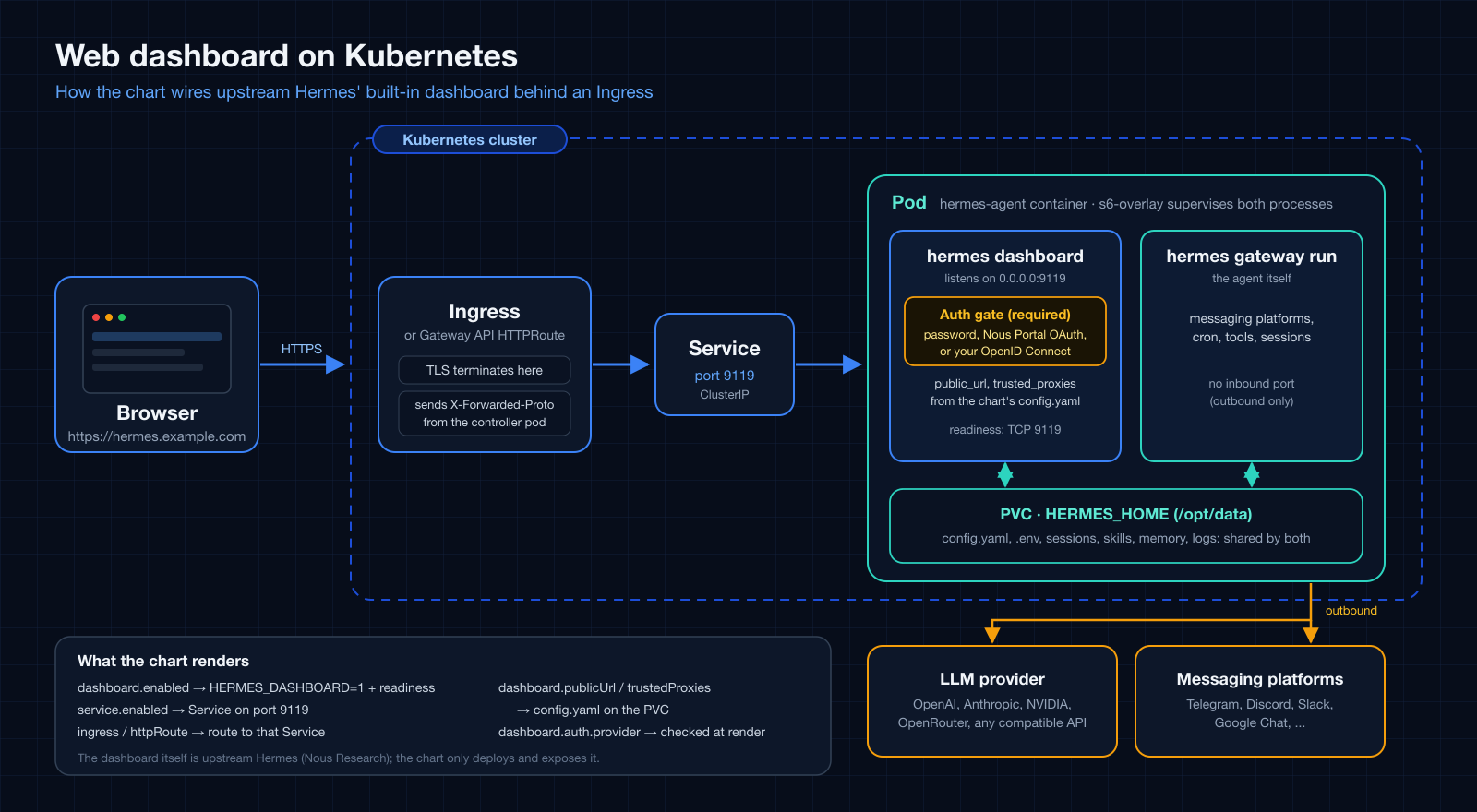
The management dashboard (service.port, default 9119) is an s6 service inside
the image and the only built-in web UI. It shows API keys to whoever is signed
in, and a signed-in user can also create shell hooks and use the Chat tab, so
treat sign-in as shell access to the pod and work through these steps in order.
1. Choose a sign-in method. On a non-loopback bind upstream's auth gate is
mandatory: without a provider the dashboard fails closed and never listens.
--insecure and HERMES_DASHBOARD_INSECURE are deprecated no-ops upstream.
| Method | dashboard.auth.provider |
Use it for | Example |
|---|---|---|---|
| Username and password | basic |
A trusted network or a VPN. Upstream does not recommend it for public internet exposure. | values-ingress.yaml |
| Nous Portal OAuth | oauth |
A public host. In the portal set Base URL to the external origin (it appends /auth/callback). A personal-account client limits sign-in to its owner. |
values-ingress-oauth.yaml |
| Your own OpenID Connect provider | oidc |
A public host with your own identity provider (a public PKCE client, no secret). The dashboard has no user allowlist: every identity the provider issues a token to for the client can sign in, so restrict the application at the provider. | values-ingress-oidc.yaml |
Use external when the credentials come from extraEnvFrom or an
ExternalSecret. Otherwise the template fails at render time when the provider's
keys are missing from env or extraEnv (for OAuth and OIDC, from
config.dashboard.oauth as well), instead of leaving an Ingress that answers
502/503. basic needs HERMES_DASHBOARD_BASIC_AUTH_USERNAME plus _PASSWORD
or _PASSWORD_HASH. The OAuth client id and the OIDC issuer are not secrets, so
the examples keep them under config.dashboard.oauth.
2. Turn it on and route it. Set dashboard.enabled: true (it renders
HERMES_DASHBOARD=1), service.enabled: true, and an ingress or httpRoute.
dashboard.publicUrl feeds config.dashboard.public_url. When empty it is
derived from the first Ingress host (https once ingress.tls is set); set it
explicitly for an HTTPRoute. It must equal the external origin registered with
the identity provider. A value already set under config.dashboard wins.
Prefer dashboard.enabled over putting HERMES_DASHBOARD=1 in extraEnv or
env. The image honors the bare variable, but the chart cannot see it, so the
readiness probe, the derived public_url and trusted_proxies, the
auth-provider check, and the trusted-proxy warning are all skipped. If you keep
the variable, add your own probes.readiness, for example a tcpSocket probe on
service.port.
3. Set a trusted proxy. Behind a TLS-terminating Ingress, list the
controller in dashboard.trustedProxies (it feeds
config.dashboard.trusted_proxies; an exact IP or a bounded CIDR, and
0.0.0.0/0 is rejected). Without it upstream ignores X-Forwarded-Proto,
sign-in still works, and the session cookies are not marked Secure. The gap is
silent, so the release notes print a warning when the dashboard is served over
https without one. List the address the dashboard sees as its peer, which
depends on the controller:
- A regular controller pod: its pod IP or the pod CIDR. Look it up with
kubectl get pods -n <controller namespace> -o wide. - A host-network controller (for example the MicroK8s ingress): the address of
the node it runs on. On an overlay CNI such as Calico VXLAN this only holds
for a controller on the same node as the dashboard pod; a controller on
another node reaches it from that node's tunnel address, which lies inside the
pod network. Measured on MicroK8s with one controller per node: with only the
node network listed, sign-in through the other nodes worked but the cookies
lost
Secure. List both the node network and the pod network (for example10.0.4.0/24and10.1.0.0/16). Find the pod network withkubectl get ippools.crd.projectcalico.org(Calico) orkubectl get nodes -o jsonpath='{.items[*].spec.podCIDR}'.
An exact IP stops matching when the controller pod is recreated; prefer a bounded CIDR outside of tests.
4. Changing it later. public_url and trusted_proxies are written into
config.yaml when the volume is first seeded, and bootstrap.overwrite
defaults to false. A later helm upgrade that changes the host or any
dashboard.* value therefore does not reach the pod, and a stale
public_url breaks the OAuth and OIDC callback. For that upgrade pass
--set bootstrap.overwrite=true, which replaces config.yaml (and a configured
SOUL.md) with the chart-rendered content, so back up runtime edits first, then
go back to false.
5. Expect a slow first start. The first start can take minutes while bundled
skills sync onto the volume (longer on network storage). While the dashboard is
enabled the chart renders a TCP readiness probe on service.port
(dashboard.readinessProbe), so the pod stays NotReady, and the Ingress does not
route to it, until the dashboard listens. helm --wait waits for that. An
explicit probes.readiness wins, and readiness never restarts the pod.
6. Check it. Without a session GET / redirects to the sign-in page and
/api/env and /api/config return 401. After signing in, GET /api/auth/me
reports the provider and the session cookies are __Host-, Secure and
HttpOnly.
| Symptom | Likely cause |
|---|---|
| The Ingress answers 502 right after install | The first start is still running; the pod is NotReady until the dashboard listens. |
| The dashboard never listens | No auth provider is configured, so the gate fails closed. |
OIDC: /auth/login answers 503 |
The issuer is wrong. The response body names the reason (OIDC discovery returned 404 for ...); a proxy with custom error pages can hide it, so query the Service directly. A trailing-slash difference in the issuer is tolerated. |
The identity provider says Unregistered redirect_uri (OIDC) or the portal says redirect_uri_mismatch (OAuth) |
The external origin differs from what is registered. If you changed the host, see step 4. |
Sign-in works but the cookies are not Secure |
No trusted proxy, a wrong address, or a *.localhost host (upstream treats loopback hosts as a development setup). Behind a host-network controller on an overlay CNI it can depend on which node the request enters: list the pod network as well (step 3). |
After enabling networkPolicy the Ingress times out, possibly only through some controllers |
The policy denies all inbound traffic and the controller is not allowed. See step 7. |
7. With a NetworkPolicy. networkPolicy.enabled denies all inbound traffic,
so it silently cuts the Ingress off from the dashboard while the pod stays Ready
(the kubelet probe is not affected). Add a rule for port 9119 to
networkPolicy.extraIngress. A host-network controller is not matched by a pod or
namespace selector. On an overlay CNI (Calico VXLAN measured) allow both the node
network and the pod network, and use the same two CIDRs in
dashboard.trustedProxies. The measured rules and a ready overlay are in
values-networkpolicy-dashboard.yaml.
API server and webhook listeners¶
apiServer.enabled starts Hermes' OpenAI-compatible API server. Its default
chart host is 0.0.0.0 so a Kubernetes Service can reach it, unlike the
upstream loopback default. Set API_SERVER_KEY through env or, preferably,
an externally managed Secret referenced by extraEnvFrom: it is required even
for a loopback-only server. Use apiServer.corsOrigins only for an explicit,
narrow browser-origin allowlist. See the upstream API server
guide.
webhook.enabled starts the one generic webhook receiver. Telegram, Discord,
Slack, and other integrations are routes behind that listener, not separate
listeners. Set WEBHOOK_SECRET or a per-route secret through env or
extraEnvFrom; see the upstream webhook
guide.
Neither runtime setting exposes a port by itself. Keep service.ports: [] for
the legacy dashboard-only Service, or specify every Service port explicitly.
The copy-ready values-api-server-and-webhook.yaml
overlay exposes API server and webhook ports and references an external Secret
for the required credentials.
A2A (Agent-to-Agent) listener¶
Unlike the two listeners above, A2A has no dedicated chart values or env var
switch - upstream's only on-switch is the gateway.platforms.a2a block in
config.yaml, so enable it directly through the chart's existing free-form
config: passthrough:
config:
  gateway:
    platforms:
      a2a:
        enabled: true
        extra:
          port: 9900
extraEnv:
  - name: A2A_HOST      # upstream defaults to 127.0.0.1; widen for a Service
    value: "0.0.0.0"
  - name: A2A_PORT
    value: "9900"
Set A2A_BEARER_TOKEN (shared) or A2A_PEER_TOKENS (per-peer, preferred)
through env or extraEnvFrom: upstream only widens the bind past loopback
once one is configured. See the upstream A2A
guide.
The copy-ready values-a2a.yaml overlay exposes the port
through an explicit Service and references an external Secret for the
required token.
HTTP routing: Ingress or HTTPRoute¶
Both routing resources are off by default. Use ingress for an installed
Ingress controller. Use httpRoute when the cluster already provides the
Gateway API CRD and a Gateway to reference through parentRefs. Pick the
routing API your cluster operates rather than enabling both for the same host
and path.
Each Ingress path can override service and port. An omitted Service name
targets this chart's Service, so it requires service.enabled: true; explicitly
named external Services are allowed without the chart Service. HTTPRoute uses
the same defaulting rule for each backendRefs entry. The chart fails early if
an implicit chart-Service backend would point at no Service.
values-ingress-listeners.yaml routes /v1
and webhook traffic through distinct Ingress hosts and Service ports.
values-httproute.yaml is the equivalent Gateway API
starting point. HTTPRoute hostnames apply to all rules in one resource; create
separate HTTPRoutes when host-level isolation between listener rules is needed.
Pod Security Standards hardening¶
podSecurityContext/securityContext are empty by default so the chart stays
compatible with any cluster, but non-root and a read-only rootfs are both
CI-verified to work against the pinned image: its s6-overlay drops to a
non-root uid on its own, and boots fine read-only once /run and /tmp are
writable+executable tmpfs mounts (/run holds s6's own init binary, which it
execs at startup). Use
values-hardened.yaml rather than hand-rolling this -
it's a Pod Security Standards restricted-compliant overlay, install it into
a namespace with pod-security.kubernetes.io/enforce=restricted set.
Two init containers need their own securityContext, not just the pod/main
container's: auth.deviceFlow.securityContext (empty by default, inherits
the login image's own user) works non-root once its target uid already owns
the token's destination - values-hardened.yaml shows the override, matching
tokenOwner. team.sharedVolume.permissions's ownership-preparation
container needs root to chown across arbitrary storage backends and has no
non-root option - disable permissions.enabled under restricted and rely on
podSecurityContext.fsGroup instead, when the storage backend honours it.
Gateway lifecycle: rollouts, shutdown, and drain¶
As of image v2026.7.1 the gateway defaults agent.restart_drain_timeout to
0: on pod stop (rollout, node drain, kubectl delete pod) it interrupts
any in-flight agent run immediately, persists the conversation transcript, and
exits fast. Rollouts are quick by default, and the Kubernetes default
30-second termination grace period is plenty.
To opt into a graceful drain window instead (wait for running agent turns before interrupting), set both halves - the drain in Hermes config and the grace period on the pod:
config:
  agent:
    restart_drain_timeout: 60    # seconds to wait for in-flight runs
terminationGracePeriodSeconds: 90 # keep WELL ABOVE the drain timeout
If the grace period is not comfortably above the drain timeout, the kubelet
SIGKILLs the gateway mid-drain - upstream documents this exact race (against
systemd's TimeoutStopSec) as leaving a stale lock that crash-loops the
gateway, which is why its default moved to 0. A drain window also cannot
"save" an unbounded agent turn; treat it as a courtesy, not a guarantee.
Scale-to-zero is not applicable in-cluster. Upstream
v2026.7.1also added scale-to-zero idle detection (dormant-quiesce), but it is exclusive to Nous' managed relay deployment: it is enabled by a platform-stampedHERMES_SCALE_TO_ZEROenv (not a user config key), arms only when messaging is relay-only with a registered wake URL, and relies on the hosting platform suspending the VM. With this chart's direct Discord/Telegram/Slack connections it never arms, and Kubernetes would keep the pod Running regardless - so the chart deliberately does not expose it.
Unattended approvals¶
The gateway pod has no TTY - Hermes' interactive approval prompt (for
dangerous terminal/execute_code commands) has no human to answer it there,
so a run can stall waiting on one. Tune this under config.approvals:
config:
  approvals:
    mode: manual        # "manual" (default) prompts; the gateway has nobody to answer
    deny:                # commands matching these patterns are refused BEFORE
      - "rm -rf /"       # any approval/yolo logic even sees them: safe to keep
      - "curl.*\\|.*sh"  # even in yolo mode
    cron_mode: deny       # unattended cron runs: "deny" (default) or "approve"
    unattended_mode: deny # API server / webhook sessions: "deny" (default) or "approve"
    single_query_mode: deny  # one-shot `hermes chat -q` runs: same choice
    discord_prompt_timeout: 120  # seconds a Discord button prompt stays live
                                 # (clamped upstream; default 300s / 5 min)
cron_mode, unattended_mode and single_query_mode are the three
"nobody can answer" switches. They cover, respectively, cron jobs, sessions
that arrive through the apiServer / webhook listeners this chart can
expose, and one-shot -q runs. Each defaults to deny: when such a session
hits a dangerous-command prompt, the command is refused immediately instead
of blocking for the approval timeout, and the agent has to find another
path. approve auto-approves everything in that context. Messaging
platforms with a human on the other end (Discord, Telegram, ...) are not
covered by these switches: they get the interactive prompt, bounded by the
platform's prompt timeout.
Separately from command approvals, writes to the agent's own instruction
files (AGENTS.md, SOUL.md, skills, memory stores) always ask for approval
and fail closed when no human channel exists, with no yolo bypass
(upstream security.protected_instruction_files, on by default). Expect
Hermes' self-improvement skill writes to prompt in chat rather than land
silently.
approvals.deny is a allowlist-of-refusals, not a full policy - it exists to
hard-block specific dangerous patterns regardless of any other approval mode
you run with. It does not, by itself, make the gateway non-interactive; pair
it with whatever HERMES_YOLO_MODE / approval-mode setting fits your risk
tolerance (see the Security guide
for the full picture - approvals policy is deliberately not duplicated here).
Environment variables¶
This chart only walks through the provider
and messenger variables needed to
get started - Hermes itself reads many more from its environment. Any of them
can be set the same way as the ones above: secrets under .Values.env
(Secret), non-secret knobs under .Values.extraEnv (plain env), or via
extraEnvFrom for externally-managed secrets (see
Configuration model).
Full reference (kept current with each Hermes release): Environment Variables - Hermes Agent docs.
A few more commonly-used ones, current as of image v2026.9.24:
| Variable | Purpose |
|---|---|
DEEPSEEK_API_KEY |
DeepSeek provider |
ZAI_API_KEY |
Z.AI / GLM provider (built-in key zai; GLM_BASE_URL picks the Global/China/Coding-Plan endpoint) |
MODEL_API_KEY |
Meta Model API (Muse Spark) provider (built-in key meta-ai; META_API_KEY is accepted as an alias, META_BASE_URL overrides the endpoint) |
NEBIUS_API_KEY / NEBIUS_BASE_URL |
Nebius Token Factory provider (built-in key nebius-token-factory) and optional endpoint override |
RAMP_ROUTER_API_KEY / RAMP_ROUTER_BASE_URL |
Ramp Router provider (built-in key router) and optional endpoint override |
TOKENPLAN_API_KEY / TOKENPLAN_BASE_URL |
Tencent TokenPlan provider (built-in key tencent-tokenplan, Anthropic Messages endpoint) and optional endpoint override |
AZURE_FOUNDRY_API_KEY |
Microsoft Foundry / Azure OpenAI provider |
HERMES_WRITE_SAFE_ROOT |
Restrict write_file/patch to these root dirs (OS path separator for multiple) |
SLACK_BOT_TOKEN / SLACK_APP_TOKEN |
Slack bot (Socket Mode) |
MATRIX_HOMESERVER / MATRIX_ACCESS_TOKEN |
Matrix homeserver integration |
WHATSAPP_CLOUD_PHONE_NUMBER_ID / WHATSAPP_CLOUD_ACCESS_TOKEN |
WhatsApp Cloud API |
HERMES_DASHBOARD_BASIC_AUTH_USERNAME / HERMES_DASHBOARD_BASIC_AUTH_PASSWORD |
Bundled username/password provider for the dashboard auth gate, which upstream engages on any non-loopback bind; HERMES_DASHBOARD_PUBLIC_URL declares the external origin behind an Ingress |
HERMES_GUEST_ONBOARDING |
Set to 1 to mint an anonymous Nous identity at boot (free nous/welcome inference plus connector tools: web search, browser, Gmail, Linear, ...). With a provider key already configured, only the connector-tools identity is minted; active_provider is left unchanged. Unset (default) matches pre-v2026.9.11 behavior. See values-nous.yaml for a zero-key overlay |
HERMES_MAX_ITERATIONS |
Tool-calling iteration budget per conversation (default: 500, then one wrap-up grace call); a hard cap is config.agent.max_turns, unlimited upstream by default and no longer seeded by this chart |
HERMES_AGENT_TIMEOUT |
Gateway inactivity timeout (default: 1800s / 30 min) |
SESSION_IDLE_MINUTES |
Idle session reset window (default: 1440) |
HERMES_TIMEZONE |
IANA timezone override |
Not env-configurable: context compression, fallback providers, and provider routing live in
config.yamlonly (under.Values.config), with no environment variable equivalent.
FAQ¶
I want to set a Hermes setting this README doesn't mention - how?
This README only covers install-time basics (provider, messenger, team topology). For anything else:
- Check the official
Configuration guide
(for
config.yamlkeys) or Environment Variables reference (for env vars) - search for what you want to change. - Found a
config.yamlkey, e.g.foo.bar: baz? Set it under.Values.config.foo.barin your values file (or--set-string config.foo.bar=baz). Found an env var, e.g.SOME_TOKEN? Set it under.Values.env.SOME_TOKEN(secret) or.Values.extraEnv(non-secret). helm upgradeand confirm withkubectl exec <pod> -- hermes doctororhelm test.
No chart change is ever needed for a setting Hermes itself already supports;
see The passthrough principle above. This chart's own
values.yaml/example files exist only for the settings worth a starter
template (a new provider's full block, a messenger's loop-brake env vars,
team topology) - not as a second copy of Hermes' own reference docs.
Why did an upstream release note not turn into a new values.yaml key?
Most upstream "add config X" requests turn out to already be reachable through
the passthrough above with zero chart changes - see recent examples:
#45,
#46,
#48. A new
values-*.yaml example file only gets added when a setting is complex enough
to be worth a copy-pasteable starting point (a new provider, a new secret
source) - not for every individual key upstream ships.
More examples¶
Ready-to-adapt -f overlays for common setups, aimed at a small/home cluster
(e.g. a Raspberry Pi / arm64 k3s cluster). Credentials in these files are
dummy placeholders or external Secret references - override placeholders at
install time with --set-string (see the command in each file's header
comment), or use the SealedSecret + extraEnvFrom pattern above.
| File | Model provider | Extras |
|---|---|---|
values-nvidia-nim-and-discord.yaml |
NVIDIA NIM | Discord bot wired in |
values-nvidia-nim-and-buzz.yaml |
NVIDIA NIM | Buzz bot wired in (Block's Nostr-based human+agent platform) |
values-github-copilot.yaml |
GitHub Copilot (copilot) |
OAuth device-flow login + Discord bot |
values-openai-codex.yaml |
OpenAI Codex (openai-codex) |
ChatGPT/Codex device login + Discord bot |
values-anthropic-and-discord.yaml |
Anthropic (Claude) | Discord bot wired in |
values-openai-and-telegram.yaml |
OpenAI (openai-api) |
Telegram bot wired in |
values-telegram-team-assistant.yaml |
OpenAI (openai-api) |
One Telegram bot shared by several authorized users |
values-telegram-team-leader.yaml + values-telegram-team-member.yaml |
NVIDIA NIM | Telegram leader/member team with mention gating and loop safeguards |
examples/argocd/hermes-team-telegram.yaml |
any | ArgoCD ApplicationSet for one leader and multiple Telegram members, with per-release Secrets |
values-google-chat.yaml |
OpenAI (openai-api) |
Google Chat bot over a Pub/Sub pull subscription, service-account JSON mounted via extraVolumes |
values-openai.yaml |
OpenAI (openai-api) |
: |
values-anthropic.yaml |
Anthropic (Claude) | : |
values-gemini.yaml |
Google Gemini | : |
values-google-vertex.yaml |
Google Vertex AI (vertex) |
Service-account JSON mounted via extraVolumes (no static API key) |
values-openrouter.yaml |
OpenRouter | : |
values-fireworks.yaml |
Fireworks AI | Native Fireworks model IDs |
values-deepinfra.yaml |
DeepInfra | Endpoint override via DEEPINFRA_BASE_URL |
values-upstage.yaml |
Upstage Solar | Endpoint override via UPSTAGE_BASE_URL |
values-moa.yaml |
Mixture-of-Agents (moa) |
Reference models run in parallel, an aggregator model synthesizes the result |
values-bitwarden.yaml |
any | Bitwarden Secrets Manager supplies provider keys at startup |
values-nous.yaml |
Nous free tier (nous) |
Zero external API keys: anonymous identity minted at boot (HERMES_GUEST_ONBOARDING=1) for nous/welcome inference and connector tools |
values-litellm.yaml |
LiteLLM proxy (remote/Ingress) | : |
values-litellm-k8s.yaml |
LiteLLM proxy (in-cluster Service DNS) | : |
values-ingress.yaml |
OpenAI (openai-api) |
Dashboard Ingress wired in (dashboard enabled, upstream password gate, trusted proxy) |
values-ingress-oauth.yaml |
OpenAI (openai-api) |
Dashboard Ingress with Nous Portal OAuth, the upstream-recommended sign-in for an internet-facing dashboard |
values-ingress-oidc.yaml |
OpenAI (openai-api) |
Dashboard Ingress with your own OpenID Connect provider (public PKCE client, no Nous Portal) |
values-api-server-and-webhook.yaml |
OpenAI (openai-api) |
API server + webhook with explicit Service ports and external listener secrets |
values-a2a.yaml |
OpenAI (openai-api) |
A2A (Agent-to-Agent), config.yaml passthrough + explicit Service port, so other A2A agents can discover and drive this one |
values-ingress-listeners.yaml |
OpenAI (openai-api) |
Ingress listener routing: /v1 API and webhook hosts use separate Service ports |
values-httproute.yaml |
OpenAI (openai-api) |
Gateway API HTTPRoute: listener routing through a pre-existing Gateway |
values-networkpolicy-litellm.yaml |
LiteLLM proxy (in-cluster) | Egress-locked NetworkPolicy: blocks RFC1918 and the cloud metadata endpoint, with a precise allowlist for the LiteLLM Service |
values-networkpolicy-dashboard.yaml |
OpenAI (openai-api) |
Dashboard Ingress with NetworkPolicy on: the inbound rule for port 9119 and the matching trusted proxies, measured on a host-network controller with Calico VXLAN |
values-hardened.yaml |
OpenAI (openai-api) |
Pod Security Standards restricted: non-root, read-only rootfs, dropped capabilities - CI-verified in a restricted-enforcing namespace |
values-soul.yaml |
any | Persistent identity: pragmatic engineering style, with runtime edits preserved |
values-multi-agent-collab.yaml |
any | Collaborating pair: two agents handing off by @mention in a shared Discord channel |
values-team-leader.yaml + values-team-member.yaml |
NVIDIA NIM (any works) | Leader-orchestrated team: serialized explicit bot @mentions plus a leader-writable/member-read-only RWX knowledge PVC; no file-based task handoff; see Teams |
values-shared-knowledge.yaml |
Anthropic (Claude) | Shared RWX PVC: multiple agents reading/writing to the same knowledge base |
Deploying via ArgoCD instead of plain helm/-f? See
examples/argocd/ - it has one Application manifest
per example above, each with its extraEnvFrom-based secret pattern.
Values¶
| Key | Type | Description | Default |
|---|---|---|---|
| affinity | object | Affinity rules for Pod scheduling. | {} |
| apiServer.corsOrigins | string | Comma-separated browser origins allowed to call the API directly. Empty disables browser CORS access. | "" |
| apiServer.enabled | bool | Enable Hermes' OpenAI-compatible HTTP API server. | false |
| apiServer.host | string | Bind address. Upstream defaults to 127.0.0.1; a Kubernetes Service needs a non-loopback address. API_SERVER_KEY is still required on loopback. | "0.0.0.0" |
| apiServer.port | int | API server port. | 8642 |
| args | list | Arguments passed through the image entrypoint. gateway run selects the non-interactive outbound messaging service instead of the default TUI. |
["gateway","run"] |
| auth | object | ------------------------------------------------------------------------- | {"deviceFlow":{"enabled":false,"forceRelogin":false,"image":{"repository":"python","tag":"3.13-slim"},"notify":"discord","provider":"github-copilot","providers":{"github-copilot":{"authHost":"github.com","clientId":"Ov23li8tweQw6odWQebz","flow":"github","scope":"read:user","tokenEnv":"COPILOT_GITHUB_TOKEN","validateUrl":"https://api.github.com/copilot_internal/v2/token"},"openai-codex":{"flow":"openai-codex","issuer":"https://auth.openai.com"}},"resources":{},"securityContext":{},"timeoutSeconds":870,"tokenOwner":{"gid":10000,"uid":10000}}} |
| auth.deviceFlow.enabled | bool | Bootstrap a provider credential via the OAuth device flow at startup. When false, the agent uses the static key from env/extraEnvFrom. |
false |
| auth.deviceFlow.forceRelogin | bool | Force a fresh login even if a token already exists on the volume. | false |
| auth.deviceFlow.image | object | Login image for GitHub-style profiles. OpenAI Codex uses the pinned Hermes image so auth.json persistence and refresh stay version-aligned. | {"repository":"python","tag":"3.13-slim"} |
| auth.deviceFlow.notify | string | Where to deliver the verification URL + user code for human approval. discord reuses the agent's bot creds (DISCORD_BOT_TOKEN + DISCORD_HOME_CHANNEL from env/extraEnvFrom); telegram reuses TELEGRAM_BOT_TOKEN + TELEGRAM_HOME_CHANNEL the same way. The code is always also printed to the init container logs as a fallback. |
"discord" |
| auth.deviceFlow.provider | string | Which provider profile to authenticate. Must be a key under providers below. Only one device-flow login runs at a time. |
"github-copilot" |
| auth.deviceFlow.providers.github-copilot.authHost | string | Host serving the device-code + token endpoints (GitHub-style paths). | "github.com" |
| auth.deviceFlow.providers.github-copilot.clientId | string | OAuth client id for the device grant. The shared opencode/Copilot-CLI client that Hermes upstream itself uses (hermes_cli/copilot_auth.py). | "Ov23li8tweQw6odWQebz" |
| auth.deviceFlow.providers.github-copilot.flow | string | Login protocol handler. | "github" |
| auth.deviceFlow.providers.github-copilot.scope | string | OAuth scope requested in the device grant. | "read:user" |
| auth.deviceFlow.providers.github-copilot.tokenEnv | string | .env key Hermes reads this provider's token from (resolution order COPILOT_GITHUB_TOKEN > GH_TOKEN > GITHUB_TOKEN). | "COPILOT_GITHUB_TOKEN" |
| auth.deviceFlow.providers.github-copilot.validateUrl | string | Optional endpoint to verify an existing token is still live; on 401/403 the init container re-runs the login. Empty = skip the check. | "https://api.github.com/copilot_internal/v2/token" |
| auth.deviceFlow.providers.openai-codex.flow | string | Use the OpenAI Codex device-code flow bundled with the pinned Hermes version and persist refreshable credentials in auth.json. | "openai-codex" |
| auth.deviceFlow.providers.openai-codex.issuer | string | OpenAI account issuer. Override only for a compatible test server. | "https://auth.openai.com" |
| auth.deviceFlow.resources | object | Resources for the login init container. | {} |
| auth.deviceFlow.securityContext | object | securityContext for the device-login init container. Empty by default - inherits the image's own user (root for the Python image, the pinned Hermes image otherwise). Overriding to a non-root uid only works if that uid can already write the token's destination path; see values-hardened.yaml for a verified non-root override (uid/gid matching tokenOwner, so the chown above becomes a same-uid no-op). | {} |
| auth.deviceFlow.timeoutSeconds | int | Seconds to wait for the human to authorize before the init container fails (and retries). Keep below the provider's device-code validity. | 870 |
| auth.deviceFlow.tokenOwner | object | uid/gid that should own the written token file. By default this init container inherits the login image's own user (root for the Python image below) so it can write to any storage class reliably, then chowns the token to this owner. Set it to the Hermes runtime uid; the upstream image's s6-overlay runs the agent as uid/gid 10000: so the non-root agent can read the credential. | {"gid":10000,"uid":10000} |
| bootstrap.enabled | bool | Seed chart-managed files into HERMES_HOME via an init container. | true |
| bootstrap.overwrite | bool | false: seed config.yaml and configured SOUL.md only if absent, preserving runtime edits across upgrades. Set true to replace both files with chart content on every deploy. | false |
| command | list | Container command override. Empty keeps the Hermes image entrypoint, which starts the s6-supervised outbound messaging gateway and prepares volume ownership before dropping privileges. Set only for explicit debugging. | [] |
| config | object | ------------------------------------------------------------------------- | {"agent":{"gateway_timeout":1800},"model":{"default":"gpt-4o-mini","provider":"openai-api"},"providers":{},"terminal":{"backend":"local"}} |
| controller | object | ------------------------------------------------------------------------- | {"type":"deployment"} |
| controller.type | string | Workload kind: "deployment" or "statefulset". | "deployment" |
| dashboard | object | ------------------------------------------------------------------------- | {"auth":{"provider":"basic"},"enabled":false,"publicUrl":"","readinessProbe":{"enabled":true,"periodSeconds":10},"trustedProxies":[]} |
| dashboard.auth.provider | string | Upstream auth provider the credentials below are for. The template fails when the provider's required keys are missing from env or extraEnv: basic (HERMES_DASHBOARD_BASIC_AUTH_USERNAME + _PASSWORD or _PASSWORD_HASH), oauth (HERMES_DASHBOARD_OAUTH_CLIENT_ID) or oidc (HERMES_DASHBOARD_OIDC_ISSUER + _CLIENT_ID). Use external when credentials arrive through extraEnvFrom or an ExternalSecret, which the chart cannot inspect. |
"basic" |
| dashboard.enabled | bool | Start the supervised management dashboard (renders HERMES_DASHBOARD=1). Exposing it also needs service.enabled plus an ingress or httpRoute. public_url and trusted_proxies are written into config.yaml when the volume is first seeded, so changing the host or dashboard.* later needs --set bootstrap.overwrite=true for that upgrade (see the README, "Expose the dashboard"). |
false |
| dashboard.publicUrl | string | External origin the dashboard is reached at, for example https://hermes.example.com. Feeds config.dashboard.public_url. When empty and ingress.enabled, it is derived from the first Ingress host (https when ingress.tls is set). Set it explicitly for an HTTPRoute. A value already set under config.dashboard wins. |
"" |
| dashboard.readinessProbe.enabled | bool | Render a TCP readiness probe on service.port while the dashboard is enabled, so the pod only joins the Service once the dashboard listens. The first start can take minutes (bundled skills sync onto the volume), during which an Ingress would otherwise answer 502. An explicit probes.readiness wins. Readiness never restarts the pod. |
true |
| dashboard.readinessProbe.periodSeconds | int | Seconds between readiness checks. | 10 |
| dashboard.trustedProxies | list | Peers allowed to supply X-Forwarded-Proto / X-Forwarded-For, usually the ingress controller's pod CIDR. Feeds config.dashboard.trusted_proxies; upstream rejects unbounded entries such as 0.0.0.0/0. |
[] |
| deploymentAnnotations | object | Annotations to add to the Deployment or StatefulSet object. | {} |
| env | object | ------------------------------------------------------------------------- | {"OPENAI_API_KEY":"sk-REPLACE_ME"} |
| externalSecret | object | ------------------------------------------------------------------------- | {"data":[],"dataFrom":[],"enabled":false,"refreshInterval":"1h","secretStoreRef":{"kind":"ClusterSecretStore","name":""},"target":{"creationPolicy":"Owner","deletionPolicy":"Retain","name":""}} |
| externalSecret.data | list | Individual remoteRef -> key mappings. See the External Secrets Operator docs for the full field set. | [] |
| externalSecret.dataFrom | list | Bulk provider-native secret imports. See the External Secrets Operator docs for the full field set. | [] |
| externalSecret.enabled | bool | Render an ExternalSecret instead of the chart's own env Secret. Requires the External Secrets Operator CRDs to already be installed in-cluster. | false |
| externalSecret.refreshInterval | string | How often ESO resyncs the target Secret from the provider. | "1h" |
| externalSecret.secretStoreRef | object | Which SecretStore/ClusterSecretStore to pull from. name is required when enabled. |
{"kind":"ClusterSecretStore","name":""} |
| externalSecret.target.name | string | Target Secret name. Empty defaults to the chart's own env Secret name (<fullname>-env); when set, every chart-owned envFrom reference uses this name instead. |
"" |
| extraContainers | list | Extra sidecar containers appended to the Pod's main containers: list. Distinct from extraInitContainers (init phase only). Full container spec; giving a sidecar its own resources and a PSS-compatible securityContext is the operator's responsibility. |
[] |
| extraEnv | list | Plain (non-secret) env vars injected directly on the container. | [] |
| extraEnvFrom | list | Extra envFrom sources (reference existing ConfigMaps/Secrets). | [] |
| extraInitContainers | list | Extra init containers, appended after the chart's own (seed-config, device-flow login). Full container spec; combine with extraVolumes for one-time preparation of a user-provided volume (for example, a shared knowledge volume used independently of the Discord team handoff). |
[] |
| extraResources | list | Extra raw manifests rendered as-is alongside this chart's resources. Each entry is tpl-rendered, so {{ .Release.Namespace }} etc. work, and may be either an object or a multiline string (see examples/argocd/). Useful for things this chart doesn't model directly, e.g. a SealedSecret that a sealed-secrets controller decrypts into a Secret referenced via extraEnvFrom (see examples/argocd/). |
[] |
| extraVolumeMounts | list | Extra volume mounts on the hermes-agent container (pairs with extraVolumes). | [] |
| extraVolumes | list | Extra volumes on the pod, for anything the agent needs as a FILE rather than an env var: e.g. a Secret holding a service-account JSON (see values-google-vertex.yaml). | [] |
| fullnameOverride | string | Fully override the generated resource name (release-name-chart). | "" |
| httpRoute.enabled | bool | Create a Gateway API HTTPRoute. The cluster must already provide the Gateway API CRD and a Gateway selected by parentRefs. |
false |
| httpRoute.hostnames | list | HTTP hostnames accepted by this route. | [] |
| httpRoute.parentRefs | list | Gateway API parent references. | [] |
| httpRoute.rules | list | HTTPRoute rules. An empty backendRef name targets this chart's Service. | [] |
| image.pullPolicy | string | Image pull policy. | "IfNotPresent" |
| image.repository | string | Container image repository (multi-arch: amd64 + arm64). | "nousresearch/hermes-agent" |
| image.tag | string | Image tag. Upstream uses DATE-based tags (e.g. "v2026.6.5" == Hermes v0.16.0), plus latest / main. There is no semver tag. Empty defaults to .Chart.AppVersion. |
"" |
| imagePullSecrets | list | Image pull secrets for private registries. | [] |
| ingress.annotations | object | Annotations to add to the Ingress (e.g. auth, cert-manager, rewrite rules). | {} |
| ingress.className | string | IngressClass name (e.g. "nginx", "traefik"). Empty uses the cluster default. | "" |
| ingress.enabled | bool | Create an Ingress resource. | false |
| ingress.hosts | list | Host/path rules. Each path defaults to this chart's Service and the legacy dashboard port; override service and port per listener. |
[{"host":"hermes-agent.example.com","paths":[{"path":"/","pathType":"Prefix"}]}] |
| ingress.tls | list | TLS configuration for the Ingress. | [] |
| nameOverride | string | Override the chart name used in resource names. | "" |
| networkPolicy | object | ------------------------------------------------------------------------- | {"allowDns":true,"blockPrivateEgress":true,"dns":{"namespaceSelector":{"matchLabels":{"kubernetes.io/metadata.name":"kube-system"}},"podSelector":{"matchLabels":{"k8s-app":"kube-dns"}}},"enabled":false,"extraEgress":[],"extraIngress":[]} |
| networkPolicy.allowDns | bool | Permit DNS lookups to kube-dns/CoreDNS. Required for the agent to resolve any provider/messaging endpoint. | true |
| networkPolicy.blockPrivateEgress | bool | Block RFC1918 ranges and the cloud metadata endpoint (both IPv4 169.254.0.0/16 and its IPv6 equivalent within fd00::/8) while still permitting public internet egress. Set false when the agent must reach an in-cluster proxy such as LiteLLM - see values-networkpolicy-litellm.yaml for a precise allowlist instead. | true |
| networkPolicy.dns.namespaceSelector | object | Kubernetes' immutable namespace-name label keeps this peer limited to kube-system. Override both selectors for a distribution whose DNS runs elsewhere. | {"matchLabels":{"kubernetes.io/metadata.name":"kube-system"}} |
| networkPolicy.enabled | bool | Create a NetworkPolicy isolating both directions. Ingress is denied entirely by default - not an oversight: hermes gateway run is outbound-only, so nothing needs to reach this Pod unless a listener (dashboard, apiServer, webhook, a2a, ...) is exposed. Use extraIngress in that case. |
false |
| networkPolicy.extraEgress | list | Additional raw NetworkPolicy egress rules, appended as-is. | [] |
| networkPolicy.extraIngress | list | Additional raw NetworkPolicy ingress rules, appended as-is. Required before enabling networkPolicy alongside any exposed listener. | [] |
| nodeSelector | object | Node selector for Pod scheduling. | {} |
| persistence | object | ------------------------------------------------------------------------- | {"accessModes":["ReadWriteOnce"],"enabled":true,"existingClaim":"","mountPath":"/opt/data","size":"5Gi","storageClass":""} |
| persistence.existingClaim | string | Use an existing PVC instead of creating a new one. When specified, the chart will use this PVC and skip creating its own. | "" |
| persistence.storageClass | string | StorageClass for the volumeClaimTemplate. Empty = cluster default. | "" |
| podAnnotations | object | Annotations to add to the Pod. | {} |
| podLabels | object | Labels to add to the Pod. | {} |
| podSecurityContext | object | Pod-level securityContext. Left empty by default to stay compatible with the image's s6-overlay init (which starts as root and drops privileges itself). Non-root and read-only rootfs are both CI-verified to work; see values-hardened.yaml for a Pod Security Standards restricted-compliant overlay rather than hand-rolling this. |
{} |
| probes | object | Health probes. Empty = none. The image's s6-overlay already supervises and auto-restarts the gateway in-container, so k8s probes are optional. Provide a full probe spec to enable, e.g. an exec check: liveness: exec: { command: ["hermes","gateway","status"] } initialDelaySeconds: 30 periodSeconds: 30 | {"liveness":{},"readiness":{},"startup":{}} |
| probes.liveness | object | Liveness probe spec. Empty = no liveness probe. | {} |
| probes.readiness | object | Readiness probe spec. Empty = no readiness probe. | {} |
| probes.startup | object | Startup probe spec. Empty = no startup probe. Use this when first start takes longer than the liveness probe allows. | {} |
| readyNotify.enabled | bool | Seed the hook and enable it. Off by default. | false |
| readyNotify.notify | string | Where to post: discord (DISCORD_BOT_TOKEN + DISCORD_HOME_CHANNEL) or telegram (TELEGRAM_BOT_TOKEN + TELEGRAM_HOME_CHANNEL). Required when enabled, unless auth.deviceFlow.enabled is true: then empty follows auth.deviceFlow.notify. |
"" |
| replicaCount | int | Set to 0 to prepare GitOps resources (Secret, ConfigMap, PVC, ...) without starting an agent Pod, then scale to 1 after credentials and optional device login are ready. The gateway and device-login init container do not run while paused. Hermes Agent is a single-writer workload bound to one HERMES_HOME (ReadWriteOnce PVC), so values above 1 are unsupported: Deployment replicas contend for the same volume and StatefulSet replicas are disconnected agent identities. | 1 |
| resources | object | Container resource requests/limits. Lightweight defaults aimed at small clusters (incl. Raspberry Pi / arm64). | {"limits":{"cpu":"2","memory":"2Gi"},"requests":{"cpu":"100m","memory":"256Mi"}} |
| runtimeClassName | string | RuntimeClass for the Pod. Set to a sandboxed runtime (gVisor: "gvisor", Kata: "kata-containers") to add a kernel isolation boundary around the agent's shell execution. Empty by default: the cluster's default runtime. | "" |
| securityContext | object | Container-level securityContext. Same caveat as podSecurityContext above. |
{} |
| service.annotations | object | Annotations to add to the Service. | {} |
| service.enabled | bool | Create a ClusterIP Service for explicitly selected listeners. | false |
| service.port | int | Legacy dashboard Service port. Used only while service.ports is empty, preserving the existing dashboard-only Service behaviour. |
9119 |
| service.ports | list | Explicit Service ports. A non-empty list replaces the legacy dashboard port entirely. Enabling apiServer or webhook does not add a Service port automatically. | [] |
| service.type | string | Service type. | "ClusterIP" |
| serviceAccount.annotations | object | Annotations to add to the ServiceAccount. | {} |
| serviceAccount.automountServiceAccountToken | bool | Mount the ServiceAccount token into the Pod. The agent does not call the Kubernetes API, so this chart turns it off. Behaviour change on upgrade: without this field, Kubernetes applies its own default of true. Set to true if something inside the Pod deliberately calls the API (e.g. kubectl-style tooling in an extraContainer). | false |
| serviceAccount.create | bool | Create a ServiceAccount for the pod. | true |
| serviceAccount.name | string | Name to use; generated from fullname when empty. | "" |
| soul | object | Contents of SOUL.md, seeded into HERMES_HOME alongside config.yaml. It defines the agent's persistent identity. Empty means the chart seeds nothing, so Hermes writes its own starter file on first run. | {"text":""} |
| team | object | ------------------------------------------------------------------------- | {"enabled":false,"identity":"","leader":{"mentionEnv":"","name":"","username":""},"members":[],"name":"","platform":"discord","protocol":{"maxHandoffs":6},"role":"member","sharedVolume":{"accessModes":["ReadWriteMany"],"claimName":"","create":false,"enabled":true,"mountPath":"/opt/data/team-knowledge","permissions":{"enabled":false,"gid":10000,"image":"busybox:1.38","securityContext":{"runAsGroup":0,"runAsUser":0},"uid":10000},"retain":true,"size":"10Gi","storageClass":""},"skill":{"configMapName":"","create":false,"enabled":true,"extraInstructions":"","name":""}} |
| team.enabled | bool | Enable the chart-native leader/member team protocol, roster skill, and shared knowledge volume mount for this release. | false |
| team.identity | string | This release's identity. For a leader it must equal leader.name; for a member it must match one entry under members. |
"" |
| team.leader.mentionEnv | string | Environment variable containing the leader's Discord user ID. Supply it through a Secret/SealedSecret; the ID is expanded by Hermes at runtime. | "" |
| team.leader.name | string | Leader identity shared by every release in the team. | "" |
| team.leader.username | string | Telegram only: the leader bot's @username, without the @. |
"" |
| team.members | list | Configured members. ApplicationSet users define this once in the common template so every generated release receives the same complete roster. | [] |
| team.name | string | Stable team identifier used in the generated skill and default names. | "" |
| team.platform | string | Chat platform the team coordinates on: discord or telegram. It picks the mention format and the gates team mode enforces (see the chart README, "Agent team"). Every release in one team must use the same platform. |
"discord" |
| team.protocol.maxHandoffs | int | Maximum serial leader-to-member handoffs before escalating to a human. | 6 |
| team.role | string | This release's team role. | "member" |
| team.sharedVolume.accessModes | list | RWX access modes used only when create=true. |
["ReadWriteMany"] |
| team.sharedVolume.claimName | string | Shared PVC name. Empty defaults to <team.name>-knowledge. |
"" |
| team.sharedVolume.create | bool | Create the shared PVC from this release. Set true on exactly one leader release; all members set false and reference the same claimName. |
false |
| team.sharedVolume.enabled | bool | Mount a required RWX knowledge volume when team mode is enabled. | true |
| team.sharedVolume.mountPath | string | Mount path for durable accepted team knowledge. | "/opt/data/team-knowledge" |
| team.sharedVolume.permissions.enabled | bool | On the leader, chown the shared volume before Hermes starts. Enable only when the storage backend permits ownership changes. This init container needs root (see securityContext below), so it is incompatible with Pod Security Standards restricted - set false and rely on podSecurityContext.fsGroup instead when the storage backend honours it. See values-hardened.yaml. |
false |
| team.sharedVolume.permissions.image | string | Init image used for shared-volume ownership preparation. | "busybox:1.38" |
| team.sharedVolume.permissions.securityContext | object | securityContext for the chown init container. Defaults to root - chown across arbitrary storage backends needs it. Not overridable to non-root; disable permissions.enabled instead under restricted. Setting this to {} does NOT restore an image-default user the way auth.deviceFlow.securityContext: {} does - it renders an explicit empty securityContext, which inherits podSecurityContext's fields (e.g. a hardened profile's non-root runAsUser), silently breaking the chown this container exists to perform. Disable permissions.enabled instead of clearing this value. |
{"runAsGroup":0,"runAsUser":0} |
| team.sharedVolume.permissions.uid | int | Runtime owner for the shared knowledge directory. | 10000 |
| team.sharedVolume.retain | bool | Keep a chart-created shared claim when the owning release is removed. | true |
| team.sharedVolume.size | string | Requested shared storage size used only when create=true. |
"10Gi" |
| team.sharedVolume.storageClass | string | StorageClass used only when create=true; empty uses cluster default. |
"" |
| team.skill.configMapName | string | Shared ConfigMap name. Empty defaults to <team.name>-skill. |
"" |
| team.skill.create | bool | Create the shared skill ConfigMap from this release. Set true on exactly one leader release; every member references the same ConfigMap. | false |
| team.skill.enabled | bool | Mount the shared team roster and protocol as a read-only skill. | true |
| team.skill.extraInstructions | string | Optional deployment-specific policy appended to the generated skill. Used only by the release with skill.create=true. |
"" |
| team.skill.name | string | Skill name. Empty defaults to <team.name>-roster. |
"" |
| terminationGracePeriodSeconds | string | Pod termination grace period in seconds. Empty = Kubernetes default (30s). The gateway (image v2026.7.1+) defaults agent.restart_drain_timeout to 0: on stop it interrupts in-flight runs immediately, persists the transcript, and exits fast: the default grace period is plenty. If you opt into a drain window via config.agent.restart_drain_timeout: <seconds>, raise this WELL ABOVE that value or the kubelet SIGKILLs the gateway mid-drain (stale lock + crash loop: the same race upstream warns about with systemd's TimeoutStopSec). See "Gateway lifecycle" in the README. |
"" |
| tests | object | ------------------------------------------------------------------------- | {"chat":{"enabled":false,"failOnError":false,"maxTurns":1,"models":[],"prompt":"Just say hi.","timeout":180},"doctorStrict":false,"doctorTimeout":120,"enabled":true,"image":{"pullPolicy":"","repository":"","tag":""},"resources":{"limits":{"cpu":"1","memory":"512Mi"},"requests":{"cpu":"100m","memory":"128Mi"}}} |
| tests.chat | object | ------------------------------------------------------------------------- | {"enabled":false,"failOnError":false,"maxTurns":1,"models":[],"prompt":"Just say hi.","timeout":180} |
| tests.chat.enabled | bool | Run a hermes chat round-trip and log the conversation. |
false |
| tests.chat.failOnError | bool | When true, a failed/empty round-trip fails the test job. | false |
| tests.chat.maxTurns | int | Max agent turns for the round-trip. | 1 |
| tests.chat.models | list | Optional pool of provider/model ids to try in order (via hermes chat -m <id> --provider config.model.provider), each with its own timeout. Passes as soon as one succeeds: useful for free-tier models that are sometimes overloaded. Leave empty to use config.model.default as-is (single attempt, no -m/--provider override). |
[] |
| tests.chat.prompt | string | Prompt sent to the agent. | "Just say hi." |
| tests.chat.timeout | int | Seconds to allow each round-trip attempt to run before timing out. | 180 |
| tests.doctorStrict | bool | When true, hermes doctor issues fail the test. When false, doctor runs for visibility but only hard checks (hermes --version, seeded config) fail. |
false |
| tests.doctorTimeout | int | Seconds to allow hermes doctor to run before timing out. |
120 |
| tests.enabled | bool | Render the chart test Job. | true |
| tests.image | object | Image used by the test Job. Empty fields fall back to the main image.* (so the hermes CLI + doctor are available and arch matches). |
{"pullPolicy":"","repository":"","tag":""} |
| tests.resources | object | Resource requests/limits for the test Job's container. | {"limits":{"cpu":"1","memory":"512Mi"},"requests":{"cpu":"100m","memory":"128Mi"}} |
| tolerations | list | Tolerations for Pod scheduling. | [] |
| webhook.enabled | bool | Enable Hermes' generic inbound webhook receiver. Telegram, Discord, Slack, and other sources are routes behind this single listener. | false |
| webhook.port | int | Webhook receiver port. | 8644 |
Autogenerated from chart metadata using helm-docs v1.14.2