대시보드 로그인
| 로그인 방식 | 필수 Secret | 오버레이 |
|---|---|---|
| 사용자 이름과 비밀번호 | OPENAI_API_KEY, HERMES_DASHBOARD_BASIC_AUTH_USERNAME, HERMES_DASHBOARD_BASIC_AUTH_PASSWORD |
values-ingress.yaml |
| Nous Portal OAuth | OPENAI_API_KEY (클라이언트 ID는 비밀이 아닙니다) |
values-ingress-oauth.yaml |
| 자체 OpenID Connect 제공자 | OPENAI_API_KEY (issuer와 클라이언트 ID는 비밀이 아닙니다) |
values-ingress-oidc.yaml |
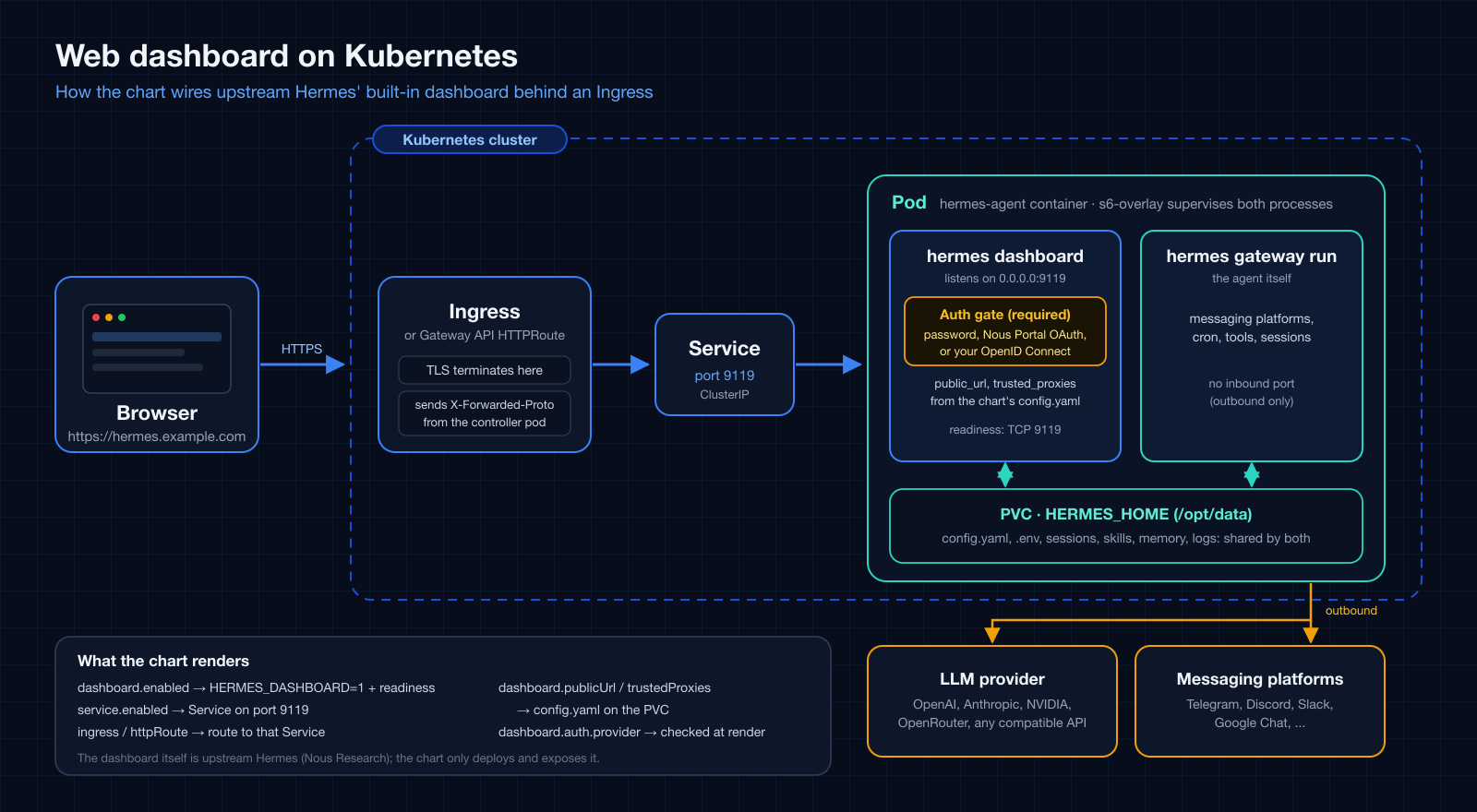
언제 사용하나요?
관리 대시보드를 URL로 접근할 수 있게 하고 싶을 때 사용하세요. 대시보드는 로그인한 사람에게 API 키를 보여 주고, 로그인한 사용자는 설정 편집, shell hook 생성(업스트림 문서상 임의 명령을 실행합니다), Chat 탭(pod 안에서 도구를 쓰는 에이전트 자체) 사용도 할 수 있습니다. 로그인을 pod 셸 접근 권한으로 여기고 방식을 먼저 고르세요. non-loopback 바인드에서는 업스트림의 인증 gate가 필수라서, provider가 없으면 대시보드는 fail-closed되어 아예 리슨하지 않습니다.
| 방식 | 용도 |
|---|---|
| 사용자 이름과 비밀번호 | 신뢰된 네트워크나 VPN. 업스트림은 공개 인터넷 노출에는 권장하지 않습니다. |
| Nous Portal OAuth | 공개 호스트. Nous 계정으로 로그인하며, 개인 계정 클라이언트는 로그인이 소유자로 제한됩니다. |
| 자체 OpenID Connect 제공자 | 자체 identity provider를 쓰는 공개 호스트. 대시보드에는 사용자 허용 목록이 없어서 제공자가 해당 클라이언트에 토큰을 발급하는 모든 신원이 로그인할 수 있으므로, 제공자에서 애플리케이션 접근을 제한하세요. |
설치
dashboard values와 이 오버레이는 1.16.0 이후의 차트 릴리스에 있습니다.
오버레이를 하나 고릅니다.
helm upgrade --install hermes-agent ./charts/hermes-agent \
  --namespace hermes-agent --create-namespace \
  -f charts/hermes-agent/values-ingress-oidc.yaml \
  --set-string env.OPENAI_API_KEY='sk-<real>' --wait
비밀번호 오버레이에는
--set-string env.HERMES_DASHBOARD_BASIC_AUTH_PASSWORD='<강한 비밀번호>'와
--set-string env.HERMES_DASHBOARD_BASIC_AUTH_SECRET="$(openssl rand -base64 32)"도
필요합니다. 차트가 대시보드용 readiness probe를 렌더링하므로 helm --wait는 대시보드가
리슨한 뒤에 반환됩니다. 첫 시작은 번들 스킬이 볼륨에 동기화되는 동안 몇 분 걸릴 수
있습니다.
배포 전 조정
- 호스트와 인증서.
ingress.hosts[0].host, TLS 블록, cert-manager 발급자 annotation을 설정하세요.dashboard.publicUrl은 첫 번째 host에서 유도되며 (ingress.tls가 있으면https), identity provider에 등록한 origin과 같아야 합니다. - Identity provider. OAuth: Nous Portal에서 대시보드를 등록하고 Base URL을 외부
origin으로 설정하세요(
/auth/callback은 포털이 붙입니다). OIDC: 리다이렉트 URIhttps://<host>/auth/callback으로 public PKCE 클라이언트를 등록하고 issuer와 클라이언트 ID를config.dashboard.oauth.self_hosted에 넣으세요. - 신뢰 프록시. 대시보드가 peer로 보는 주소를
dashboard.trustedProxies에 넣으세요. 없으면 세션 쿠키에서Secure가 빠집니다. overlay CNI의 컨트롤러는 파드 네트워크 안의 노드 터널 주소로 접근할 수 있으므로 노드 네트워크뿐 아니라 파드 네트워크도 넣으세요. - 나중에 바꿀 때.
public_url과trusted_proxies는config.yaml에 한 번 시드됩니다. 이를 바꾸는 업그레이드에는 그 업그레이드에 한해--set bootstrap.overwrite=true가 필요합니다. - NetworkPolicy.
networkPolicy.enabled를 켰다면 컨트롤러가 9119 포트에 접근하도록 허용하세요. Egress 제한 NetworkPolicy를 참고하세요.
전체 단계와 증상 표는 README의 대시보드 노출하기에 있습니다.
확인
세션이 없으면 GET /는 로그인 페이지로 리다이렉트되고 /api/env와 /api/config는
401입니다. 로그인 후 GET /api/auth/me가 provider를 보여 주고 세션 쿠키는 __Host-,
Secure, HttpOnly입니다. 업스트림은 *.localhost 호스트를 개발 환경으로 보고
Secure 쿠키를 설정하지 않으므로 그런 호스트로 테스트하지 마세요.
전체 오버레이
사용자 이름과 비밀번호
# values-ingress.yaml
#
# Exposes the Hermes management dashboard (service.port, default 9119) via an
# Ingress.
#
# The dashboard is an s6 service inside the image and stays DOWN until
# `dashboard.enabled` (HERMES_DASHBOARD=1) is set. In-container it binds 0.0.0.0, and on any
# non-loopback bind upstream's auth gate is mandatory: without an auth
# provider the dashboard fails closed and never listens, so an Ingress in
# front of it would answer 502/503. This example uses the bundled
# username/password provider. The deprecated `--insecure` /
# HERMES_DASHBOARD_INSECURE escape hatch is a no-op upstream.
#
# The dashboard shows API keys to whoever is logged in, and a logged-in user
# can also create shell hooks and use the Chat tab (shell access to the pod).
# Upstream says the
# username/password provider is for a trusted network or a VPN, NOT for public
# internet exposure. For a public host use values-ingress-oauth.yaml (Nous
# Portal) or values-ingress-oidc.yaml (your own identity provider) instead; on
# a private network you can still add a second auth layer at the proxy
# (oauth2-proxy, an ingress basic-auth annotation, ...) as defence in depth.
#
# Dummy values: override at install time. Never commit real credentials.
#
#   helm upgrade --install hermes-agent ./charts/hermes-agent \
#     --namespace hermes-agent --create-namespace \
#     -f charts/hermes-agent/values-ingress.yaml \
#     --set-string env.OPENAI_API_KEY='sk-<real>' \
#     --set-string env.HERMES_DASHBOARD_BASIC_AUTH_PASSWORD='<strong password>' \
#     --set-string env.HERMES_DASHBOARD_BASIC_AUTH_SECRET="$(openssl rand -base64 32)" \
#     --wait
#
# Or reference an externally managed Secret holding those keys through
# `extraEnvFrom` instead of `env` (see the README's "Secret provisioning
# strategies").

config:
  model:
    provider: openai-api
    default: gpt-4o-mini
  terminal:
    backend: local

dashboard:
  enabled: true
  # External origin the dashboard is reached at. Left empty it is derived from
  # the first ingress host below (https once ingress.tls is set).
  # publicUrl: "https://hermes-agent.example.com"
  # Only listed peers may supply X-Forwarded-Proto / X-Forwarded-For. Put your
  # ingress controller's pod CIDR (or its exact pod IP) here; Hermes rejects
  # unbounded entries such as 0.0.0.0/0. Without this, a TLS-terminating
  # ingress is not trusted and cookies are not marked Secure.
  trustedProxies:
    - "10.244.0.0/16"
  auth:
    # The template fails when this provider's keys are missing from env.
    provider: basic

# Secrets rendered into the chart's env Secret.
env:
  OPENAI_API_KEY: "sk-DUMMY_replace_me_000000000000000000000000"
  HERMES_DASHBOARD_BASIC_AUTH_USERNAME: "admin"
  HERMES_DASHBOARD_BASIC_AUTH_PASSWORD: "DUMMY_replace_me"
  # 32+ random bytes signing the provider's session tokens; set it so logins
  # survive pod restarts (blank = a fresh random key per process).
  HERMES_DASHBOARD_BASIC_AUTH_SECRET: "DUMMY_replace_me_with_openssl_rand_base64_32"

service:
  enabled: true
  type: ClusterIP
  port: 9119

ingress:
  enabled: true
  className: nginx
  annotations: {}
  hosts:
    - host: hermes-agent.example.com
      paths:
        - path: /
          pathType: Prefix
  tls: []
  #  - secretName: hermes-agent-tls
  #    hosts:
  #      - hermes-agent.example.com
Nous Portal OAuth
# values-ingress-oauth.yaml
#
# Exposes the Hermes management dashboard through an Ingress and signs users in
# with Nous Portal OAuth. Upstream recommends this provider for a dashboard that
# is reachable over the public internet; the bundled username/password provider
# (values-ingress.yaml) is meant for a trusted network or a VPN.
#
# 1. Register the dashboard in the Nous Portal ("Local Dashboards" page, or
#    `hermes dashboard register` where a Nous login exists) and copy the client
#    id it returns (shape `agent:<id>`). In the portal, set Base URL to the
#    dashboard's external origin, https://hermes-agent.example.com, with no path:
#    the portal appends /auth/callback itself. (`hermes dashboard register` takes
#    the full `--redirect-uri https://hermes-agent.example.com/auth/callback`.)
#    A personal-account registration limits sign-in to its owner ("Only you" in
#    the portal), so, unlike the OIDC example, no extra access control is needed
#    for that case.
# 2. Put that client id in `config.dashboard.oauth.client_id` below. The client
#    id is not a secret. The template fails at render time when it is missing;
#    if you register from inside the pod instead (the CLI writes
#    HERMES_DASHBOARD_OAUTH_CLIENT_ID into the persistent .env), set
#    `dashboard.auth.provider: external` so the render-time check is skipped.
# 3. Install, using your own host and ingress controller CIDR:
#
#      helm upgrade --install hermes-agent ./charts/hermes-agent \
#        --namespace hermes-agent --create-namespace \
#        -f charts/hermes-agent/values-ingress-oauth.yaml \
#        --set-string env.OPENAI_API_KEY='sk-<real>' --wait
#
# After sign-in `GET /api/auth/me` reports `provider: nous`. Observed with a
# personal account: `email` and `display_name` come back empty.
#
# Troubleshooting, as observed against the portal: a dashboard whose external
# origin differs from the registered Base URL is rejected by the PORTAL, not by
# the dashboard, with "Authorization failed ... Error: redirect_uri_mismatch:
# redirect_uri does not match the agent's canonical URL or localhost carve-out".
# The portal also requires PKCE; the dashboard sends it, so a hand-built
# authorize request without a code_challenge fails with "invalid_request".
#
# The external origin must match the registered Base URL exactly. It is
# derived from the first Ingress host (https once `ingress.tls` is set); set
# `dashboard.publicUrl` explicitly when it differs. Dummy values below: replace
# them, and never commit real credentials.

config:
  model:
    provider: openai-api
    default: gpt-4o-mini
  terminal:
    backend: local
  dashboard:
    oauth:
      # Client id issued by the Nous Portal for this dashboard.
      client_id: "agent:REPLACE_ME"

dashboard:
  enabled: true
  # Only listed peers may supply X-Forwarded-Proto / X-Forwarded-For. Put your
  # ingress controller's pod CIDR (or its exact pod IP) here; without it the
  # session cookies are not marked Secure behind a TLS-terminating Ingress.
  trustedProxies:
    - "10.244.0.0/16"
  auth:
    provider: oauth

env:
  OPENAI_API_KEY: "sk-DUMMY_replace_me_000000000000000000000000"

service:
  enabled: true

ingress:
  enabled: true
  className: nginx
  annotations: {}
  #  cert-manager.io/cluster-issuer: letsencrypt-prod
  hosts:
    - host: hermes-agent.example.com
      paths:
        - path: /
          pathType: Prefix
  tls:
    - secretName: hermes-agent-tls
      hosts:
        - hermes-agent.example.com
자체 OpenID Connect 제공자
# values-ingress-oidc.yaml
#
# Exposes the Hermes management dashboard through an Ingress and signs users in
# against your own OpenID Connect identity provider (Keycloak, Authentik, Auth0,
# Okta, Google, ...). No Nous Portal is involved. Upstream recommends an
# OAuth/OIDC provider for a dashboard reachable over the public internet; the
# bundled username/password provider (values-ingress.yaml) is meant for a
# trusted network or a VPN.
#
# In your identity provider, register a PUBLIC client (no client secret) that
# uses the authorization-code flow with PKCE (S256), and allow the redirect URI
#   https://hermes-agent.example.com/auth/callback
# Then set the issuer and client id below. The issuer must be HTTPS (loopback
# http is accepted only for local development) and serve
# `<issuer>/.well-known/openid-configuration`. Neither value is a secret. The
# template fails at render time when either is missing; use
# `dashboard.auth.provider: external` when they come from `extraEnvFrom` or an
# ExternalSecret instead.
#
#   helm upgrade --install hermes-agent ./charts/hermes-agent \
#     --namespace hermes-agent --create-namespace \
#     -f charts/hermes-agent/values-ingress-oidc.yaml \
#     --set-string env.OPENAI_API_KEY='sk-<real>' --wait
#
# ACCESS CONTROL IS YOURS TO SET. The dashboard has no allowlist of its own:
# every identity your provider issues a token to for this client can sign in,
# and the dashboard shows API keys to whoever is signed in. Restrict the
# application or client at the identity provider (a group or policy binding)
# to the people who should reach the dashboard.
#
# Troubleshooting, as observed behind ingress-nginx:
#   - A wrong issuer makes GET /auth/login answer 503. The dashboard's own body
#     names the reason ("Provider unreachable: OIDC discovery returned 404 for
#     ..."), but a proxy with custom error pages can replace it with a generic
#     503, so query the Service directly or read the response body to see it.
#     A trailing-slash difference in the issuer is tolerated.
#   - A redirect URI that is not registered fails at the identity provider (for
#     example "Unregistered redirect_uri"), not on the dashboard.
#
# The external origin must match the registered redirect URI exactly. It is
# derived from the first Ingress host (https once `ingress.tls` is set); set
# `dashboard.publicUrl` explicitly when it differs. Dummy values below: replace
# them, and never commit real credentials.

config:
  model:
    provider: openai-api
    default: gpt-4o-mini
  terminal:
    backend: local
  dashboard:
    oauth:
      self_hosted:
        issuer: "https://auth.example.com/application/o/hermes/"
        client_id: "hermes-dashboard"
        # scopes: "openid profile email"

dashboard:
  enabled: true
  # Only listed peers may supply X-Forwarded-Proto / X-Forwarded-For. Put your
  # ingress controller's pod CIDR (or its exact pod IP) here; without it the
  # session cookies are not marked Secure behind a TLS-terminating Ingress.
  trustedProxies:
    - "10.244.0.0/16"
  auth:
    provider: oidc

env:
  OPENAI_API_KEY: "sk-DUMMY_replace_me_000000000000000000000000"

service:
  enabled: true

ingress:
  enabled: true
  className: nginx
  annotations: {}
  #  cert-manager.io/cluster-issuer: letsencrypt-prod
  hosts:
    - host: hermes-agent.example.com
      paths:
        - path: /
          pathType: Prefix
  tls:
    - secretName: hermes-agent-tls
      hosts:
        - hermes-agent.example.com