Dashboard sign-in
| Sign-in method | Required secret | Overlay |
|---|---|---|
| Username and password | OPENAI_API_KEY, HERMES_DASHBOARD_BASIC_AUTH_USERNAME, HERMES_DASHBOARD_BASIC_AUTH_PASSWORD |
values-ingress.yaml |
| Nous Portal OAuth | OPENAI_API_KEY (the client id is not a secret) |
values-ingress-oauth.yaml |
| Your own OpenID Connect provider | OPENAI_API_KEY (the issuer and client id are not secrets) |
values-ingress-oidc.yaml |
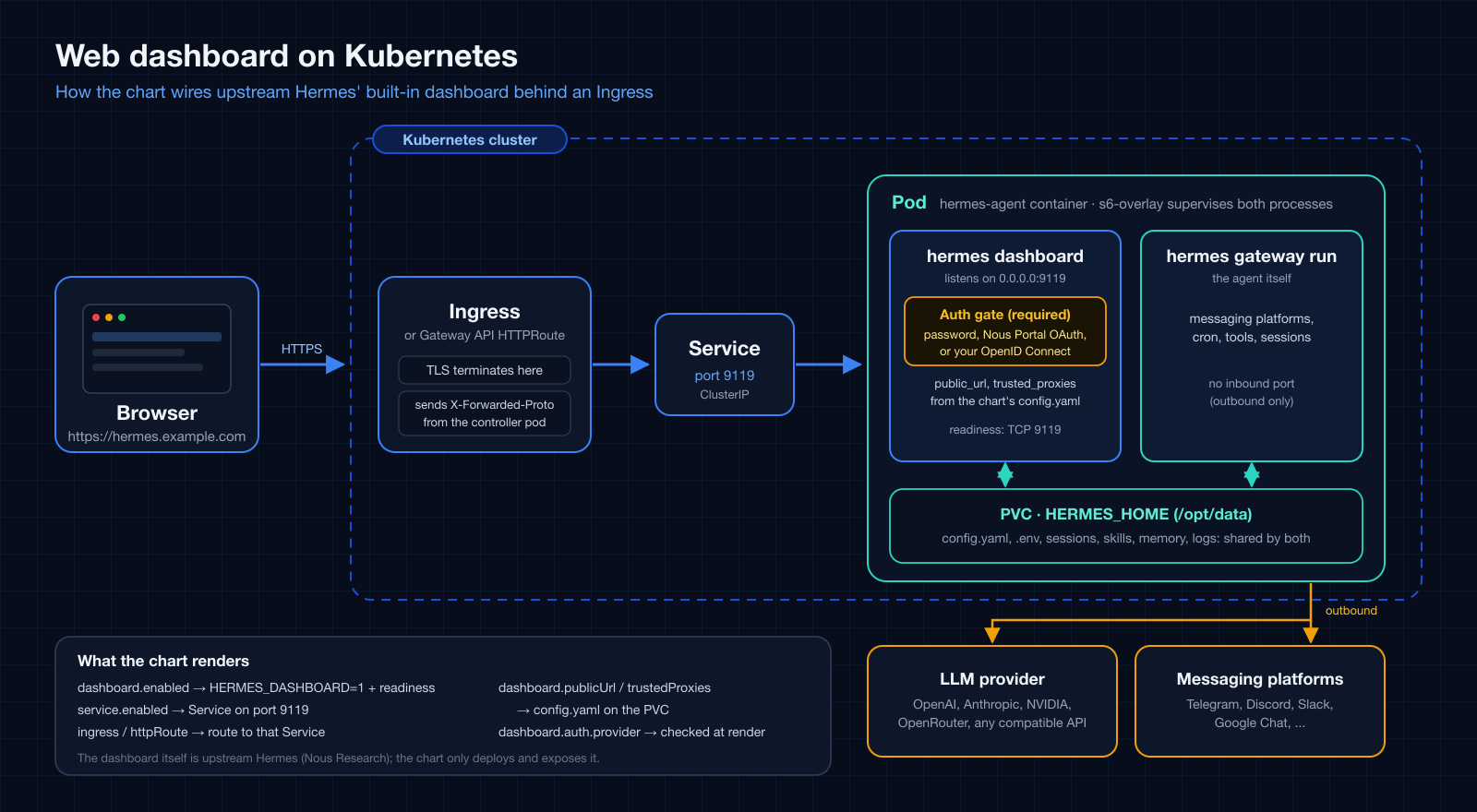
When to use it
Use this when the management dashboard should be reachable at a URL. It shows API keys to whoever is signed in, and a signed-in user can also edit the configuration, create shell hooks (upstream documents that they run arbitrary commands), and use the Chat tab, which is the agent itself with its tools inside the pod. Treat sign-in as shell access to the pod, so choose the method first. On a non-loopback bind upstream's auth gate is mandatory: without a provider the dashboard fails closed and never listens.
| Method | Use it for |
|---|---|
| Username and password | A trusted network or a VPN. Upstream does not recommend it for public internet exposure. |
| Nous Portal OAuth | A public host. Sign-in with a Nous account; a personal-account client limits sign-in to its owner. |
| Your own OpenID Connect provider | A public host with your own identity provider. The dashboard has no user allowlist: every identity the provider issues a token to for the client can sign in, so restrict the application at the provider. |
Install
The dashboard values and these overlays are in chart releases after 1.16.0.
Pick one overlay.
helm upgrade --install hermes-agent ./charts/hermes-agent \
  --namespace hermes-agent --create-namespace \
  -f charts/hermes-agent/values-ingress-oidc.yaml \
  --set-string env.OPENAI_API_KEY='sk-<real>' --wait
The password overlay also needs
--set-string env.HERMES_DASHBOARD_BASIC_AUTH_PASSWORD='<strong password>' and
--set-string env.HERMES_DASHBOARD_BASIC_AUTH_SECRET="$(openssl rand -base64 32)".
helm --wait returns once the dashboard listens, because the chart renders a
readiness probe for it. The first start can take minutes while bundled skills sync
onto the volume.
Adapt before deploying
- Host and certificate. Set
ingress.hosts[0].host, the TLS block, and a cert-manager issuer annotation.dashboard.publicUrlis derived from the first host (httpsonceingress.tlsis set); it must equal the origin registered with the identity provider. - Identity provider. OAuth: in the Nous Portal register the dashboard and set
Base URL to the external origin; the portal appends
/auth/callback. OIDC: register a public PKCE client with the redirect URIhttps://<host>/auth/callbackand put the issuer and client id underconfig.dashboard.oauth.self_hosted. - Trusted proxy. List the address the dashboard sees as its peer in
dashboard.trustedProxies, or the session cookies loseSecure. A controller on an overlay CNI can reach the pod from a node tunnel address inside the pod network, so list the pod network as well as the node network. - Changing it later.
public_urlandtrusted_proxiesare seeded intoconfig.yamlonce. A later upgrade that changes them needs--set bootstrap.overwrite=truefor that upgrade. - NetworkPolicy. If
networkPolicy.enabledis on, allow the controller to reach port 9119; see Egress-locked NetworkPolicy.
The README section Expose the dashboard has the complete steps and a symptom table.
Check it
Without a session GET / redirects to the sign-in page and /api/env and
/api/config return 401. After signing in, GET /api/auth/me reports the provider
and the session cookies are __Host-, Secure and HttpOnly. A hostname under
*.localhost is treated as a development setup by upstream and never gets Secure
cookies, so do not test with one.
Complete overlays
Username and password
# values-ingress.yaml
#
# Exposes the Hermes management dashboard (service.port, default 9119) via an
# Ingress.
#
# The dashboard is an s6 service inside the image and stays DOWN until
# `dashboard.enabled` (HERMES_DASHBOARD=1) is set. In-container it binds 0.0.0.0, and on any
# non-loopback bind upstream's auth gate is mandatory: without an auth
# provider the dashboard fails closed and never listens, so an Ingress in
# front of it would answer 502/503. This example uses the bundled
# username/password provider. The deprecated `--insecure` /
# HERMES_DASHBOARD_INSECURE escape hatch is a no-op upstream.
#
# The dashboard shows API keys to whoever is logged in, and a logged-in user
# can also create shell hooks and use the Chat tab (shell access to the pod).
# Upstream says the
# username/password provider is for a trusted network or a VPN, NOT for public
# internet exposure. For a public host use values-ingress-oauth.yaml (Nous
# Portal) or values-ingress-oidc.yaml (your own identity provider) instead; on
# a private network you can still add a second auth layer at the proxy
# (oauth2-proxy, an ingress basic-auth annotation, ...) as defence in depth.
#
# Dummy values: override at install time. Never commit real credentials.
#
#   helm upgrade --install hermes-agent ./charts/hermes-agent \
#     --namespace hermes-agent --create-namespace \
#     -f charts/hermes-agent/values-ingress.yaml \
#     --set-string env.OPENAI_API_KEY='sk-<real>' \
#     --set-string env.HERMES_DASHBOARD_BASIC_AUTH_PASSWORD='<strong password>' \
#     --set-string env.HERMES_DASHBOARD_BASIC_AUTH_SECRET="$(openssl rand -base64 32)" \
#     --wait
#
# Or reference an externally managed Secret holding those keys through
# `extraEnvFrom` instead of `env` (see the README's "Secret provisioning
# strategies").

config:
  model:
    provider: openai-api
    default: gpt-4o-mini
  terminal:
    backend: local

dashboard:
  enabled: true
  # External origin the dashboard is reached at. Left empty it is derived from
  # the first ingress host below (https once ingress.tls is set).
  # publicUrl: "https://hermes-agent.example.com"
  # Only listed peers may supply X-Forwarded-Proto / X-Forwarded-For. Put your
  # ingress controller's pod CIDR (or its exact pod IP) here; Hermes rejects
  # unbounded entries such as 0.0.0.0/0. Without this, a TLS-terminating
  # ingress is not trusted and cookies are not marked Secure.
  trustedProxies:
    - "10.244.0.0/16"
  auth:
    # The template fails when this provider's keys are missing from env.
    provider: basic

# Secrets rendered into the chart's env Secret.
env:
  OPENAI_API_KEY: "sk-DUMMY_replace_me_000000000000000000000000"
  HERMES_DASHBOARD_BASIC_AUTH_USERNAME: "admin"
  HERMES_DASHBOARD_BASIC_AUTH_PASSWORD: "DUMMY_replace_me"
  # 32+ random bytes signing the provider's session tokens; set it so logins
  # survive pod restarts (blank = a fresh random key per process).
  HERMES_DASHBOARD_BASIC_AUTH_SECRET: "DUMMY_replace_me_with_openssl_rand_base64_32"

service:
  enabled: true
  type: ClusterIP
  port: 9119

ingress:
  enabled: true
  className: nginx
  annotations: {}
  hosts:
    - host: hermes-agent.example.com
      paths:
        - path: /
          pathType: Prefix
  tls: []
  #  - secretName: hermes-agent-tls
  #    hosts:
  #      - hermes-agent.example.com
Nous Portal OAuth
# values-ingress-oauth.yaml
#
# Exposes the Hermes management dashboard through an Ingress and signs users in
# with Nous Portal OAuth. Upstream recommends this provider for a dashboard that
# is reachable over the public internet; the bundled username/password provider
# (values-ingress.yaml) is meant for a trusted network or a VPN.
#
# 1. Register the dashboard in the Nous Portal ("Local Dashboards" page, or
#    `hermes dashboard register` where a Nous login exists) and copy the client
#    id it returns (shape `agent:<id>`). In the portal, set Base URL to the
#    dashboard's external origin, https://hermes-agent.example.com, with no path:
#    the portal appends /auth/callback itself. (`hermes dashboard register` takes
#    the full `--redirect-uri https://hermes-agent.example.com/auth/callback`.)
#    A personal-account registration limits sign-in to its owner ("Only you" in
#    the portal), so, unlike the OIDC example, no extra access control is needed
#    for that case.
# 2. Put that client id in `config.dashboard.oauth.client_id` below. The client
#    id is not a secret. The template fails at render time when it is missing;
#    if you register from inside the pod instead (the CLI writes
#    HERMES_DASHBOARD_OAUTH_CLIENT_ID into the persistent .env), set
#    `dashboard.auth.provider: external` so the render-time check is skipped.
# 3. Install, using your own host and ingress controller CIDR:
#
#      helm upgrade --install hermes-agent ./charts/hermes-agent \
#        --namespace hermes-agent --create-namespace \
#        -f charts/hermes-agent/values-ingress-oauth.yaml \
#        --set-string env.OPENAI_API_KEY='sk-<real>' --wait
#
# After sign-in `GET /api/auth/me` reports `provider: nous`. Observed with a
# personal account: `email` and `display_name` come back empty.
#
# Troubleshooting, as observed against the portal: a dashboard whose external
# origin differs from the registered Base URL is rejected by the PORTAL, not by
# the dashboard, with "Authorization failed ... Error: redirect_uri_mismatch:
# redirect_uri does not match the agent's canonical URL or localhost carve-out".
# The portal also requires PKCE; the dashboard sends it, so a hand-built
# authorize request without a code_challenge fails with "invalid_request".
#
# The external origin must match the registered Base URL exactly. It is
# derived from the first Ingress host (https once `ingress.tls` is set); set
# `dashboard.publicUrl` explicitly when it differs. Dummy values below: replace
# them, and never commit real credentials.

config:
  model:
    provider: openai-api
    default: gpt-4o-mini
  terminal:
    backend: local
  dashboard:
    oauth:
      # Client id issued by the Nous Portal for this dashboard.
      client_id: "agent:REPLACE_ME"

dashboard:
  enabled: true
  # Only listed peers may supply X-Forwarded-Proto / X-Forwarded-For. Put your
  # ingress controller's pod CIDR (or its exact pod IP) here; without it the
  # session cookies are not marked Secure behind a TLS-terminating Ingress.
  trustedProxies:
    - "10.244.0.0/16"
  auth:
    provider: oauth

env:
  OPENAI_API_KEY: "sk-DUMMY_replace_me_000000000000000000000000"

service:
  enabled: true

ingress:
  enabled: true
  className: nginx
  annotations: {}
  #  cert-manager.io/cluster-issuer: letsencrypt-prod
  hosts:
    - host: hermes-agent.example.com
      paths:
        - path: /
          pathType: Prefix
  tls:
    - secretName: hermes-agent-tls
      hosts:
        - hermes-agent.example.com
Your own OpenID Connect provider
# values-ingress-oidc.yaml
#
# Exposes the Hermes management dashboard through an Ingress and signs users in
# against your own OpenID Connect identity provider (Keycloak, Authentik, Auth0,
# Okta, Google, ...). No Nous Portal is involved. Upstream recommends an
# OAuth/OIDC provider for a dashboard reachable over the public internet; the
# bundled username/password provider (values-ingress.yaml) is meant for a
# trusted network or a VPN.
#
# In your identity provider, register a PUBLIC client (no client secret) that
# uses the authorization-code flow with PKCE (S256), and allow the redirect URI
#   https://hermes-agent.example.com/auth/callback
# Then set the issuer and client id below. The issuer must be HTTPS (loopback
# http is accepted only for local development) and serve
# `<issuer>/.well-known/openid-configuration`. Neither value is a secret. The
# template fails at render time when either is missing; use
# `dashboard.auth.provider: external` when they come from `extraEnvFrom` or an
# ExternalSecret instead.
#
#   helm upgrade --install hermes-agent ./charts/hermes-agent \
#     --namespace hermes-agent --create-namespace \
#     -f charts/hermes-agent/values-ingress-oidc.yaml \
#     --set-string env.OPENAI_API_KEY='sk-<real>' --wait
#
# ACCESS CONTROL IS YOURS TO SET. The dashboard has no allowlist of its own:
# every identity your provider issues a token to for this client can sign in,
# and the dashboard shows API keys to whoever is signed in. Restrict the
# application or client at the identity provider (a group or policy binding)
# to the people who should reach the dashboard.
#
# Troubleshooting, as observed behind ingress-nginx:
#   - A wrong issuer makes GET /auth/login answer 503. The dashboard's own body
#     names the reason ("Provider unreachable: OIDC discovery returned 404 for
#     ..."), but a proxy with custom error pages can replace it with a generic
#     503, so query the Service directly or read the response body to see it.
#     A trailing-slash difference in the issuer is tolerated.
#   - A redirect URI that is not registered fails at the identity provider (for
#     example "Unregistered redirect_uri"), not on the dashboard.
#
# The external origin must match the registered redirect URI exactly. It is
# derived from the first Ingress host (https once `ingress.tls` is set); set
# `dashboard.publicUrl` explicitly when it differs. Dummy values below: replace
# them, and never commit real credentials.

config:
  model:
    provider: openai-api
    default: gpt-4o-mini
  terminal:
    backend: local
  dashboard:
    oauth:
      self_hosted:
        issuer: "https://auth.example.com/application/o/hermes/"
        client_id: "hermes-dashboard"
        # scopes: "openid profile email"

dashboard:
  enabled: true
  # Only listed peers may supply X-Forwarded-Proto / X-Forwarded-For. Put your
  # ingress controller's pod CIDR (or its exact pod IP) here; without it the
  # session cookies are not marked Secure behind a TLS-terminating Ingress.
  trustedProxies:
    - "10.244.0.0/16"
  auth:
    provider: oidc

env:
  OPENAI_API_KEY: "sk-DUMMY_replace_me_000000000000000000000000"

service:
  enabled: true

ingress:
  enabled: true
  className: nginx
  annotations: {}
  #  cert-manager.io/cluster-issuer: letsencrypt-prod
  hosts:
    - host: hermes-agent.example.com
      paths:
        - path: /
          pathType: Prefix
  tls:
    - secretName: hermes-agent-tls
      hosts:
        - hermes-agent.example.com