jyje/hermes-agent-helm
👩🏻💻 Hermes Agent on Kubernetes - sign in with Codex/Copilot, run agent teams, stay lightweight.



🚀 Hermes Team · Chart docs · CONTRIBUTING · SECURITY · AGENTS
Found this useful? Please give it a ⭐ - it helps others find it.
Summary
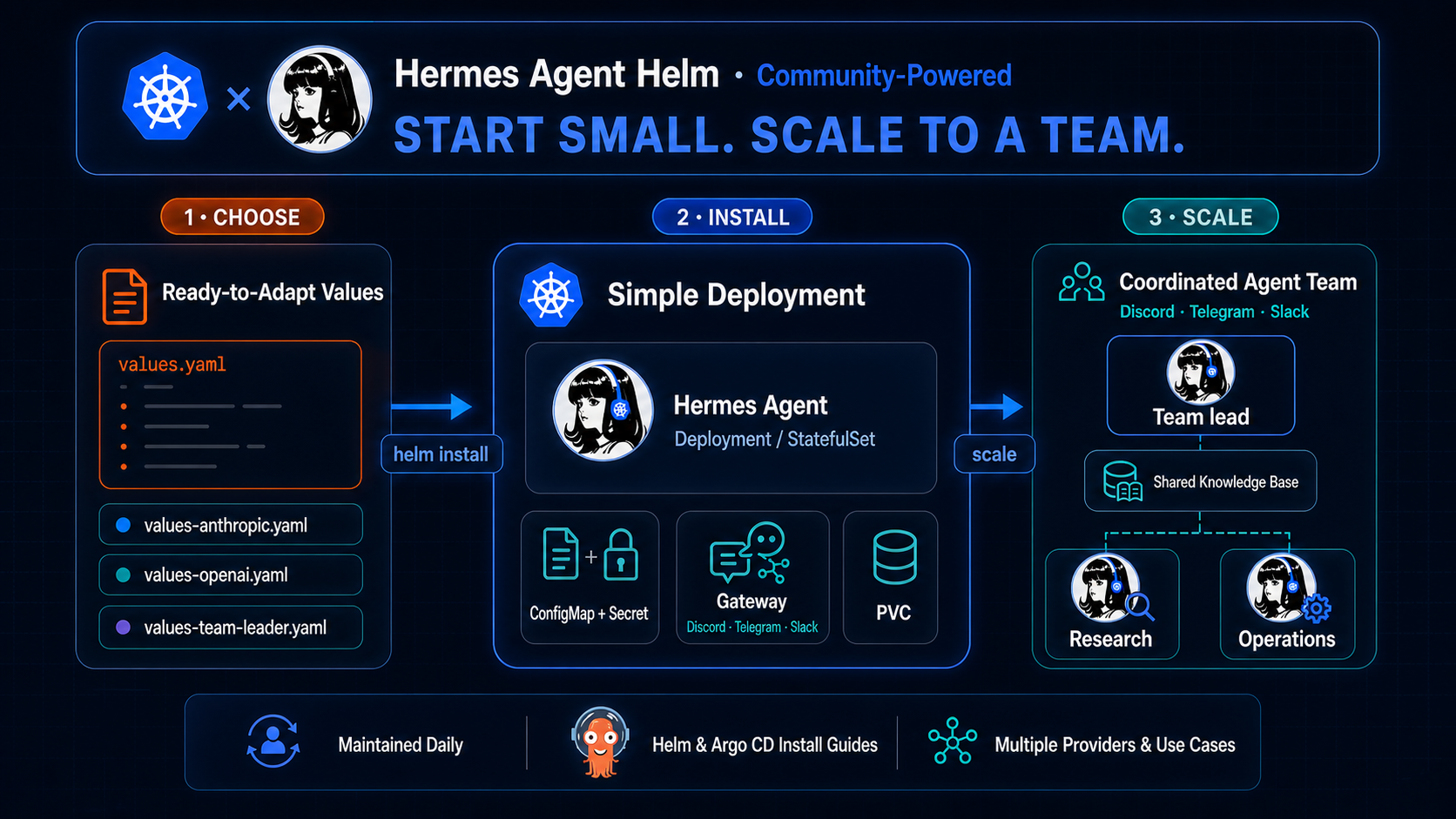
Run Hermes Agent on Kubernetes
with one helm install - works with any LLM provider Hermes supports, scales
down to a single small node, and is verified to actually run, not just render.
Just as easily, group several instances into a full Hermes Team
on the same cluster. A community-powered chart, not an official Nous
Research release.
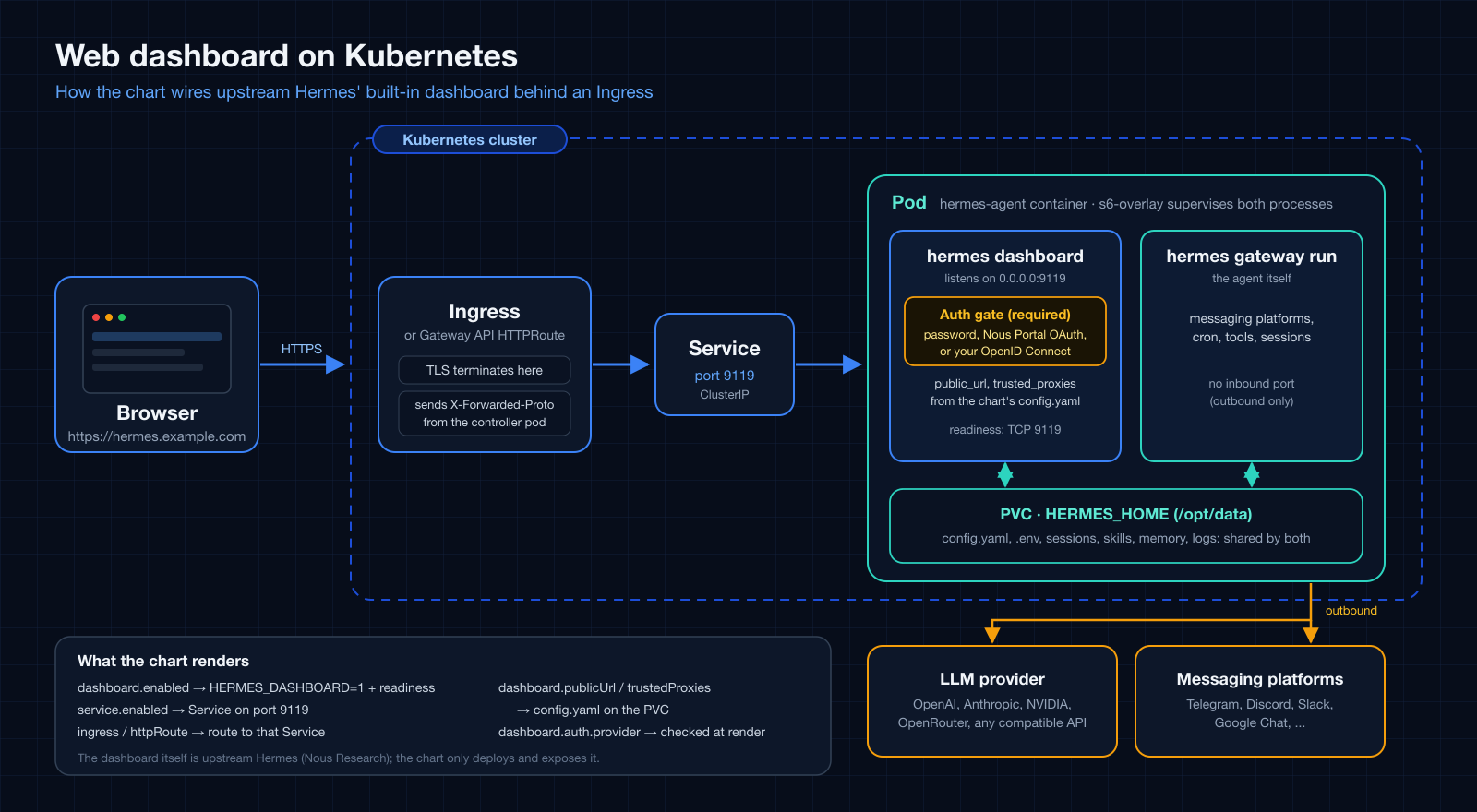
Prefer a browser? Hermes ships its own web dashboard (chat in the full terminal UI, past sessions, models, skills, cron jobs and settings). The chart can switch it on and publish it at a URL of your own through an Ingress or HTTPRoute, behind a password, Nous Portal OAuth, or your own OpenID Connect sign-in. The diagram shows how the pieces fit; see Dashboard sign-in and Ingress to set it up.
Quick Start
-
OCI (recommended) — install directly from the registry, no
helm repo addneeded:helm install hermes-agent oci://ghcr.io/jyje/hermes-agent-helm/hermes-agent \ --namespace hermes-agent --create-namespace \ --set-string env.OPENAI_API_KEY='sk-...' \ --wait -
Helm Repository - a Helm repository is also published to GitHub Pages, if you'd rather add it once and install by name:
helm repo add hermes-agent https://jyje.github.io/hermes-agent-helm
helm repo update
helm install hermes-agent hermes-agent/hermes-agent \
  --namespace hermes-agent --create-namespace \
  --set-string env.OPENAI_API_KEY='sk-...' \
  --wait
Optionally pin --version to a specific released chart version instead of latest.
To install from this repo's source instead (e.g. to try an unreleased change), see Development below.
Why this chart
- All of Hermes's Provider Support, via
values.yaml. Hermes itself already supportsopenai-api,anthropic,gemini,openrouter,nvidia,deepseek, and any OpenAI-compatible endpoint (e.g. LiteLLM) through environment variables - this chart just exposes that config throughvalues.yamland ships ready-to-adapt examples per provider, with no provider baked into the templates. - Chat-first gateway and account login. Supply a Discord or Telegram bot
token and the chart runs Hermes's outbound gateway with a Kubernetes-managed
lifecycle. For GitHub Copilot and OpenAI Codex, its optional
device-login bootstrap sends the one-time link and code to the Discord home
channel (or logs), then persists refreshable credentials in
HERMES_HOME. Approve once; normal Pod restarts reuse the stored login. - Lightweight → Production. Sized for homelab / single-node / edge clusters
out of the box (one replica, modest requests, a small PVC), and ready for
production by scaling up - not out. Hermes is a single-instance personal
agent (one
HERMES_HOME, one gateway, one memory), so you don't replicate a pod; you run several well-managed instances and group them into a team that shares context over a common gateway channel. See Hermes teams. - Verified End-to-End. CI installs the chart on an ephemeral kind
cluster and runs the bundled test Job (
hermes doctor). When theNVIDIA_API_KEYrepository secret is available, it also runs a livehermes chatround-trip against NVIDIA NIM - not a mock. The Discord-thread leader team has also completed a live human → leader → two members → leader round-trip; Telegram team orchestration remains separate.
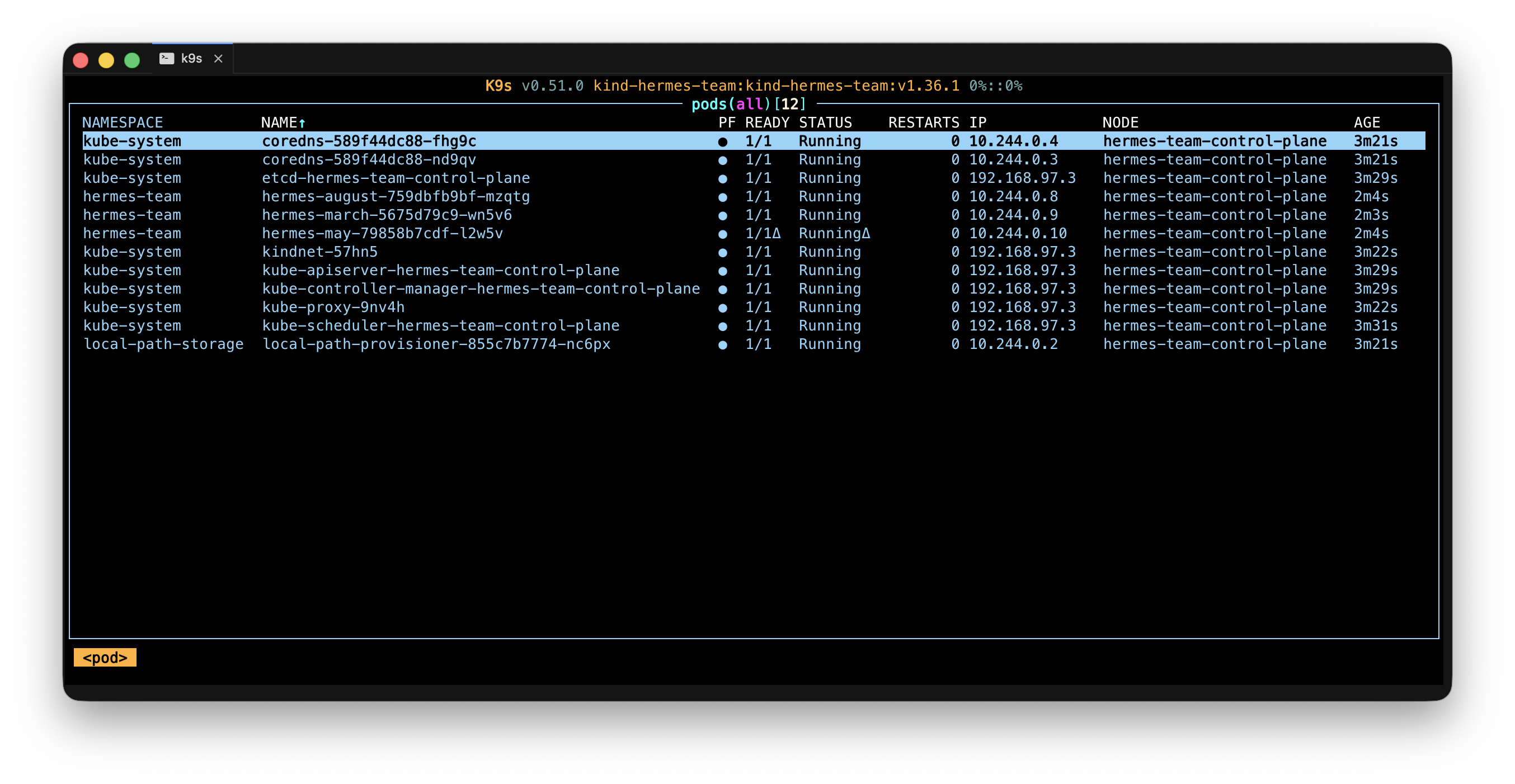
Deployment evidence: leader august and members
may/march running as independent releases on kind.
This screenshot does not by itself prove the multi-turn mention loop; see
Hermes teams for the current status.
For the full resource breakdown, configuration model, and provider-by-provider install examples (including messenger integrations), see charts/hermes-agent/README.md.
Production Checklist
None of this is on by default - defaults stay lightweight (see above). Each
row below is something you turn on deliberately, and each points at what
actually backs the claim, so you can judge it yourself instead of taking a
production-ready label on faith.
| Concern | How | Verified by |
|---|---|---|
| Pod Security Standards | -f charts/hermes-agent/values-hardened.yaml |
hardened kind scenario (PSS restricted) |
| Egress control | networkPolicy.enabled=true |
rendered-policy assertion in CI |
| Kernel isolation | runtimeClassName: gvisor (or another sandboxed runtime) |
cluster-dependent - documented only |
| Secret management | the Bitwarden example or SealedSecret walkthrough | Bitwarden: CI's values-examples smoke test · SealedSecret: documented only |
| Upgrade safety | bootstrap.overwrite=false is the default; migrations back up the persistent config |
Kind CI verifies migration, backup, overwrite and preserve paths |
Full Installation
OCI (recommended)
# render the chart and check its templates before installing
helm template hermes-agent oci://ghcr.io/jyje/hermes-agent-helm/hermes-agent \
  --set-string env.OPENAI_API_KEY='sk-...'

# install with the generic defaults (set your provider key)
# release name == chart name keeps resources clean (hermes-agent-0, not hermes-agent-hermes-agent-0)
helm upgrade --install hermes-agent oci://ghcr.io/jyje/hermes-agent-helm/hermes-agent \
  --namespace hermes-agent --create-namespace \
  --set-string env.OPENAI_API_KEY='sk-...' --wait

# run the install test (doctor-style Job)
helm test hermes-agent -n hermes-agent
kubectl logs -n hermes-agent -l app.kubernetes.io/component=test --tail=-1
Helm Repository
# add the Helm Repository and fetch the latest chart index
helm repo add hermes-agent https://jyje.github.io/hermes-agent-helm
helm repo update

# render the chart and check its templates before installing
helm template hermes-agent hermes-agent/hermes-agent \
  --set-string env.OPENAI_API_KEY='sk-...'

# install with the generic defaults (set your provider key)
helm upgrade --install hermes-agent hermes-agent/hermes-agent \
  --namespace hermes-agent --create-namespace \
  --set-string env.OPENAI_API_KEY='sk-...' --wait

# run the install test (doctor-style Job)
helm test hermes-agent -n hermes-agent
kubectl logs -n hermes-agent -l app.kubernetes.io/component=test --tail=-1
See charts/hermes-agent/README.md for the full
values table, the "More examples" table (values-*.yaml for every supported
provider plus Discord/Telegram and LiteLLM - copy the raw YAML and pass it with
-f), and an ArgoCD example.
Automation
Three things this repository automates that affect you as a chart user:
- Upstream tracking. A scheduled job checks for a newer Hermes image every
six hours and opens an
appVersionupdate pull request. It never publishes a release on its own: the update goes through the same review and Changesets path as any other chart change. - Signed releases. Publishing produces a cosign-signed OCI artifact alongside the Helm repository index.
- Post-release verification. After every release, CI installs the published artifact from OCI, verifies its signature, and runs the chart's own test suite against it.
Every workflow, its triggers, and how they connect is documented in the CI guide.
Development
Clone the repo and install from the local chart path (a relative path, not the published registry) to check a change before opening a PR:
git clone https://github.com/jyje/hermes-agent-helm.git
cd hermes-agent-helm

# render & lint
make template
make lint

# install from the local chart source
helm upgrade --install hermes-agent ./charts/hermes-agent \
  --namespace hermes-agent --create-namespace \
  --set-string env.OPENAI_API_KEY='sk-...' --wait

# run the install test (doctor-style Job)
helm test hermes-agent -n hermes-agent
kubectl logs -n hermes-agent -l app.kubernetes.io/component=test --tail=-1

# or start from a ready-made example (provider, Discord/Telegram, LiteLLM, ...)
helm upgrade --install hermes-agent ./charts/hermes-agent \
  --namespace hermes-agent --create-namespace \
  -f charts/hermes-agent/values-anthropic-and-discord.yaml \
  --set-string env.ANTHROPIC_API_KEY='sk-ant-...' \
  --set-string env.DISCORD_BOT_TOKEN='...' --wait
Branch model, release process, and further local checks (make docs /
make test) are covered in CONTRIBUTING.md; chart design
principles are in AGENTS.md.
Roadmap
This chart deploys and manages one agent well; teams via an ArgoCD ApplicationSet are how you scale today, and a CRD-based operator is a long-term, not-started candidate. See docs/about/roadmap.md.
Contributing
Issues, PRs, and ideas are all welcome - start with CONTRIBUTING.md (branch model, local checks, release flow). Every merged contribution is credited in the changelog and release notes.
Thanks to everyone who has contributed to and starred this project ⭐
Banner © Nous Research (MIT).